• Skip to primary navigation
  • Skip to main content
  • Skip to footer

Teaching in Higher Ed

  • Podcast
  • Blog
  • SPEAKING
  • Media
  • Recommendations
  • About
  • Contact

Resources

Exploring Teaching Philosophies

By Bonni Stachowiak | April 7, 2017 | | XFacebookLinkedInEmail

When I was preparing my promotion and tenure portfolio in 2010, the resource I used more than any other was the book:

The Academic Portfolio: A Practical Guide to Documenting Teaching, Research, and Service, by Peter Seldin and J. Elizabeth Miller*.

The first half of the book lays out a structure for how to approach documenting one's development in higher education, while the second half contains samples of portfolios from faculty in various disciplines.

While I am not actively working on a portfolio at this time, I have enjoyed continuing to read teaching philosophies that various faculty include on their websites/blogs.

Teaching Philosophy Inspiration

Ryan Cordell's teaching philosophy is inspirational, both in the way he describes his approaches and also from the examples he links to of how his teaching philosophy gets realized.

Jeffrey W. Murray asserts that we should consider non-traditional ways of developing a teaching philosophy, if we find ourselves too constrained by the standard format.

Adam Croom's talk on Openness Without Penalty cautions us to avoid thinking of every possible educational technology as a prescription for effective teaching. He states:

In fact, I would go further and say that not every technology is congruent with every teaching philosophy. As an instructor I’m not a neutral entity; I teach my subjects the way I want to teach them. Similarly, technologies are not neutral as they, too, have biases that have been implicitly or explicitly built into them and their uses.”

Elizabeth (Betsy) Barre takes the courageous route of articulating how love may even enter into our teaching philosophies. She also describes the ultimate benefit of a liberal arts education as she writes:

A truly liberal education, on the other hand, provides students the motivation, information, and tools necessary to “liberate” themselves from the dictates of authoritative truth—academic or otherwise. This means, incidentally, that I am just as concerned about avoiding proselytization as my colleagues. If my teaching philosophy prioritizes any values, they are the values that provide the foundation for intellectual diversity. Thus, the primary goal of normative debate in my classroom is to encourage students to learn how to think for themselves. In the end, they may accept the value of authority and continue to hold the positions they held when they entered the classroom. The hope, however, is that they will have secured better reasons for doing so. Put simply, my central concern is not what my students think, but whether and how they do so.”

Jeffrey Wiese describes in his statement of teaching philosophy how he went through four phases of a teacher, from trying to show medical students how much he knew to when he was able to follow his father's example and become more of a coach (which he describes further on episode #096 of the Teaching in Higher Ed podcast: The Clinical Coach).

Finally, one area of content that I didn't explore in my first academic portfolio that I hope to include in my one for full professor is regarding how my teaching philosophy has been shaped by others who have taught me. Gardner Campbell has modified his recent syllabi by adding a dedication. This is the way he acknowledges those who have been what he calls “a cloud of witnesses” around him in his teaching.

Gardner shares:

These are the people whose work has shaped me, and who have shaped my work. In the most intimate cases, these are people with whom I’ve broken bread. People with whom I’ve fought, and cried. People who’ve believed in me when I didn’t believe in myself, people who’ve encouraged me, people who’ve intervened at key moments. People who are with me as I think and write and teach and learn.

I have always felt that the courses I design and lead, at their best, do not deliver content so much as they mingle souls, as John Donne said letters do.

Your Turn

I know I have missed a plethora of wonderful examples of teaching philosophy statements that faculty have placed online. If you have links to share of other teaching philosophies that have resonated with you, please share them in the comments or via email.

Filed Under: Resources

Gratitude

By Bonni Stachowiak | April 5, 2017 | | XFacebookLinkedInEmail

Thanks to all of you who responded to my blog post about the stress I've been experiencing regarding a family member's dementia diagnosis, as well as to those who wrote in about the related podcast episode. I am grateful to be in community with you.

An Anecdote for Worry

I often share with my students that it is easy to become overwhelmed with worry, but that one of the anecdotes I have found for that is to think about things I'm grateful for…

Gratitude List

Just in the last week, I'm thankful for:

  • Dave's (my husband's) support in transitioning our family member into a safer place this past weekend
  • An inspiring webinar from the innovators at Hypothes.is about how to integrate their social annotating tool inside of Canvas
  • A Duarte webinar I couldn't attend (but enjoyed watching, afterward) called – Beyond the Cluttered Slide
  • Getting to catch glimpses of Maha Bali's OER17 keynote through social media
  • That James Lang and Ken Bain were willing to experiment with a new podcast format for episode #146 of Teaching in Higher Ed
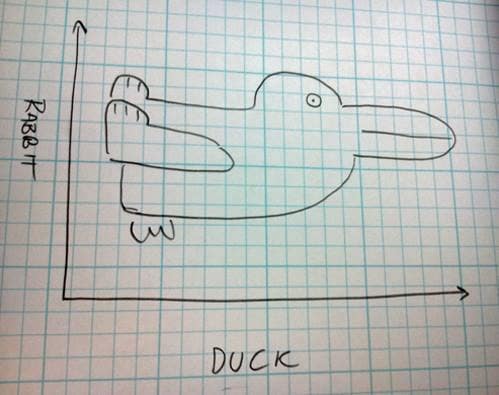
  • This tweet regarding the best graph ever

Best graph ever. pic.twitter.com/fUg6y3xon4

— Academia Obscura (@AcademiaObscura) April 4, 2017

There's so much more I could write, but not in the five minutes I have to set up for a committee meeting I'm leading this morning.

What are you grateful for this week?


Filed Under: Resources

Creating Authentic and Explanatory Videos

By Bonni Stachowiak | February 20, 2017 | | XFacebookLinkedInEmail

authentic and explanatory videos

In this past week's episode with Steven Michels, we both spoke about the importance of allowing for more authenticity in videos we create for class. I shared about the time I sneezed during one of my pencasts and how funny the students found it.

It turns out, I was just opening doors for others to follow suit. On this week's NPR game show, Wait Wait Don't Tell Me, the host Peter Segal sneezed not-once-but-twice during the broadcast, and they left it in the edited show. It was made more funny by the call-in guest predicting his forthcoming, second sneeze.

I share a bit more about ways to keep your class videos engaging in this earlier post. Here are a few more resources to help you, as you look to create videos for your classes.

Resources for Creating Videos

  • Record Your Screen – If what you want to do is record your screen, here's some guidance for tools to use to perform that function. This is the way you can record your voice over a slide deck, for example. It's also the way to show someone how to do something within a piece of software.
  • How to Record Your Screen (PC-centric) – When I want a fast screen-recording experience, I go with SnagIt, which is mentioned in this article. It's available for both the Mac and the PC.
  • How to Record a Pencast – One of my favorite books on visual thinking is The Back of the Napkin, by Dan Roam. In it, he advises us to get rid of our slide decks and go back to communicating via the back of a napkin. Making a pencast is somewhat like that, except that it doesn't involve any napkins being harmed in the process.
  • Video Creation – Richard Byrne's Free Technology for Teachers site has a wealth of resources for educators who want to use technology in our teaching. In this case, he has a page devoted to all sorts of different types of videos you may want to create: from one-take videos, to more sophisticated animation ones.
  • 13 Tips for Recording Your iPhone – While this article is specific to Camtasia, you can still record your iPhone via many software products (some of which you may already have).

Inspiration

  • The 10 Best Explainer Videos of All Time and The Best Explainer Videos of 2016 – When I'm about to embark into something creative, I often start by looking for inspiration. If you want to explain a key concept in your video, these two links (from two very different websites) will provide you with some creative starting points.
  • The Learning Scientists – This site provides a good example of using videos to explain key concepts, while still having handouts and other means for reinforcing the learning. Additionally, this site is great for helping students learn more about learning.
  • Common Craft videos – The creators at Common Craft  were doing explainer videos, long before it became all the rage. Each time I watch one of their videos, I am reminded about something fundamental to helping others understand complex concepts.
  • Alan Smith: Why You Should Love Statistics – Yes, I have decided to include a TED talk in a post about creating videos. In particular, I think looking at his slide design is helpful in deciding how we can teach harder subjects with fewer words on our slides.
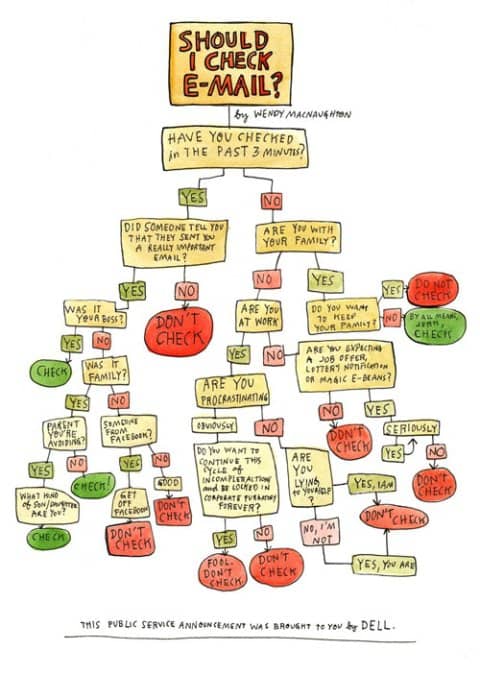
  • How to Be an Educated Consumer of Infographics – Before we start creating a bunch of videos, we should ask ourselves if a video is necessary to convey what we hope to get across. Perhaps a well thought-out graphic will teach better than a 20-minute video? Here's a fun look at teaching us about when to check our email (mid-way down the page and also included, below).
A handy flowchart to help you decide if you should check your email. (Wendy MacNaughton, independent illustrator, for Dell / Forbes)

What approaches and tools do you use in creating authentic and explanatory videos?

Filed Under: Resources

How to Increase Our Digital Literacy Literacy

By Bonni Stachowiak | February 7, 2017 | | XFacebookLinkedInEmail

As I begin to compose this blog post, my browser has more tabs open than I think I've ever had open at one time before. I've bookmarked 30+ articles about digital literacy the past couple of years, with each post linking to a plethora of additional resources on the subject. My goal in this post is to increase our literacy about the topic of digital literacy.

My Quest

I want to write a post about digital literacy, as a means of recapping my conversation with Mike Caulfield that was published last week.

The Trouble

It is so challenging to even just begin by defining digital literacy, let alone to begin to discuss some of the criticisms of the more popular publications on the topic.

My Compromise

Instead of trying to give readers a thorough exploration of the topic (Mike Caulfield admitted on Twitter that his Digital Literacies: Which One? post was initially intended to be just a few hundred words, but before he knew it, quickly grew into thousands), I'm going to introduce a few places to get started with the subject.

Digital Literacy: A Definition

JISC defines digital literacy as:

Digital literacies are those capabilities which fit an individual for living, learning and working in a digital society.”

They go on to explain:

Digital literacy looks beyond functional IT skills to describe a richer set of digital behaviours, practices and identities. What it means to be digitally literate changes over time and across contexts, so digital literacies are essentially a set of academic and professional situated practices supported by diverse and changing technologies. This definition quoted above can be used as a starting point to explore what key digital literacies are in a particular context eg university, college, service, department, subject area or professional environment.”

Lest I leave you assuming that this is the agreed-upon definition for digital literacy, there are as many definitions as there seem to be publications on the subject. Belshaw cautions us about the ambiguity that emerges, when we refer to digital literacy.

Belshaw's TEDx talk on the essential elements of digital literacy provides a wonderful overview:

Essential Frameworks

There are a few frameworks that are critical to understanding the ways in which we might think about digital literacy. Some of these frameworks focus on domains, while others are more tool/skill-oriented.

  • Developing Digital Literacies from JISC
  • Digital Literacy: An NMC Horizon Project Strategic Brief (though also reading this critique of the brief is helpful)
  • ALL ABOARD: Digital Skills in Higher Education
  • The Essential Elements of Digital Literacies
  • Framework for Information Literacy for Higher Education from ACRL

While not specific to solely digital literacy, I do think Mozilla's web literacy map is worth exploring, as well.

Domain-Specific Sites

As Mike Caulfield asserted, a big part of increasing our digital literacy is improving our knowledge within the specific domain being evaluated. Here are just a few resources to help with that endeavor:

  • Politifact
  • SciCheck
  • Quote Investigator
  • Snopes

Next Steps

There are two specific ways I plan on taking action on what I have been learning about digital literacy. I plan on sharing the ALL ABOARD digital skills framework with the faculty development committee I chair, as a means of brainstorming on possible breakouts for our annual Fall faculty gathering. I also hope to introduce students to some relevant domain-specific sites that could support them in increasing their own digital literacy. Like Mike Caulfield, I also hope that these types of sites continue to grow.

What steps are you taking in developing your own or someone else's digital literacy?

Filed Under: Resources

Essential Word Processor Features for Faculty

By Bonni Stachowiak | November 1, 2016 | | XFacebookLinkedInEmail

Word Processor

I was helping a student get prepared for a job interview yesterday. She said that half of her time at the company was going to be spent in a one-on-one interview, while the other half of the time would be devoted to an assessment of her Word and Excel skills.

She admitted to not being adept at Excel, but touted her Word skills, since she had been using it extensively in her current internship. I inquired as to whether or not she knew how to set tabs. She said she knew how to “tab over,” but didn't even know what I meant when I asked about “setting” a tab.

I have the utmost confidence in her ability to do well on the interview. She will quickly be able to learn more of the word processing and spreadsheet skills she needs and the organization she's interviewing with will have an exceptional intern.

However, it did get me thinking about the most common features in word processors that many faculty don't utilize, which ultimately make their work harder in the long run.

Here are the most essential features I recommend you leverage, when using a word processor:

Use Styles

If you've written an academic paper, or a manual of some kind, you've likely made use of headings and subheadings. However, most people don't know that you can create a style in your word processor that, when applied, automatically places that formatting on a given line/paragraph. There are some built-in styles in most word processors, which you can modify at any time to have the look-and-feel that you want.

This documentation shows you how to create styles in Microsoft Word, but you're only a search away from discovering how to use styles in whatever word processor you happen to use.

Here's a video of how to create styles in Microsoft Word from Lynda.com*.

Auto-create a Table of Contents

Once you have styles set up in your document, it becomes incredibly easy to auto-create a table of contents in your document. After you auto-create a table of contents, you can come back later and right-click and choose update, to have the table of contents reflect any changes you have made in your document since you first created it.

Here's how to auto-create a table of contents in Microsoft Word.

This video shows you how to quickly create a table of contents, and incorporates a review of applying styles, as was discussed, above.

Insert Page or Section Breaks (Versus Pressing Enter a Bunch of Times)

When you want to move down to a new page in your document, many people are tempted to accomplish this goal by pressing enter a bunch of times. The problem with this is that, if you make changes to your document down the road, your page breaks will all likely be shifted a bit and your pages will not appear as you originally desired.

Instead, if you insert a page break, or a section break – new page, you can be assured that no matter what changes you make to the document, a new page will appear where you originally intended. Section breaks are helpful if you want to have a different page numbering scheme (like roman numerals at the start of a document that then move into regular numbers), or if you want each section of a document to have a different header (like perhaps the name of the chapter or section of a document). Page breaks can be inserted and also can be deleted, if you change your mind later.

Here's the documentation on how to insert a page break in Microsoft Word.

Below is a short video on how to insert a page break in Microsoft Word.

Next Steps

Those are just three features in a word processor that have a lot of leverage, but it is really just the beginning of finding ways to save yourself time. I've found that the website Lynda.com* has plenty of video tutorials to help me work more effectively with many different technology tools. Here's a referral link* that will allow you to receive a free, 2-week trial to their service*, which I highly recommend.

Your Turn

What features do you consider most essential in getting the most out of a word processor?

Filed Under: Resources

  • « Go to Previous Page
  • Page 1
  • Interim pages omitted …
  • Page 9
  • Page 10
  • Page 11
  • Page 12
  • Page 13
  • Interim pages omitted …
  • Page 17
  • Go to Next Page »

TOOLS

  • Blog
  • Podcast
  • Community
  • Weekly Update

RESOURCES

  • Recommendations
  • EdTech Essentials Guide
  • The Productive Online Professor
  • How to Listen to Podcasts

Subscribe to Podcast

Apple PodcastsSpotifyAndroidby EmailRSSMore Subscribe Options

ABOUT

  • Bonni Stachowiak
  • Speaking + Workshops
  • Podcast FAQs
  • Media Kit
  • Lilly Conferences Partnership

CONTACT

  • Get in Touch
  • Support the Podcast
  • Sponsorship
  • Privacy Policy

CONNECT

  • LinkedIn
  • Instagram
  • RSS

CC BY-NC-SA 4.0 Teaching in Higher Ed | Designed by Anchored Design