• Skip to primary navigation
  • Skip to main content
  • Skip to footer

Teaching in Higher Ed

  • Podcast
  • Blog
  • SPEAKING
  • Media
  • Recommendations
  • About
  • Contact

2022 Top Tools for Learning Votes

By Bonni Stachowiak | August 13, 2022 | | XFacebookLinkedInEmail

Tools4Learning with gold tools like a wrench, nails, etc.

Each year, I look forward to reviewing the results of Jane Hart’s Top 300 Tools for Learning and to submitting my votes for a personal Top Tools for Learning list. I haven’t quite been writing up my list every single year (missed 2020), but I did submit a top 10 list in 2015, 2016, 2017, 2018, 2019, and 2021. I haven’t come across too many others’ 2022 Top Tools for Learning votes, yet, but did enjoy reviewing Mike Taylor’s list.

I avoid looking at the prior year’s lists until I have identified my votes for current year. Once my list was finished for 2022, however, I did compare and realize that I had left Zoom off for this year. Given that I use Zoom pretty much daily for meetings, teaching, speaking engagements, and podcast interviews, I suspect this is one of those things where Zoom has become so integral to my life that it’s become like water that I can’t see because I’m swimming in it.

Something that I am still looking forward to getting more practice with is a technique shared by Kevin Kelly on Episode 406 of the Teaching in Higher Ed podcast. Kevin shared about how to turn a Zoom chat into a useful summary and included a sample summary from an AAEEBL Meetup in the show notes for the episode.

Another thing I realize as I reflect back on the current and prior years of voting is how much every single tool I use fits into a personal knowledge mastery system, which I have learned so much about from Harold Jarche over decades now. Harold Jarche writes:

Personal knowledge mastery is a set of processes, individually constructed, to help each of us make sense of our world and work more effectively. PKM keeps us afloat in a sea of information – guided by professional communities and buoyed by social networks.

PKM is the number one skill set for each of us to make sense of our world, work more effectively, and contribute to society. The PKM framework – Seek > Sense > Share – helps professionals become knowledge catalysts. Today, the best leaders are constant learners.

Harold was on Episode 213 of the Teaching in Higher Ed podcast, if you would like to learn more about PKM. There is also an entire collection of PKM episodes.

My 2022 Top Tools for Learning

Below are my top 10 Tools for Learning for 2022. Jane Hart’s survey methodology has shifted over the years. She now asks us to list each tool and then identify which of three categories we most often use it for: personal learning, workplace learning, or education. Mine overlap quite a bit, within those categories, but I’ve done my best to pick the context in which I use it most often.

1. Overcast | Personal Learning | PKM-Seek

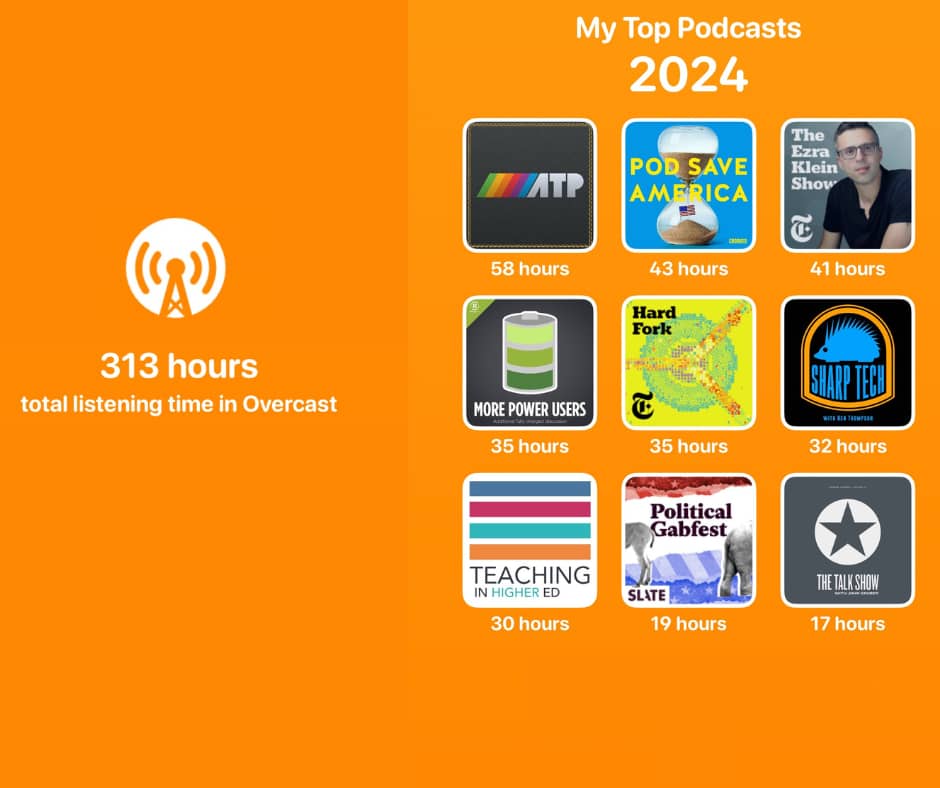
This podcast “catcher” app is a daily part of my life and learning. Overcast received a major design overhaul in March of 2022, which led me to reorganize my podcast playlists to take full advantage of the new features. In October of 2021, I wrote up my podcast favorites, in case you’re interested.

2. Unread | Personal Learning | PKM-Seek

While Overcast is for the spoken word, Unread is primarily for written pieces. Powered by real simple syndication (RSS), Unread presents me headlines of unread stories across all sorts of categories, which I can tap (on my iPad) to read, or scroll past to automatically mark as read. I use Unread in conjunction with Inoreader, which is a robust RSS aggregator that can either be used as an RSS reader, as well, or can be used in conjunction with an RSS reader, such as Unread.

On a related note, if you like the idea of information flowing to you (via RSS) versus you having to go find it – and you like to cook – check out the app Mela. I switched to it in the past year and haven’t looked back.

3. Twitter | Personal Learning | PKM-Seek

I continue to benefit from a strong personal learning network (PLN), which for me is at its most vibrant on Twitter. Whether it’s for something as simple as getting some good tv/movie recommendations when I am under the weather, or for a deeper and more significant purpose of learning from those in the disability community, I find a tangible benefit with almost every visit. Yes, there are also major problems on social media platforms, including Twitter. But for me, the key has been all in who I follow and how I engage in community with others on Twitter.

4. Raindrop | Workplace Learning | PKM-Sense

While the first three tools I mentioned were all about seeking information, Raindrop is all about sense making (in the present and future) for me. It is a digital bookmarking tool. I wrote about how I use Raindrop in late 2020. I continue to see daily benefits with having such a simple-yet-robust way of making sense of all the information coming at me on a daily basis. Raindrop recently added the ability to highlight text on a page you have bookmarked, but I haven’t experimented with that feature much yet. If I want to do something with annotations and highlighting, I tend to gravitate toward Hypothes.is, a social annotation tool.

5. PollEverywhere | Education | PKM-Sense

When I started in a professional career in the early 1990s, I used to work for a computer training company. One regular thing that would happen with less-experienced instructors would be them standing at the front of the class, asking if everyone “got it” or was “with them.” As you can imagine, many times people either didn’t realize that they were lost, or they were too embarrassed to admit it.

Polling tools like PollEverywhere remove the barrier of people not realizing that they don’t understand something, or for those are reluctant to share their confusion publicly. PollEverywhere also has features to support team collaboration, asynchronous and/or synchronous polling, and can integrate with a learning management system (LMS). I primarily use PollEverywhere for formative assessment, allowing people to respond anonymously to the questions being posed. I subscribe to the Present plan, which allows me to have up to 700 people responding at one time on a given poll question. People in an education context who needed to create reports and access archived poll responses would likely need to go with an Individual Instructor premium account, or department/university-wide plan.

6. Padlet | Education | PKM-Sense

One of many collaborative tools I enjoy using is Padlet, a virtual cork board. I use Padlet to create a shared vision for a class or a team, to create a crowd-sourced music playlist for an event or class, as a parking lot, and to collectively come up with ways to extend learning. This year for our faculty gathering, we have Padlet boards for virtual collaboration and have also printed out posters (with QR codes that point back to the Padlet boards) that people can respond in person to using sticky notes. I love the blend of the analog and the digital that is possible using this approach.

7. Loom | Education | PKM-Share

The past couple of years, Loom has become a part of my daily computing life. It is a simple screen casting tool. Record what’s on your screen (with or without your face included via your web cam) and as soon as you press stop, there’s a link that automatically gets copied to your computer’s clipboard which is now ready to paste anywhere you want. I use Loom for simple explanations, to have asynchronous conversations with colleagues and students, to record how-to videos, and to invite students to share what they’re learning. If you verify your Loom account as an educator, you get the pro features for free.

8. Canva | Workplace Learning | PKM-Share

My use of the graphic design website Canva has evolved over the years. I started by using it to create graphics and printable signs for classes. Now I also use it to create presentations (which can include embedded content, slides, videos, etc.). As I just revisited Canva features in writing this past, I discovered even more things I wasn’t even aware that Canva can do.

I find the pro version worthwhile for both work and for Teaching in Higher Ed, as having the ability to include an entire team of people and have everyone be able to access a brand kit(s) to achieve consistent colors, logos, and other brand assets is a game-changer. We haven’t experimented as much with branded templates or comments and sharing, but there’s so much to benefit from with Canva working collaboratively. The free plan is also quite generous and worth signing up for, even if you don’t wind up upgrading to Pro or Canva for Teams.

9. WordPress | Workplace Learning | PKM-Share

The Teaching in Higher Ed website has been on a hosted WordPress site for so long, I can’t even remember where it resided prior to WordPress. My friend and web developer, Naomi Kasa, has helped keep the site beautiful and functional. One of my favorite features of the site is the page Naomi created with all my upcoming and past speaking engagements. It is great having all that information in one place and to see the collection of resources keep growing over time. Take a look at my resources page for a recent speaking engagement and how I embedded a Canva presentation, which includes use of embedded content and video.

10. Blubrry | Workplace Learning | PKM-Share

If you are going to have a podcast and you want to efficiently and effectively get it released to the majority of the various podcast players, you are going to need a podcast hosting company. We have used Blubrry for years now and appreciate its reliability, ease of use, and integration with WordPress.

Your Turn

Would you like to submit a vote with your Top Tools for Learning? You can fill out a form, write a blog post, or even share your picks on Twitter. The 2022 voting will continue through Thursday, August 25 and the results will be posted by Tuesday, August 30, 2022.

Filed Under: Personal knowledge mastery

21 Top Teaching in Higher Ed Podcast Episodes

By Bonni Stachowiak | October 2, 2021 | | XFacebookLinkedInEmail

Top 2019-2021 Top Teaching in Higher Ed Podcast downloads

I started producing weekly Teaching in Higher Ed podcast episodes in June of 2014. Since that time, a new episode has aired each week. This is something that I’m both proud of – yet a little horrified that I have got a streak going that may not be sustainable (or make sense) in the long run. As of today (October 2), I also have another streak going… I’ve closed my Apple Watch rings for 334 days straight. That means I’ve done at least 30 minutes of cardio, stood for at least a minute for 12 hours, and burned at least 440 calories during the day. I’m thinking it might be healthy if I were to not focus as much as I have been on maintaining either of these streaks and give myself a bit of a break. But I plan on sticking with them both (if I can) at least until the end of 2021.

A few years ago, Dave and I switched hosting companies for our podcasts. That’s why, instead of this being a list of the top 21 episodes of all time, I’m sticking with the top 21 since 2019. Someday, I might go back and combine the data from before the switch and now. However, for now, I’m keeping it simple.

Top 21 of the Most Listened to Episodes since 2019

  1. Episode 324 – Teaching Effectively with Zoom with Dan Levy (2020)
  2. Episode 309 – Hyflex Learning with David Rhoads (2020)
  3. Episode 263 – Recipes for Effective Teaching with Elizabeth Barkley (2019)
  4. Episode 320 – How to Be Together in Learning Online with Jesse Stommel (2020)
  5. Episode 258 – Paying the Price with Sara Goldrick-Rab (2019)
  6. Episode 316 – Designing for the Uncertain Fall with Maria Andersen (2020)
  7. Episode 254 – Stop Talking, Start Influencing with Jared Horvath (2019)
  8. Episode 291 – Learning Myths and Realities with Michelle Miller (2020)
  9. Episode 314 – Culturally Responsive Online Teaching with Courtney Plotts (2020)
  10. Episode 295 – Online Engagement Through Digital PowerUps with Travis Thurston (2020)
  11. Episode 256 – Creating Wicked Students with Paul Hanstedt (2019)
  12. Episode 296 – Toward Cruelty-Free Syllabi with Matthew Cheney (2020)
  13. Episode 273 – Engaging Learners in Large Classes with Bonni Stachowiak (2019)
  14. Episode 264 – Serving Hispanic Students with Melissa Salazar (2019)
  15. Episode 271 – The Missing Course with David Gooblar (2019)
  16. Episode 269 – Removing Learning Barriers with Universal Design for Learning (UDL) with Jennifer Pusateri (2019)
  17. Episode 290 – The Productive Online and Offline Professor with Bonni Stachowiak (2020)
  18. Episode 282 – Using Challenges to Motivate Learners with Mike Wesch (2019)
  19. Episode 277 – Intentional Tech with Derek Bruff (2019)
  20. Episode 253 – Spaces and Places (and Nudges) with José Bowen (2019)
  21. Episode 259 – Intentional and Transparent Assessment with Natasha Jankowski (2019)

Other Popular More Recent Episodes

Here are some other more recent popular episodes from 2021:

  • How to Use a Course Workload Estimator, with Betsy Barre
  • Small Teaching Reprised, with James Lang
  • On Improving Our Teaching, with Dan Levy
  • Equity-Centered Trauma-Informed Education, with Alex Shevrin Venet
  • The Role of Faculty in Student Mental Health, with Sarah Lipson and Laura Horne
  • Equity-Enhancing Data Tools, with Viji Sathy and Kelly Hogan
  • Online Culture, with Courtney Plotts

Filed Under: Personal knowledge mastery

2021 Podcast Favorites

By Bonni Stachowiak | October 2, 2021 | | XFacebookLinkedInEmail

2021 Favorite Podcasts (collection of podcast logos)

The first person to inspire me to list out annually which podcasts are taking up my “ear share” was Bryan Alexander. In January of 2021, he wrote up his most recent list of what podcasts he’s listening to, while admitting he hadn’t done this in a while. I have also missed keeping up with what I sometimes think of as an annual list. I wrote up favorite podcast lists in 2019, 2018, 2017, 2014, and also published an article about podcasting in the University of Austin's Flow Journal in 2017.

Here’s my 2021 list of favorite podcasts, organized by category. At the end of the list, for the first time, I select ten shows that if I was only allowed that many to listen to each week, I would choose. Note to self: Why did you do that to yourself? Note to readers: Because I listen to a podcast, doesn't mean I agree with what is said in episodes… I appreciate having my mind-expanded, yet do find that I sometimes wish some of the people I listen to would do a bit more of the same, which you will read about a little toward the end of this post. 

Teaching and Higher Education

  • Tea for Teaching – “…a series of informal discussions of innovative and effective practices in teaching and learning. Hosted by John and Rebecca, who run the Center for Excellence in Learning and Teaching at the State University of New York at Oswego.” I’ve learned so much from John, Rebecca, and their guests over many years now.
  • Gettin' Air with Terry Greene – Terry prepares for each interview with care and asks authentic questions about open education.
  • The EdSurge Podcast – I tend to listen more often to the higher education focused episodes. Jeff Young is an excellent interviewer who understands the higher education context well.
  • Lecture Breakers with Barbi Honeycutt – “…a place where college professors… share innovative teaching strategies, practical ideas, teaching tips, and resources to help you break up your lecture, energize your classroom, increase student engagement, and improve learning.”
  • Think UDL – thoughtfully hosted by Lillian Nave. Each episode leaves me knowing more about Universal Design for Learning (UDL) and ways to support learning more effectively.
  • Teacher of the Ear – Formerly named HybridPod, this show is hosted by Chris Friend, who now teaches at Kean University in Union, New Jersey, U.S.A. We can look forward to a new episode about podcasting as pedagogy later in October.

News and Politics

  • Make Me Smart with Kai and Molly – “Each weekday, Marketplace’s Kai Ryssdal and Molly Wood make today make sense…. Break down happenings in tech, the economy and culture.” I listen to Make Me Smart almost every weekday.
  • Pantsuit Politics – “…a podcast for real conversations that help us understand politics, democracy, & the news – while still treating each other like thoughtful human beings.”
  • Political Gabfest – Emily Bazelon, John Dickerson, and David Plotz discuss the week's politics in an entertaining and informative way.
  • The Ezra Klein Show – Weekly conversations about “something that matters.” Ezra is a phenomenal interviewer and I find myself waking away from each episode with an issue that will capture my thoughts for some time to come.
  • The Daily – “Twenty minutes a day, five days a week, hosted by Michael Barbaro and powered by New York Times journalism.”
  • Post Reports – “The Post’s premier daily podcast, featuring unparalleled reporting, expert insight and clear analysis, every weekday afternoon.”
  • This Land – “The award-winning documentary podcast This Land is back for season 2. Host Rebecca Nagle reports on how the far right is using Native children to attack American Indian tribes to advance a conservative agenda.”
  • What a Day – “Big news. Short podcast. Can’t keep up with the flood of news every morning? We’ve got you covered.”
  • Amicus, with Dalia Lithwick – smart conversation about the law.
  • Pod Save America – “A no-bullshit conversation about politics hosted by Jon Favreau, Jon Lovett, Dan Pfeiffer and Tommy Vietor that breaks down the week's news and helps people figure out what matters and how to help.”
  • On the Media – “WNYC's weekly investigation into how the media shapes our worldview.”
  • The Dig – “… goes deep into politics everywhere, from labor struggles and the political-economy to imperialism and immigration.”

Technology

  • Mac Power Users – “Learn about getting the most from your Apple technology with focused topics and workflow guests. Creating Mac Power Users, one geek at a time since 2009.”
  • Connected – “Weekly panel discussion on Apple and the impact of technology on our lives.”
  • Accidental Tech Podcast – “Three nerds discussing tech, Apple, programming, and loosely-related matters.”
  • The Talk Show with John Gruber – “The director’s commentary for Daring Fireball,” an Apple-oriented technology blog by John Gruber.
  • Upgrade – Upgrade looks at how technology shapes our lives, from the devices in our hands and pockets to the streaming services that keep us entertained.
  • Automators – “Automation makes your life easier and everyone can do it. We tell you how.” The show is Mac-centric, though it also covers web services that enable automation.

See more technology-oriented podcasts that I listen to under the: Podcasts I Pay For section.

Mind-expanding Shows

  • Scene on Radio – “…two-time Peabody-nominated podcast from the Center for Documentary Studies at Duke University.” This is not one of those shows where you have to go back to the first session to understand what’s going on now. However, earlier seasons were breathtaking and life-changing. I still regularly think about Season 2: Seeing White and Season 3: Men and highly recommend them, in addition to the current season of Scene on Radio.
  • Strong Songs – “Music: It’s good. On each episode, host Kirk Hamilton takes listeners inside a piece of music, breaking it down and figuring out what makes it work.” Some of my favorite episodes include: “September” by Earth, Wind, & Fire, “Babylon Sisters” by Steely Dan, and “I Will Always Love You” by Dolly Parton.
  • Hidden Brain – “Hidden Brain Shankar Vedantam uses science and storytelling to reveal the unconscious patterns that drive human behavior, shape our choices and direct our relationships.” Thanks for recommending it such a long time ago, Isabeau Iqbal.
  • This American Life – “This American Life is a weekly public radio program and podcast. Each week we choose a theme and put together different kinds of stories on that theme.” (One of the all-time greatest podcasts!)
  • Code Switch – “What's CODE SWITCH? It's the fearless conversations about race that you've been waiting for. Hosted by journalists of color, our podcast tackles the subject of race with empathy and humor. We explore how race affects every part of society — from politics and pop culture to history, food and everything in between. This podcast makes all of us part of the conversation — because we're all part of the story.” Thanks to Rob Parke for recommending this show on Episode 126 of Teaching in Higher Ed.

Business, Economics, and Leadership

  • Planet Money – “The economy explained. Imagine you could call up a friend and say, “Meet me at the bar and tell me what's going on with the economy.” Now imagine that's actually a fun evening.”
  • Marketplace – “…helmed by Kai Ryssdal, examines what the day in money delivered, through stories, conversations, newsworthy numbers and more. “
  • Coaching for Leaders – “Leaders Aren't Born, They're Made. It's a myth that leadership skills can't be learned. Almost nobody is a born leader. Most leaders I know learned how to lead through the school of hard knocks, good training, years of hard work, effective coaching, and great mentors.” (Hosted by this guy I know – who I happen to be married to – Dave Stachowiak.)
  • The Look & Sound of Leadership – Candidly, if I hadn’t have had this podcast recommended to me by Dave (my husband), I may not have listened. Given that we both have doctoral degrees in organizational leadership, let’s just say that one of us (that would be me) doesn’t always gravitate to doing a bunch of listening on the topic in my “free” time. Tom is a fantastic storyteller and coach, however, and I've learned a great deal from him over the years. “Using an uncommon blend of storytelling and coaching, Tom Henschel created a unique and influential podcast. Eavesdrop on a monthly coaching conversation and get practical tools you can apply the minute the episode ends.”
  • Women at Work – Produced by Harvard Business Review. It sometimes goes on hiatus for a while – but it is well worth browsing prior episodes. Excellent interviews to helps us all fulfill our potential with excellence and joy!
  • Worklife, with Adam Grant – “Organizational psychologist Adam Grant takes you inside the minds of some of the world's most unusual professionals to explore the science of making work not suck. From learning how to love criticism to harnessing the power of frustration, one thing's for sure: You'll never see your job the same way again.”

Work/Productivity

  • Nested Folders with Rosemary Orchard & Scotty Jackson – “…ways of thinking, working, and using technology salutations to achieve more and feel good about doing their best work.”
  • GTD – “Our GTD podcasts are here to support you at every stage of your GTD practice. … The podcasts include personal and professional stories, as well as practical tips about GTD systems for desktop and mobile, using apps and paper. Start listening now and you'll be well on your way to stress-free productivity.”
  • Focused – Great productivity show, hosted by David Sparks and Mike Schmitz.
  • The Productivity Show – The team from Asian Efficiency helps us up our game on this practical podcast.

Life and Faith

  • Unlocking Us with Brené Brown – When this podcast moved to Spotify, I dropped my listening frequency way down. But each time I consume anything by Brené Brown, my life gets better.
  • On Being – “A Peabody Award-winning public radio show and podcast. What does it mean to be human? How do we want to live? And who will we be to each other? Each week a new discovery about the immensity of our lives. Hosted by Krista Tippett.”
  • Everything Happens with Kate Bowler – “Life isn’t always bright and shiny, as Kate Bowler knows. Kate is a young mother, writer and professor who, at age 35, was suddenly diagnosed with State IV cancer. In was, insightful, often funny conversations, Kate talks with people about what they’ve learned in dark times. Kate teaches at Duke Divinity School and is author of Everything Happens for a Reason (And Other Lies I’ve Loved).
  • Kelly Corrigan Wonders – “…a place for people who like to laugh while they think and find it useful to look closely at ourselves and our weird ways in the hopes that knowing more and feeling more will help us do more and be better.” Her episode with Anne Lamott nourished my soul right down to my core. Another vital episode was her conversation with Tressie McMillan Cottom, which explored Tressie’s “thoughts, emotions and deeply ingrained habits when it comes to money… both new and old.”
  • Another Name for Every Thing with Richard Rohr – Despite the podcast ending in March of 2021, I still go back and listen (or re-listen) to older episodes. “Another Name for Every Thing with Richard Rohr is a conversational podcast series on the deep connections between action and contemplation. Richard is joined by two students of the Christian contemplative path, Brie Stoner and Paul Swanson, who seek to integrate the wisdom amidst diapers, disruptions, and the shifting state of our world.”
  • The Evolving Faith Podcast – Despite having ended in late October, 2020, this is another show I go back to revisit regularly. These are timeless conversations about faith, belonging, identity, disability, embodiment, wonder, politics, empathy, injustice, and courage.
  • The Holy Post – I did not think I would like this podcast at all. Multiple friends recommended it. Still, I resisted. When I finally listened, it quickly went up near the top of my listening queue, each time a new episode was released. “Conversations about culture, theology, politics, and living a thoughtful Christian life.” Each episode starts with a few news-related items, including occasional bits about “news of the butt.” Then, Skye Jethani interviews a guest, including a recent interview with one of my all-time favorite Christian authors – Philip Yancey.

Podcasts I Pay For

The overwhelming majority of podcasts remain free in 2021. However, some podcasts have ad-free options, while others use some form of a subscription model. I pay for two podcasts (one directly; the other, as a part of a broader, content subscription).

  • Dithering – A podcast hosted by Ben Thompson and John Gruber, two technology experts. They air episodes twice per week that are exactly 15 minutes in length.
  • MacStories – I subscribe to Club MacStories Premier, which includes a number of subscriber-only podcasts, as well a a number of other geeky benefits for Mac and iOS users.

Attempt at a Top 10

Narrowing down all of the wonderful podcasts, above, to just ten is incredibly hard to do. The world of podcasting is rich with compelling content. Additionally, I enjoy some shows because they are “easy” to listen to – in that I don’t have to think very hard while taking them in. I'm trying to be realistic about which ones I tend to move to the top of my listening queue versus ones I “think” I should be listening to more. I suspect I would change my mind on this attempt at narrowing my favorites down to an arbitrary number of them, were I to compile such a list tomorrow.

In no particular order:

  1. Make Me Smart
  2. Kelly Corrigan Wonders
  3. Scene on Radio
  4. Everything Happens with Kate Bowler
  5. Dithering
  6. The Ezra Klein Show
  7. Mac Power Users
  8. MacStories – I’m cheating here, a little, since there are multiple MacStories shows under this umbrella.
  9. The Holy Post – While I continue to hold out hope that the hosts will continue to experience an evolving faith in their lives (perhaps even by listening to the Evolving Faith podcast back catalog?), the combination of lighthearted conversation in the beginning, along with humor and humbleness has me moving this one to the top of my queue more often than I might like to admit.
  10. Automators
  11. Teaching in Higher Ed – Kidding about this one. But I do listen back to every episode, always trying to get better at what I do. It’s hard to listen, often, but I force myself to do it, in the interest of continuing to grow my ability to have these conversations about teaching.

Filed Under: Personal knowledge mastery

2021 Top Tools for Learning: My Vote

By Bonni Stachowiak | July 6, 2021 | | XFacebookLinkedInEmail

Tools4Learning - Jane Hart's annual survey

I’m excited to participate this year, once again, in Jane Hart’s Top Tools 4 Learning. It is the 15th time she has conducted the survey. In more recent years, Jane asked us to separate our list of ten tools into the following three contexts:

  • Personal Learning
  • Workplace Learning
  • Education

She then lists the top 200 results across all of the categories, as well as listing a top 100 for each category.

Not surprisingly, I didn’t participate last year. But I do have blog posts for the following years:

  • 2019 Top Tools for Learning
  • 2018 Top Tools for Learning
  • 2017 Top Tools for Learning
  • 2016 Top Tools for Learning
  • 2015 Top Tools for Learning

As a person who enjoys it when I have a long streak of something going, I also want to be gentle with myself regarding what it has been like to attempt to keep even the simplest of things going during a pandemic. I avoid looking back at my own Top Tools for Learning prior posts, as well as Jane Hart’s listings, until after I have written the current year’s post. That way, I avoid biasing myself, given all the great tools there are to support our learning.

Top Ten Tools for Learning

Below, I present to you my 2021 list (which hopefully can make up for my lack of a list in 2020). In no particular order, the following are my Top Ten Tools for Learning:

Raindrop.io | Personal Learning | Digital bookmarking tool | Having the ability to save links and be able to easily resurface them later on is essential to my Personal Knowledge Mastery (PKM) system.

Overcast | Personal Learning | Podcast catcher | Despite not having as much time during the pandemic for podcast listening, I still treasure those episodes that I am able to consume. The reason I use Overcast is due to it’s smart speed function (set how fast you want to listen to particular podcasts and it keeps that setting saved) and the ability to share clips of episodes easily.

Twitter | Personal Learning | Microblogging + social media network | On Episode 53 of the Teaching in Higher Ed podcast, Peter Newbury explained his method for who to follow on Twitter in that he connects with people who are like him, along with people who are not like him. I have carried that advice with me since that conversation in 2015 and have benefitted richly from it.

Readwise | Personal Learning | Digital reading highlights manager | Have you ever gone to purchase a book, only to have the book seller’s website tell you that you had already bought it? Have you ever went to read a book, only to discover you read it years ago? Readwise helps resurface the highlights that you have saved from a number of digital sources. You can save highlights from Amazon Kindle, Apple Books, Instapaper, PDF documents, Inoreader, Evernote, and a whole lot of other services. Their tagline explains the functionality well: “Readwise helps thousands of readers get the most out of their digital highlights.”

Inoreader | Personal Learning | RSS feed aggregator | Rather than trying to remember to visit every website that might have information that is relevant to me, I use RSS (real simple syndication) to subscribe to various feeds, so all the information comes into one place. Inoreader is an RSS aggregator (meaning it “collects” all the things I want to subscribe to and keeps track of what I have read and what remains unread). To read my RSS feeds, I prefer to use Unread. When reading RSS feeds using the Unread app on my iPad, I can browse articles and mark things as read using only my thumb.

Zoom | Education | Web conferencing | While there are other web conferencing tools that attempt to ‘catch up’ with Zoom on a sustained basis, I still have found no other tool that comes even close. Zoom is easy to get started with, handles lower bandwidth situations with ease, and continues to innovate without allowing their usability to diminish.

Canva | Workplace Learning | Graphic design creator | I have two different Canva Pro accounts (personal and work), because it has that much benefit. For each context, I can have our various logos, color scheme(s), and photos/graphics uploaded and saved.

Blubrry | Workplace Learning | Podcast hosting | If you want to have a podcast that goes out to be listed among the various platforms/services, you will need a podcast hosting company. Teaching in Higher Ed has been a part of my life since June of 2014 and has contributed more to my learning than any single other effort I’ve undertaken since then.

Google Jamboard | Education | Collaborative sticky notes and simple drawings/text | Whenever I’m with a group of people, I can invite them to “join” me on Google Jamboard to collaborate by adding sticky notes, text, and simple shapes to a shared canvas.

Loom | Education | Screencasting | I use Loom in my teaching, work, and personal lives multiple times a day. When I have a quick thing I want to “show” someone, I can record my screen quickly and copy a link to the resulting video with a single click. I can also include my web cam and do a video with something on my screen, or just the camera, alone.


Would you like to submit a vote with your Top Tools for Learning? You can fill out a form, write a blog post, or even share your picks on Twitter. The 2021 voting will continue through Thursday, August 26 and the results will be posted by Wednesday, September 1.

Filed Under: Resources

Standing Presenting Set-Up

By Bonni Stachowiak | December 26, 2020 | | XFacebookLinkedInEmail

I gave a couple of talks this month that I wanted to share a bit with you. First, David Rhoads and I joined Bryan Beatty to discuss the myths and truths of Hyflex Learning. I also shared at the Lilly Conference about igniting our collective imagination. Each of those two links has the associated resources on them and more information. However, during the Lilly Conference one, I got asked a fair amount of questions about my standing set up in the chatbox, which I didn't anticipate.

When I saw the question, I joked that I was not going to be held up as a model for standing setups. I had used this bendable tripod thingy with a screw sticking out of the top of it and tried to balance my webcam on top of the screw. I'm not sure if the camera was straight at any point in my presentation. Two of the three legs of the tripod blocked my already-poor view of the Zoom window and the other application I was using to run my slide-deck and polling. I used one of our kids' upholstered chairs to raise my keyboard up a bit and had my trackpad resting in the seat of the chair.

Let's just say it wasn't ideal.

Trent Tucker came to the rescue on Twitter. He tweeted: “…as luck would have it, I ran into a colleague at #myTRU who has the stand-up teaching set-up I was looking for! Cranks the desk up, rolls the whiteboard into place, webcam on… stand-up teaching!”

Hey @NeuroscienceUT @marklipton @bonni208 … as luck would have it, I ran into a colleague at #myTRU who has the stand-up teaching set-up I was looking for! Cranks the desk up, rolls the whiteboard into place, webcam on… stand-up teaching! #EdTech #TeachFromHome #cdnpse pic.twitter.com/MjVJbQx5UX

— Dr. Trent “I wear a mask” Tucker, PhD (@ProfTucker) December 4, 2020

Trent later described what things look like before John Ofee transforms the desk to the standing setup:

“Hi Bonni — I have permission from @john_ofee to share this. It's his office and set-up, I took the photo and doctored it up. Here is the “before” picture — it's a regular office then it transforms into super stand-up teaching space from the other photo. Happy blogging.”

A friend from work said his wife was really liking her stand that converts her desk to a standing desk, so I bought a similar one. I like it a lot, from a functionality standpoint. However, it was too wide to fit the part of my desk where my monitor sits. I'm thinking it will head to work with me when I one day return and will likely work better there.

Now Dave and I are thinking that I should look for an independent tripod that would raise my webcam up high enough to not give me the appearance of having four chins (my words, not his). My goal is to have things up and running well by the time I speak at the Musical Theatre Educators Alliance's conference in early January 2021. Standing for that one seems most important… I'm working hard at keeping the bad musical theatre puns to myself for the event, as well. “Ya Got Trouble – Right Here in River City…” In all seriousness, I couldn't be more excited and honored to join them for the conference.

One purchase that has worked out well in my setup is this light that sits atop my monitor. It's LED can be adjusted in two ways: brightness and tone (warm/cool). It has a dimmer on it and a power button (that unfortunately I keep forgetting to turn off when I leave my computer for the day; I'm thinking of seeing if there is some kind of automation I can use for this situation).

It needs to be shut off when I'm on any kind of web conference tool, or it makes my webcam adjust awkwardly and put me in the shadows. But it works great for when I tuck my computer and keyboard away and work on analog tasks. Speaking of pen and paper tools, I recently received an early Christmas gift, which I initially heard about from Katie Linder. Here's Katie's recent answer to the question: Will I Use PowerSheets in 2021? I've gotten as far as putting my name in the front and looking through everything that came in the PowerSheets bundle I received.


Filed Under: Productivity

  • « Go to Previous Page
  • Page 1
  • Interim pages omitted …
  • Page 7
  • Page 8
  • Page 9
  • Page 10
  • Page 11
  • Interim pages omitted …
  • Page 69
  • Go to Next Page »

TOOLS

  • Blog
  • Podcast
  • Community
  • Weekly Update

RESOURCES

  • Recommendations
  • EdTech Essentials Guide
  • The Productive Online Professor
  • How to Listen to Podcasts

Subscribe to Podcast

Apple PodcastsSpotifyAndroidby EmailRSSMore Subscribe Options

ABOUT

  • Bonni Stachowiak
  • Speaking + Workshops
  • Podcast FAQs
  • Media Kit
  • Lilly Conferences Partnership

CONTACT

  • Get in Touch
  • Support the Podcast
  • Sponsorship
  • Privacy Policy

CONNECT

  • LinkedIn
  • Instagram
  • RSS

CC BY-NC-SA 4.0 Teaching in Higher Ed | Designed by Anchored Design