• Skip to primary navigation
  • Skip to main content
  • Skip to footer

Teaching in Higher Ed

  • Podcast
  • Blog
  • SPEAKING
  • Media
  • Recommendations
  • About
  • Contact

How to be more productive by factoring in context

By Bonni Stachowiak | October 13, 2015 | | XFacebookLinkedInEmail

context

I have always been a big fan of personal productivity books and tools. When David Allen's first edition of Getting Things Done came out, I liked his methods, with one big exception:

I completely didn't get how considering context was going to be useful to me at all

For those of you who may not be familiar with the idea of using context in your planning, he advises that with each action item on our to do list, we not only consider when this action needs to be taken, but also what (or who) would need to be present in order to do it.

The examples I remember him giving in the first edition were primarily location based. If I were going on an errand to our local CVS, it would also be good to know to stop at the grocery store, which is next door. Also helpful would be to drop by and pick up our dry cleaning.

The problem with his examples was that I can't stand going on errands and it is mostly Dave (my husband) who does the grocery shopping and dry cleaning drop offs in our household. If I'm going to grocery shop, it is likely going to be via the Amazon Fresh delivery service.

While this post links to how to articles on OmniFocus, the set up of contexts is available in many different kind of task managers. Even if your specific tool doesn't have a field for context, you can still type in an @ symbol at the end of each task name and include the context you want to use, such as:

@agenda:FDC or @energy:high or @grocerystore

Why I Changed to Better Appreciate Context

Three factors caused me to make a dramatic shift in my appreciation of context in personal productivity:

  1. I become an OmniFocus user. OmniFocus is one of the task management applications that has features set up for leveraging contexts.
  2. David Allen revised his Getting Things Done book and somehow it stuck better with me on this edition.
  3. I expanded my thinking of how contexts might be set up beyond location-based ones, thanks to experts like Tim Stringer.

There are still ways that other people make use of contexts that don't resonate with me too heavily.

Some people use energy-level contexts and work on the @focus tasks when they are at a time of the day that allows them to target their attention at a given task.

Others set up sophisticated location-based contexts that are better served for people who run lots of errands at once.

If you have set up a system like OmniFocus, but don't think it is working well for you, check out these potential pitfalls and associated solutions.

Contexts that Work Well for Me

By far, these are the contexts that work best for me:

  • Setup and track agenda items for meetings using contexts
  • Track action items that I am waiting for a response on before completing the task
  • Keep track of things I need to talk to someone about (like a spouse, or direct report) by setting up their name as a context
  • Set up a context for programs/services I use frequently (I have one set up for our LMS, so whenever I go login, I can take care of all the small actions that need to be addressed during that one visit)

Here are the application-related contexts that I have set up on OmniFocus:
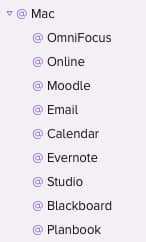
mac-contexts

By far, the biggest time saver on the list is the @Moodle context.

Another one that works well for me is the @Studio context. We have a studio set up at home with professional audio equipment. Whenever I have tasks that can only be accomplished when accessing the audio equipment, I apply that context.

Then, each time I sit down at that computer, I have all the tasks I should take care of in that sitting.

[reminder]How do you use the concept of context in your personal productivity approaches? [/reminder]


Filed Under: Productivity Tagged With: context, gtd

Continuous improvement in teaching

By Bonni Stachowiak | September 29, 2015 | | XFacebookLinkedInEmail

continuous-improvement

My Introduction to Business students just took their first exam of the semester. For some, it was the first college-level test they have ever taken.

I had a couple of goals I was aiming for this semester.

Avoid surprises on the exam structure

Each semester, I have students participate in an online forum, where they reflect on their first exam. They write about what went well, what didn't, what they will do differently next time, and what I could have done differently to support them in their learning.

The most common factor that students have identified in the past as a hinderance to them doing well on the exam was that they didn't know what to expect on the exam. This has frustrated me in the past, because it tends to come from an external locus of control paradigm. However, I now think I was just being stubborn and could have done something much sooner to take away this as a potential challenge for the students.

This semester, I'm using PollEverywhere even more than in the past. In particular, I regularly let them know that the kinds of questions they see (especially the multiple choice and the true/false) are the same types of questions they are going to see on the first part of the exam.

They also take weekly quizzes and I reminded them frequently that those questions were written by the publisher… the same source for the questions that show up on the exam.

Finally, I had them take a non-graded pop-quiz with an essay question that was in the same style / format as the ones that would show up on their exam.

I'm happy to report that not a single one of my 95 students who are in the three sections of the classes I'm teaching this semester indicated that they were unaware of what the exam would be like…

Success.

Prepare students for application-oriented questions

The other goal I had for this first exam was to better prepare students for going beyond memorization, but being able to apply their learning in a given context.

One of the most listened to episodes of Teaching in Higher Ed is the conversation I had with Tine Reimers on critical thinking.

It doesn't surprise me, as I struggle to develop these skills in my students. I had mixed results on the exam in this area.

One of the questions posed to them had to do with defining corporate social responsibility and then giving examples of ways that a particular company might address various stakeholders' needs and wants.

All students in the classes were able to list the stakeholders. The vast majority were able to give generic examples, such as offering benefits to the employees. There were probably 20% who were unable to make their examples specific to the company, however.

When it came to students being able to give examples for the four types of competition in markets, the success rate was much lower. Students were able to regurgitate the definitions from the textbook (which are poor, at best), but the examples they used demonstrated their lack of comprehension of these types of competition.

For monopoly, students were most often able to indicate that this was a market in which there was only one competitor.

However, their examples either had to do with their preference for a particular brand (“Apple is a monopoly, because no other technology company makes products as well as they do and they are one of the wealthiest companies in the world”), or they had answers like that bottled water companies were monopolies (We had discussed many times about how it wouldn't make sense to have multiple pipes going to your house of water and you choosing which one you liked the best). I guess they had water on their mind, but didn't realize how different bottled water is from the water we pay for as a utility.

David Merill always emphasizes that when we are teaching in the phase he calls demonstration, that we should show the learner not just how to do something, but also how not to do something.

The students clearly didn't have enough examples of what wouldn't fit into the category of each of these competitive structures.

The next time I teach this course, I'm either going to decide that this topic just isn't necessary at the level of introductory business and have them learn it in economics, or I'm going to create an experiential exercise in class to hammer home the examples more.

Creating an in-class reinforcement exercise

I'll bring in a bag full of items for each group of 4-5 students. There will be signs hanging around the classroom for each of the type of competition. Students will take each item in the bag and set it on the table under the appropriate competition type sign. Then, I'll have each group go and stand in front of one of the signs and determine whether or not the items that have been set there are correct for their type of competition.

Competition exercise

If I ultimately determine that I don't have enough time in class to go this in depth on this one learning objective, I can always build some kind of online exercise that will accomplish the same thing.

Building an online reinforcement on competition types

I could have a virtual bag in which the items that require sorting could be housed. Then, I could have some kind of a drag-and-drop interaction that has them drag them over to the name of the appropriate type of competition.

Articulate Storyline is a rapid elearning creation tool that has the capability to build drag-and-drop interactions in online courses. We have been big fans of Articulate's eLearning creation applications over the years. However, they are a Windows-only platform and we have now become a Mac-only household.

It looks like Adobe Captivate also now has drag and drop interactions. Captivate is available on the Mac and PC, so makes for a good option.

Both Articulate Storyline and Captivate are high-end applications and have the price tag you would associate with such advanced features.

Continuous improvement in teaching

I am overall pleased with the results of this first exam. Taking the time to reflect on how I can continuously improve this class after each exam is important to me. I'm glad I invested the time today to consider what changes to make, both the next time I teach this class, and as I continue with these students throughout the rest of the semester.

[reminder]Have you had any exams in your classes yet this academic year? If so, what did you discover? [/reminder]

Filed Under: Teaching Tagged With: exams, grading

Top 100 tools for 2015

By Bonni Stachowiak | September 22, 2015 | | XFacebookLinkedInEmail

jane500Jane Hart has released her top 100 technology tools list for 2015.

I always find the list beneficial to help me explore tools that I may be missing to facilitate learning for students.

Jane Hart has done it, again, with contributions from more than 2,000 learning professionals and educators.

My List

Back in the summer, I blogged about my picks for the top 10 tools I use.

Top 100 Tools for Learning 2015 from Jane Hart

Your turn

[reminder]What are some of your top tools? Are there any tools in the list that you think you'll try out this year? [/reminder]

Filed Under: Educational Technology Tagged With: edtech

A rewarding week…

By Bonni Stachowiak | September 15, 2015 | | XFacebookLinkedInEmail

A rewarding week...

This past week was definitely rewarding.

  • James Lang wrote an article for The Chronicle of Higher Education about the Teaching in Higher Ed podcast that was edifying.
  • Josh Eyler came back on the show to talk about teaching lessons from Pixar movies (episode #065). I think it was my 3 1/2 year-old son's favorite episode yet. [Disclosure: Our son only wanted to listen to the movie clips, though.]
  • I got to speak to Ainissa Ramirez, a science evangelist who I had learned about on NPR's All Things Considered. The episode with her will air on Thursday, September 17.
  • The Teaching in Higher Ed podcast was listed among the top 10 higher ed podcasts on itunes throughout the week.

It is so energizing to get to connect with people who are so committed to teaching and learning. I'm excited to think about what this next year in podcasting will bring.

If you have gotten something out of Teaching in Higher Ed, would you consider helping others discover the show by:

  1. Forwarding James Lang's article about Teaching in Higher Ed to others who have a passion for teaching
  2. Commenting on the article James Lang wrote with what has been your favorite episode of Teaching in Higher Ed, so that it might get additional exposure with those who read The Chronicle
  3. Rating or ranking the show (https://teachinginhighered.com/itunes – it will take you into iTunes, where you can rate/rank it, or via whatever app/service you usually use to listen)

Thanks for being a part of the Teaching in Higher Ed community.


Filed Under: Resources

Quick teaching

By Bonni Stachowiak | September 8, 2015 | | XFacebookLinkedInEmail

quick-teaching

I've often been frustrated at the 50-minute time block for courses.

At our university, morning classes on Monday/Wednesday/Friday are held [typically] in 50 minute blocks, while afternoon classes and those held on Tuesday/Thursday are conducted in an hour and 15 minutes.

Generally speaking, I tend to reserve the first five minutes for an introduction and welcome, while the last five minutes is left open for questions (or more likely because something took longer than I predicted).

That leaves really 40 minutes to facilitate learning.

Let's say I use five minutes to introduce the topic and some key terms and up to ten minutes to show some kind of video.

Now we are down to just 25 minutes to facilitate learning.

I might give instructions on an exercise for five minutes, let them come up with ideas on their own for ten minutes and then work in groups for another ten minutes.

Class is now over.

No feedback has been given on their group work.

There are all sorts of ways to change the time estimates up that I've reflected above.

Students can watch the video before they come to class and answer a few questions on their own. I could combine the giving instructions with the welcome.

However, the fact remains that it is very challenging to invite active learning in a 50 minute class session.

One technique I do is to follow up with some written or spoken feedback after the class session has ended.

My Introduction to Business students did an exercise recently about corporate social responsibility and stakeholders.

Introductory Pre-work

Before coming to class, the students watched a pencast and took a quiz to gain the basic vocabulary.

Activation in Class

In class, we listened to part of an interview with John MacKey (Whole Foods' CEO and founder) about conscious capitalism, in which he discussed some of ways in which he responds to stakeholders' needs. As they listened, I asked them to group the approaches he described under a list of the five, main stakeholders: investors, community members, employees, the environment, and customers.

We then scrolled through Apple's supplier responsibility site and discussed how challenging it can actually be to live out your company's values when you have a complex supply chain.

Application

Finally, I hung up signs around the room with the names of the various stakeholders. I made the signs on Canva, which is a terrific resource for quickly making gorgeously-designed graphics, without being a graphic designer, yourself.

The students met in groups and had to come up with three ways that Toyota might address each of the stakeholder groups.

Here is one of the class section's stickies.

Reinforcement after class

There wasn't time for me to review their responses in class. However, I was able to quickly capture their ideas via Evernote's iPhone app. Then, I wrote an email to them and discussed areas of strength in their responses and what they will want to improve upon by the time their first exam arrives in a couple of weeks.

Interleaving practice in weeks to come

Even though I would much prefer not to teach in 50-minute sessions, it does keep me from neglecting opportunities for interleaving practice.

Here's Robert Bjork describing the benefits of interleaving practice and how it is superior to blocked practice (even though it doesn't initially appear to be so).

Now that students have had an introduction to corporate social responsibility and they have been able to practice applying their new vocabulary in different contexts, they are ready for unexpected and low-stakes practice in the weeks to come.

I am getting a lot of leverage out of Remind this semester, as I send short messages no more than 2-3 times a day, asking students follow up questions about subjects we have explored in class.  They are not required to respond, but if they do, I will reply to them and let them know if they're on the right track.

[reminder]What approaches do you use when dealing with a short time frame in which to teach?[/reminder]

Filed Under: Teaching Tagged With: teaching

  • « Go to Previous Page
  • Page 1
  • Interim pages omitted …
  • Page 42
  • Page 43
  • Page 44
  • Page 45
  • Page 46
  • Interim pages omitted …
  • Page 70
  • Go to Next Page »

TOOLS

  • Blog
  • Podcast
  • Community
  • Weekly Update

RESOURCES

  • Recommendations
  • EdTech Essentials Guide
  • The Productive Online Professor
  • How to Listen to Podcasts

Subscribe to Podcast

Apple PodcastsSpotifyAndroidby EmailRSSMore Subscribe Options

ABOUT

  • Bonni Stachowiak
  • Speaking + Workshops
  • Podcast FAQs
  • Media Kit
  • Lilly Conferences Partnership

CONTACT

  • Get in Touch
  • Support the Podcast
  • Sponsorship
  • Privacy Policy

CONNECT

  • LinkedIn
  • Instagram
  • RSS

CC BY-NC-SA 4.0 Teaching in Higher Ed | Designed by Anchored Design