• Skip to primary navigation
  • Skip to main content
  • Skip to footer

Teaching in Higher Ed

  • Podcast
  • Blog
  • SPEAKING
  • Media
  • Recommendations
  • About
  • Contact

The struggle is real (group projects)

By Bonni Stachowiak | February 17, 2015 | | XFacebookLinkedInEmail

The struggle is real

I've been thinking a lot about group projects.

Back in episode 25, Chrissy Spencer introduced us to the CATME team maker and other group project tools. I also recently became aware of Babson's group project survival guide, which offers students many tools to set a solid foundation for their work, not to mention resources for when they run into trouble.

While I've been thinking a lot about what to incorporate, my actions have been limited (read non-existent) in making any changes.

I keep succumbing to the faulty logic that if I introduce just the right set of tools to students, that they won't have as difficult of a time working on group projects. If I can tweak the processes I use just a bit more, I'll identify a magic combination of approaches that will make everything run smoothly.

I've been getting discouraged, thinking that I'm in my tenth year of teaching and when it comes to group projects, it might as well be my first.

Then I settle myself down a bit and revisit letters and emails from former students. A friend had once advised me to have a folder in my filing cabinet where I keep words of encouragement to serve as fuel for the days in teaching when I find I have little left to give.

When I look at those letters, they remind me that it is the very messiness that I attempt to remove from the process of group projects that enabled these individuals to learn the most.

The struggles students encounter that they so very much want me to save them from will have the most value if I don't step in. My desire to be helpful and supportive has the potential for blocking opportunities for deep learning to occur.

I keep wanting to make things seamless. When my mind realizes the impossibility of that, I lose all motivation to make the ongoing changes I've been considering.

Nevertheless, this semester I plan on using the CATME team charter, instead of the one I've been using. Also, after the students select their groups, there will be a place for teams to post agendas and minutes each week inside our LMS, using the CATME agenda and minutes template.

Then, I'll remain confident that it is going to get messy.

And messiness isn't always such a bad thing…

Cupcake kiss
Cupcake kiss


Filed Under: Teaching Tagged With: groupprojects, teams

Inviting more ease into your week

By Bonni Stachowiak | February 10, 2015 | | XFacebookLinkedInEmail

ease

I enjoyed the conversation with Natalie Houston immensely, which aired this past week in episode #034. She reminded us all to find ways to have more of a sense of ease in our lives.

She said:

Productivity, to me, is not about doing more things faster. It is about doing the things that are most important to me and creating the kind of life I want to have…

Here are a couple of opportunities for having more ease in my life that I discovered this week:

Set a timer to better enjoy breaks and conversations with students

Since the conversation with Natalie, I've been setting timers like crazy. While I had used this approach previously, she shed new light on the practice and inspired me to take more regular advantage of the focus on the moment.

I found a Tweet where Natalie coached a colleague who wanted motivation and concentration to:

@rgfeal set timer for one minute; close eyes and breathe. Then ask yourself: what should I do next? Write down whatever comes up. Then act.

— Natalie M. Houston (@nmhouston) September 30, 2012

I met with a few students this week and really felt more connected with the conversations in those times when I remembered to set a timer. There was one time when I neglected to do so, and I both wound up completely throwing off my schedule for the latter part of the afternoon, and wasn't as engaged as in the other “timed” conversations.

Natalie also offers these tips about using a timer while grading.

Install a custom style in Zotero, which enables you to create an annotated bibliography

This one is really more for my doctoral students than for me, though I treasure the opportunities to bring more ease into other people's lives. As a part of their program, they're asked a number of times to develop an annotated bibliography.

We also strongly encourage the use of the citations manager, Zotero. The annotated bibliography assignment hasn't aligned well with using the automated features in Zotero, since until now, I thought it could only “spit out” a list of sources, not something that included annotations.

Thanks to Emory Libraries and Information Technology, I found out I was wrong. Turns out, you can create a custom style in Zotero, or download one from their repository and leave the heavy lifting to others.

[reminder]How are you inviting more ease into your life this week?[/reminder]

Filed Under: Productivity Tagged With: grading, productivity, timers, zotero

Let’s get moving

By Bonni Stachowiak | February 3, 2015 | | XFacebookLinkedInEmail

We had a little visitor come in to my night class this week.

I haven't seen students move that fast in the ten years I've been teaching.

get moving

Traditional gender roles were played out, perfectly, as the young women raced to the side of the room without a lizard, and the young men ran toward it with glee.

I'm proud to report that I just stood there, completely entertained.

Even though they are an engaged class, this incident brought about a whole new level of energy for the rest of the evening.

I particularly enjoyed how the presenters who went immediately after our lizard friend was evicted from the classroom, were able to incorporate the reptile into an example on Rawls' theory of justice.

There's just something that happens when we all get moving, students and faculty alike. To that end, here are some ideas for getting physical movement happening inside and outside the classroom:

Tape signs on the wall and have students give input via sticky notes

I've written previously about an exercise that uses sticky notes and gets students moving around the classroom.

There's also a PostIt Plus app that will allow you to capture the data, virtually, and then let you sort and move the individual sticky notes on your screen, as needed. As with any good app, there are plenty of sharing options made available.

Have students walk and talk

When I'm reviewing a concept that can sometimes be difficult for students to apply, I often have them take a walk around the building, while they talk to someone else in the class about the topic.

I make it clear that when they return from their walk, that I will be randomly calling on students, so that they feel a bit more pressure to stay on task during their walk.

I also always join with a group for the walk, or go with a student who doesn't have a partner. This always gives me one more opportunity for one-on-one interaction.

Use a FitBit

Fitness trackers are becoming all the rage these days. Those of us who use them know that they have the power to get us making all sorts of seemingly small changes that add up to signifiant change.

We take the stairs, park further away, and run around more with our kids.

The FitBit device tracks steps and flights of stairs. Dave and I both use one, though he likes the FitBit charge that goes on your wrist and I prefer the one you wear on the waist of your pants.

Consider a treadmill desk

When we finished off an extensive consulting project about a year ago, Dave and I decided to reward ourselves with a treadmill desk. He had wanted one for a while and I was ambivalent (but not opposed to spending the money, necessarily).

I didn't think I would use it that much, since I thought it would be too hard to maintain a train of thought.

It wound up being just the opposite experience. I find that I'm able to get into a flow and work longer and stay focused more than when I'm sitting at a desk.

We have a LifeSpan treadmill desk and both absolutely love it.

[reminder]What do you do to get your students (or yourself) moving?[/reminder]

Filed Under: Teaching

Let's get moving

By Bonni Stachowiak | February 3, 2015 | | XFacebookLinkedInEmail

We had a little visitor come in to my night class this week.

I haven't seen students move that fast in the ten years I've been teaching.

get moving

Traditional gender roles were played out, perfectly, as the young women raced to the side of the room without a lizard, and the young men ran toward it with glee.

I'm proud to report that I just stood there, completely entertained.

Even though they are an engaged class, this incident brought about a whole new level of energy for the rest of the evening.

I particularly enjoyed how the presenters who went immediately after our lizard friend was evicted from the classroom, were able to incorporate the reptile into an example on Rawls' theory of justice.

There's just something that happens when we all get moving, students and faculty alike. To that end, here are some ideas for getting physical movement happening inside and outside the classroom:

Tape signs on the wall and have students give input via sticky notes

I've written previously about an exercise that uses sticky notes and gets students moving around the classroom.

There's also a PostIt Plus app that will allow you to capture the data, virtually, and then let you sort and move the individual sticky notes on your screen, as needed. As with any good app, there are plenty of sharing options made available.

Have students walk and talk

When I'm reviewing a concept that can sometimes be difficult for students to apply, I often have them take a walk around the building, while they talk to someone else in the class about the topic.

I make it clear that when they return from their walk, that I will be randomly calling on students, so that they feel a bit more pressure to stay on task during their walk.

I also always join with a group for the walk, or go with a student who doesn't have a partner. This always gives me one more opportunity for one-on-one interaction.

Use a FitBit

Fitness trackers are becoming all the rage these days. Those of us who use them know that they have the power to get us making all sorts of seemingly small changes that add up to signifiant change.

We take the stairs, park further away, and run around more with our kids.

The FitBit device tracks steps and flights of stairs. Dave and I both use one, though he likes the FitBit charge that goes on your wrist and I prefer the one you wear on the waist of your pants.

Consider a treadmill desk

When we finished off an extensive consulting project about a year ago, Dave and I decided to reward ourselves with a treadmill desk. He had wanted one for a while and I was ambivalent (but not opposed to spending the money, necessarily).

I didn't think I would use it that much, since I thought it would be too hard to maintain a train of thought.

It wound up being just the opposite experience. I find that I'm able to get into a flow and work longer and stay focused more than when I'm sitting at a desk.

We have a LifeSpan treadmill desk and both absolutely love it.

[reminder]What do you do to get your students (or yourself) moving?[/reminder]

Filed Under: Teaching

Testing out a new communication tool

By Bonni Stachowiak | January 27, 2015 | | XFacebookLinkedInEmail

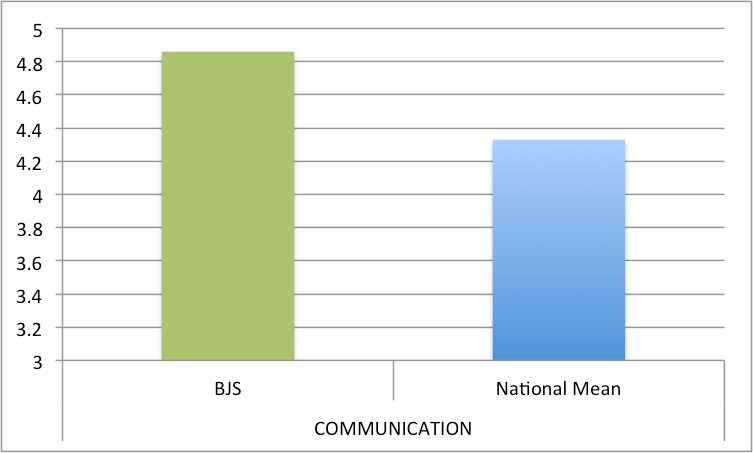
As anyone who has been listening to the podcast or reading this blog for a while knows, I'm a big fan of Remind for keeping in touch with students.

One of its strong points is that it is almost entirely a one-way communication channel from you to your students, with the exception of those students who have downloaded the Remind App and who respond with a thumbs up, or a question mark.

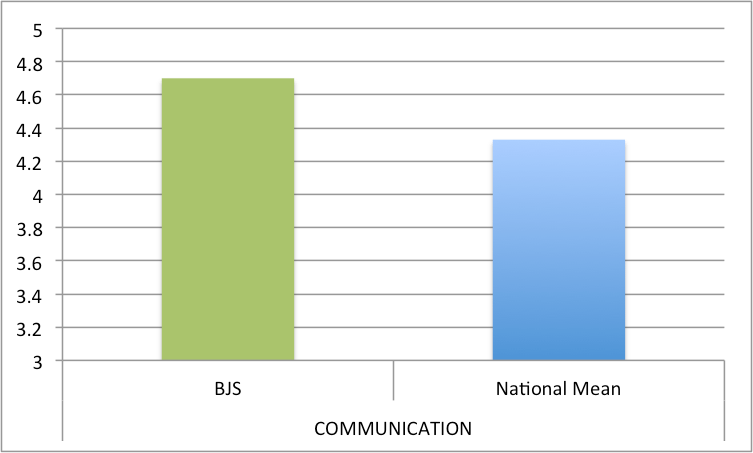
COMMUNICATION

I was so inspired by Bethany Usher in episode 27 to get my students doing some research and/or service learning projects.

I decided that my business ethics students are a good group to try something new out with this semester, since they are juniors and seniors and I know almost all of them from prior classes. However, having a good communication tool is paramount for something like this.

While we are still using Remind for messages that only need to come from me, we have decided to try out Slack.

What is Slack?

Slack is a cloud-based tool that is aspiring to take the place of email and keeps communication all in one place.

slack1It is somewhat like a chat board, but easily lets you attach files, include images, and categorize your talk around what they call channels. If you want to hear how a sandwich company uses Slack, you can check out their promotional video.

Our class now has the two channels that Slack sets up by default (#general and #random) and I also set up a channel for them to begin brainstorming their research and service learning projects.

Once a group determines what their project is going to be, I set up a channel for the group. That way, students only have to be engaged in conversations that are relevant to their work in the class, but I can check in to monitor their progress and make suggestions along the way.

Another powerful aspect of Slack is its ability to integrate with other services many of us use. I've already set it up with Dropbox and that's working seamlessly.

A couple of the students in the class are going to be planning our ethics competition event for the end of the semester. They will be using Slack for chats, but the project management piece will be taken care of by the online project planning site Asana, which fortunately integrates with Slack, too.

Besides my business ethics class, I also have my teaching assistant on both Slack and Asana. She says she likes how Slack organizes our messages by channel (as opposed to if we just texted to each other). I especially like how I can track when stuff gets done, through the Asana integration.

[reminder]Are you trying out any new communication tools this semester?[/reminder]

Filed Under: Educational Technology Tagged With: communication, edtech

  • « Go to Previous Page
  • Page 1
  • Interim pages omitted …
  • Page 46
  • Page 47
  • Page 48
  • Page 49
  • Page 50
  • Interim pages omitted …
  • Page 69
  • Go to Next Page »

TOOLS

  • Blog
  • Podcast
  • Community
  • Weekly Update

RESOURCES

  • Recommendations
  • EdTech Essentials Guide
  • The Productive Online Professor
  • How to Listen to Podcasts

Subscribe to Podcast

Apple PodcastsSpotifyAndroidby EmailRSSMore Subscribe Options

ABOUT

  • Bonni Stachowiak
  • Speaking + Workshops
  • Podcast FAQs
  • Media Kit
  • Lilly Conferences Partnership

CONTACT

  • Get in Touch
  • Support the Podcast
  • Sponsorship
  • Privacy Policy

CONNECT

  • LinkedIn
  • Instagram
  • RSS

CC BY-NC-SA 4.0 Teaching in Higher Ed | Designed by Anchored Design