Our university switched over to online course evaluations this semester.
The good news is that the system they decided to use integrates with our learning management system (Canvas). They were able to set up reminders for students to complete the evaluations that were irritating enough to get them to complete them. All seemed to go smoothly on the students' end of things, in terms of collecting the desired data.
I received a 93% response rate on the evaluations, making them essentially comparable to when we were doing paper evaluations in past semesters.
What I consider to be the bad news is that we weren't informed about how we would be evaluated on our teaching, prior to the evaluations being distributed to our students in our LMS.
When we moved off of our old system, we were no longer allowed to use our provider's proprietary set of course evaluation questions. New questions were developed by our institution, but word never went out as to what questions our students would be asked about their learning experience.
My 2016 Fall Experiments
I've taught introduction to business for 12 years now. However, it seems like every semester is at least somewhat different. This semester, I experimented in two ways:
- Incorporated a bit of public sphere pedagogy (though the stories shared by Thia Wolf on the podcast still have me realizing I've only just scratched the surface)
- Tested more often and lowered the stakes on exams (inspired in part by James Lang‘s book, Small Teaching)
Public Sphere Pedagogy
This semester, I decided to take inspiration from Shark Tank and have business professionals come in as judges for the student's business plan presentations. The judge's role was to indicate how much confidence they would have in investing in the various business ideas that were shared.
Inviting people who haven't yet established relationships with the students was a very important part of the process. It seemed to cause the students to take their presentations more seriously than they might otherwise have… What the guests said carried more weight, since there was no way that having already known them would have impacted their perceptions of this final part of the course.
I can't recommend highly enough, incorporating some type of public sphere pedagogy into your course design. Doug McKee recently shared about the success of his poster sessions event for his applied econometrics class at Cornel. If nothing else, as he shares, your students will probably have a bit more fun.
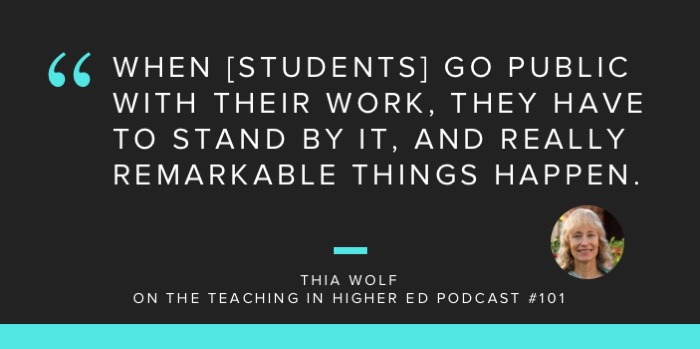
Thia was so right when she said:
When [students] go public with their work, they have to stand by it, and really remarkable things happen.” – Thia Wolf
Testing Frequency and Stakes
Previously, when I taught introduction to business, there have been three exams. In total, the exams were worth 45% of the students' grades. Doing poorly on any one exam could potentially bring a student's grade down in the class an entire letter grade.
This semester, I decided to increase the frequency of exams and also add the ability for students to drop their lowest exam grade. The nice part about this process is that our learning management system (Canvas) has a feature built in that meant that throughout the semester, students could see that their lowest exam score was being dropped and they were even able to enter in what-if scenarios for what the mathematical results would be, if they attained certain scores on upcoming exams.
I added an exam in a format I've started calling the “not-so-final final exam.” Students are provided an overview of all the topics in the class, in the form of pencasts (video lectures with me drawing and them hearing my voice), quizzes, and assigned reading.
Those students who earned over 90% on the not-so-final final exam were allowed to skip taking the final exam and use that score as their final exam grade. As you might imagine, this was hugely motivational for some of the top students. 10% of the students were able to attain this grade and skip the final.
After the not-so-final final, students had three, regular exams, and one comprehensive final exam. When the judges for the business plan presentations were determining who the business(es) were that they were going to fictitiously invest in, I spoke to the students about their experiences with the revised exam format for this semester.
100% of the students indicated in our dialogue that they would prefer to take more exams, with the ability to have their lowest exam score graded. I was extremely pleased with this part of my semester's experiments and plan on incorporating this methodology in all future courses that involve exams.
2016 Fall Course Evaluations
Reading my course evaluations was quite edifying this semester. I received high scores on the questions that asked whether or not I explained the course requirements, was prepared to teach each class session, and that I used class time effectively.
I'm not going to go too much into particulars, but there was clearly a single student who was unhappy with the class and me as a professor. Whenever this happens, I work hard to remember that there were 29 others who had very positive things to report. Also, I attempt not to predict who it might have been who responded in that way. Nonetheless, I'm human, and sometimes I get discouraged, or I try to unravel the mystery of who it was…
I had someone recommend that I keep an encouragement folder with notes, emails, and letters from students to revisit, when I need a little boost. This time, it wasn't necessary for me to pull the encouragement folder out, but I mention it to you, in case you want to start depositing items like this into a folder, for the times when you'll be in need of affirmation.

It was nice to see that 100% of the students found that I was responsive to questions, was available for help outside of class, and that I graded assignments in a timely manner.
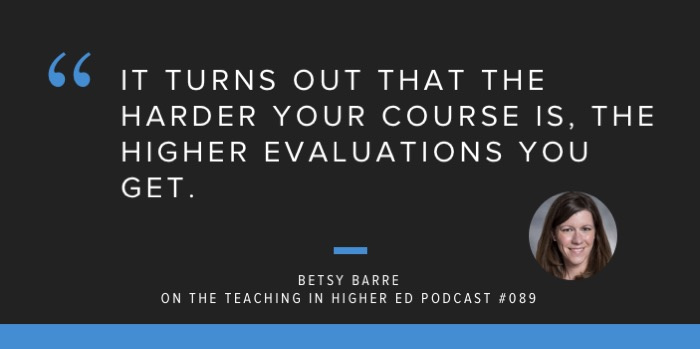
One of the evaluation questions that I typically skip to, when I first start reviewing them is the one regarding the difficulty of the course. As Betsy Barry shared on episode #089 of the Teaching in Higher Ed podcast:
It turns out that the harder your course is, the higher your evaluations will be…” – Betsy Barry
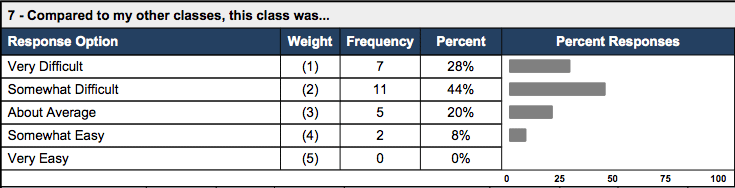
As I look at the students feedback about the difficulty of this course, I'm trying hard not to try to figure out who the two students might be who found the course somewhat easy. I was pleased that the majority of the students found it challenging, though.
I got to know the students who earned A grades fairly well in this class and all of them reported that it was difficult for them. I met with them often during the semester, as they worked to achieve good results on upcoming exams and assignments. Their hard work paid off… So, perhaps there were a couple of students who weren't aiming for an A, but thought that if they had put more effort in, they would have been able to “easily” achieve a higher grade.
Here I go, trying to figure out who responded in what way, when I'm not sure that's particularly helpful. Sigh. This is the quantitative feedback about the perceived difficulty level.
Edifying Feedback
As I finish this post, here are some comments I'll be saving in my encouragement file, for those times when I need to “get back up, again.”
How would you describe the effectiveness of the teaching activities for this particular course:
Holy cow, Dr. B could pack so much fun into such a short 50 minutes class. I learned so much about business, life and my faith through her expressive, personal, and hilarious personality. I loved every minute of this class, and as a non-major, graduating senior, I am beyond thankful that I took this class. I loved it.”
Every teaching activity inside and outside of class has really challenged me as a student and helped me learn in a way in which I never have before. My business professor, Dr. Stachowiak, is the best teacher I have ever had in my life, and I'm excited to take the skills I've learned in this course with me in life!”
This class changed my life. This was my first business class and yes it was a lot more work than my other classes, but I learned the most in this class. There are many things I can say that have helped me this semester. Outside of class she assigned us required reading and we had to take online quizzes for those chapters. A lot of work because it required you to read a few chapters then take a couple test all on the same time, but it forced me to read and be prepared for upcoming class. So the knowledge that I read, her teaching and discussions in class added to the knowledge I already knew. It was so helpful throughout the semester. I never felt like I was drowning with so much informations, she knew exactly what she as doing and how to prepare us for the best.”
Do you have any feedback and/or suggestions that might make this class more effective in the future?
I wish that every vanguard student could take this as a general education class. It is so helpful to know just some of the basics of business no matter where you end up in your career you will have a boss or be a boss and this gives you such a great taste of what business is all about. Dr. B is an incredible human and I am beyond thankful for the amount of time she took to know everyones name, speak into our individual gifts and abilities, and teach our class with care, concern and absolute joy that radiate from everything she does.”
Dr. Stachowiak has an amazing personality and made going to class enjoyable. Her teaching was very effective the way it is.”
Negative Feedback
As I indicated earlier, there was clearly one student who was unhappy with the course, in general, and with me, as the professor. I received some negative, qualitative feedback, along with the positive comments.
She should right down the notes instead of posting them online and expect us to know it all and what it means.”
NEED TO TAKE NOTES IN CLASS NOT ONLINE AND LEARN THEM ON YOUR OWN!”
I usually like to take any negative feedback that's been provided and think through some action steps I could perform to make the learning experience better for future students. However, in this case, it was difficult to know what this student meant by ‘notes,' since I don't really have ‘notes,' per se, that I post online, or provide in class.
The best I can take away from these comments is that perhaps this student felt a disconnect between what was happening in the classroom and what was done online (this class is in a blended format). I am constantly working to have communication channels that connect our in-class experiences with the online ones. That is likely something that I'll never feel like I have 100% right, but I'll never stop trying.
Also, I'm reminded of how Stephen Brookfield has shared how difficult it can be to teach. While this set of evaluations leave me feeling like we had a successful Fall of 2016, I never want to have even one person feel like they weren't provided with the help that they needed.
And so, we keep on working to facilitate learning more effectively for our students… And try to keep a sense of humor.