• Skip to primary navigation
  • Skip to main content
  • Skip to footer

Teaching in Higher Ed

  • Podcast
  • Blog
  • SPEAKING
  • Media
  • Recommendations
  • About
  • Contact

How to keep course files organized

By Bonni Stachowiak | December 16, 2014 | | XFacebookLinkedInEmail

I never realized that I was “different” until my friend showed such an interest in how I organized my files and folders for my academic life.

keep-course-files-organized

My Mom was always a person with a fond appreciation for file cabinets and keeping articles of interest around various topics. She definitely passed that on to me.

Now, neither of us wants that many physical files cluttering up our home. However, since storage space on our hard drives and/or in the cloud is relatively inexpensive today, it makes sense to hang on to stuff, in case it winds up being useful in the future.

The search features on computers today are so robust, that you could argue that having a good folder structure is no longer necessary. Some time ago, I trimmed the number of folders in my email program, so that I didn't have to scroll through so many when I was looking for something via my iPhone.

However, I still find it helpful to have a basic system of folders on both email and on my hard drive to accommodate those times when search doesn't get me what I need.

Keep course files organized

In any given semester, there are two main directories (folders) that I spend most of my digital time in:

Screen Shot 2014-12-12 at 12.29.11 PM 1) Semester-specific folder

This folder contains data related to a specific semester. For 2015s, I have my class rosters (which are also sign-in sheets), my schedule (which gets printed and hung up outside my office), and a folder for students' work in each of my classes that semester.
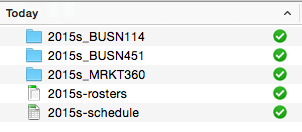
Screen Shot 2014-12-12 at 12.29.32 PM

In addition to the schedule that hangs on my wall, I create my version of Michael Hyatt's ideal week template. This exercise enables me to see how I want to invest my time throughout the semester and identify any barriers, in advance.

I spoke about how I use the ideal week template on episode 23 of the Teaching in Higher Ed podcast.

Inside each of the semester-class folders will be the students' work, as the semester gets under way.

As I begin a new semester, I move the previous semester's folder into a directory named z-Archive. The naming convention on that folder allows for it to be listed at the bottom of my main university folder, since I don't need to access it often.

I use Dropbox for almost all my files now. They now offer 1 terabyte of data on their pro plan, so it makes good sense to invest in the service. I appreciate how I can create a link to a file with a right mouse click and choosing “share dropbox link.”

When you move a folder (to an archive folder, for example), any links that you provided to students for feedback are then broken. That's why I wait until a few weeks into a new semester prior to moving/archiving the folder.

Screen Shot 2014-12-12 at 12.46.32 PM 2) Course content folder

This folder has directories for each of the classes I have taught previously. The PowerPoints, exams, and other class resources are kept in the folders. The publisher materials also go here, though I tend not to keep archives, since much of the information is redundant and some of the files are quite large.
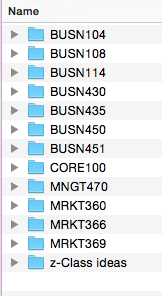
Screen Shot 2014-12-12 at 12.39.53 PMNote that the name of the courses folder begins with a 1-. Since I spend so much time in the semester-specific folder and the courses folder during a given semester, it helps to have them appear toward the top of the list of items, so I can get to them quickly.

Within the 1-courses folder is also a folder called z-Class ideas. This has course descriptions for electives that I have proposed previously, as well as class resources for courses that I was potentially going to teach down the road and needed a place to hang on to such materials.

Other tips

When people have asked me for guidance on file organization in the past, they have often shown me their current structure (or lack of it). It is hard for me not to turn in to a major back-seat driver in these cases, as they often show themselves to be working far harder than they need to…

Here are a few other suggestions for keeping your class resources organized:
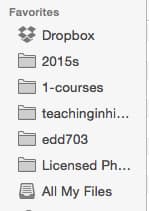
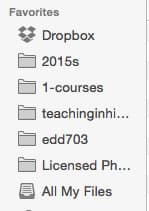
Screen Shot 2014-12-12 at 2.01.19 PMUse aliases or favorites

On the Mac, there's a favorites list over on the left-hand side of each finder window. I keep my most commonly used folders there, including my semester-specific and course-content folders.

On the PC, you might consider using aliases, which let you create a link that takes you to the folder, which you can then place wherever you want to have easy access.

Avoid punctuation in file names

It pains me when I see a file name like: assignment.smith.final.pptx

Punctuation was never meant to be any part of a file name. While some operating systems allow for punctuation better than they previously did, it still isn't a good idea. Somewhere down the line, your file could encounter a system that doesn't like punctuation in file names and you may not necessarily catch why the error is occurring right away.

Direct students on what to name their files

It can be a big help if the students are told what to name the files that they submit for your courses. Yes, they may forget, and you will still need to tweak some of them. However, most of them will remember and it will save you that much more time in your grading process.

[reminder]What techniques do you use to keep your course files organized?[/reminder]
Filed Under: Productivity Tagged With: organization, productivity

Bringing life to this time of the semester

By Bonni Stachowiak | December 9, 2014 | | XFacebookLinkedInEmail

It is a tough time of the semester. The grading pile is stacked high (in my case, virtually). Energy levels are low (my whole family just spent the last few weeks passing an illness to each person who lives in our home).

Bringing life to this time of the semester

While this is not my favorite time of the year, I do have a few techniques I use to bring a little life into my days and to keep myself plugging along.

Take regular breaks

While I don't typically adhere to a strict Pomodoro technique, I do try to remember to take a break every hour. My wrists are really bad, too, so I incorporate stretching in as often as I can into those breaks.

Use music for inspiration

NPR is a great source for finding music for every desired mood. If you need a reminder to avoid worry, Playing for Change has this great version of Don't Worry Be Happy.

If you need a good laugh, Weird Al Yankovic has a great grammar-related spoof called Word Crimes that is perfect for all the grading we're doing this time of year.

Track your progress

Sometimes it can seem like we aren't getting anywhere. I follow my Mom's advice from when I was a kid and would get overwhelmed. She recommended that I create (or revisit) a list of everything that needed to get done. Then, I could prioritize the most important item on the list and get moving toward done.

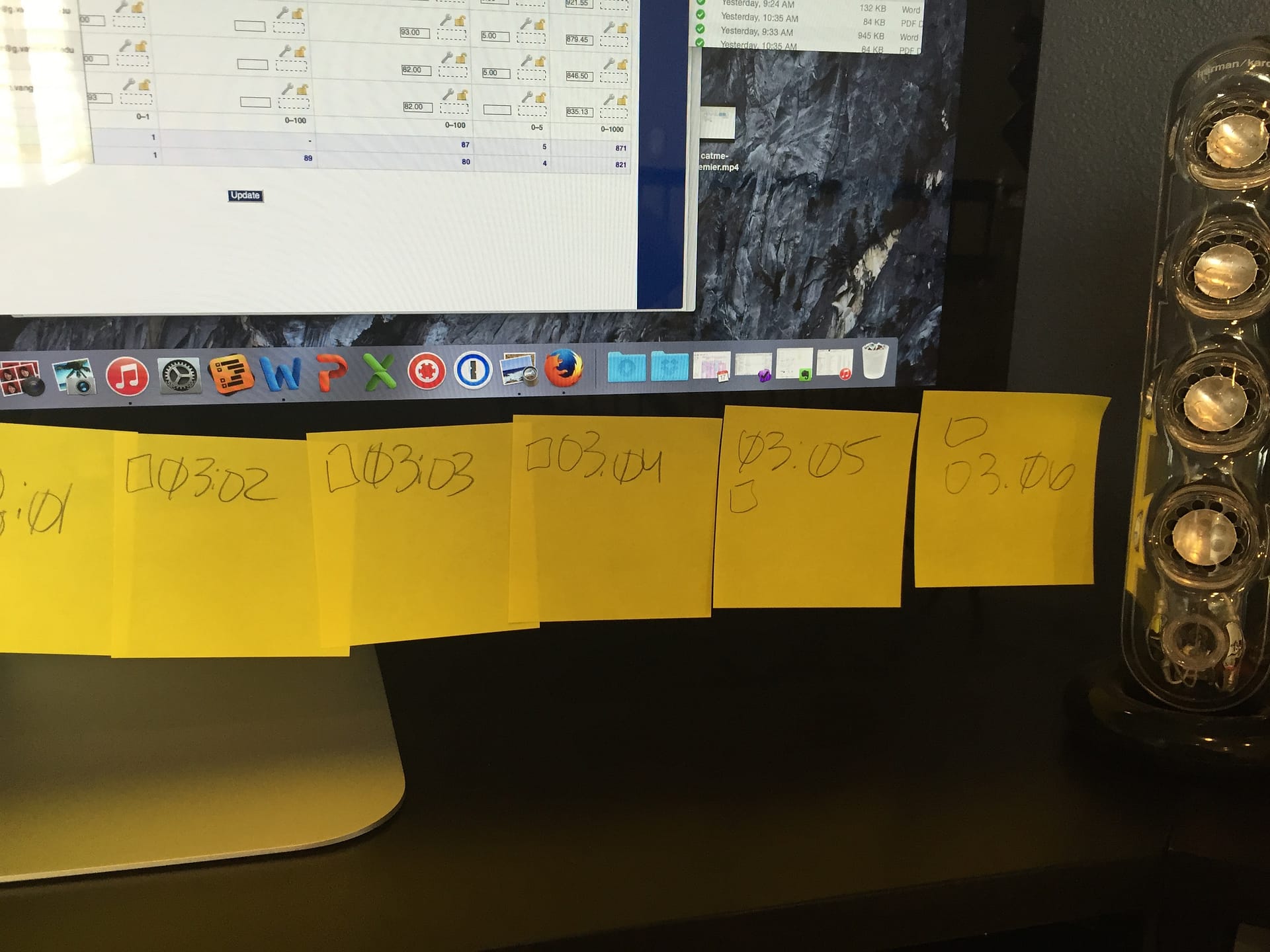
stickiesI use OmniFocus for tracking all my tasks, which really helps me feel like things won't slip through the cracks during the busier seasons (or, at least I'll know that they have been missed, if I am not able to get to everything). I also like to break tasks like “grade business plans” down into even smaller tasks and have a visual reminder on my monitor of how much further I have to go.

Each time I finish grading a business plan, I remove the sticky note from the bottom of my monitor. That process gives me a visual indication of just how far I've come and how much there is left to grade on that particular piece of the virtual pile.

Establish a reward

Walter Mischel, the researcher responsible for developing the marshmallow test, reminds us of the importance of self-discipline and delayed gratification.

I find that when the temptation to stop what I'm working on and to “eat” my marshmallow early starts to crop up, it helps to have already considered what reward I will give myself when I've accomplished the end-of-semester tasks.

As geeky as this is, I think for me it is going to be to dive in to watching videos on how to learn OmniFocus better and also to start playing with the CATME tool, introduced to us by Dr. Chrissy Spencer in episode 25.

[reminder]What will you reward yourself with, once you're done with the grading and all the other end-of-semester tasks? [/reminder]

Filed Under: Productivity Tagged With: productivity

Plugging in to Teaching in Higher Ed

By Bonni Stachowiak | November 18, 2014 | | XFacebookLinkedInEmail

A few episodes ago, I recommended the podcast called Serial.

It is the first podcast that I have heard described as one you're going to want to binge-watch. The good news is that there haven't been that many episodes released yet, so you have plenty of time to catch up with the rest of us obsessed fans.

Lest you think that there's no practical value to listening as a professor, there are plenty of lessons in there about effective storytelling.

TOP-5

If you are just checking out the Teaching in Higher Ed podcast and blog, you won't likely experience quite as much suspense as you will if you listen to Serial. However, we have had some great guests agree to come on the show and share their wisdom.

Top five podcast episodes

  1. Role immersion games in the higher ed classroom with Dr. Marc Carnes (author of Minds on Fire)
  2. How to move a course online and other community questions with cohosts Bonni & Dave Stachowiak
  3. How to get students to participate in discussion with Dr. Stephen Brookfield
  4. Back to school episode with Dr. Sandie Morgan
  5. How technology is changing education with Audrey Watters

Five essential blog posts

While the following blog posts aren't necessarily ranked via objective criteria, such as hits, they stand out as essential reads to those looking to better their teaching:

  1. Creating measurable learning objectives
  2. Cultivating character
  3. Stop yourself from becoming a digital hoarder
  4. Shaping first impressions in the college classroom
  5. The dangers of making assumptions as educators

If you have just joined the community, the resources listed above are a great place to start. I hope you'll join the conversation happening in the comments section of each episode and blog post.

Filed Under: Resources

Help students answer the dreaded career question

By Bonni Stachowiak | November 11, 2014 | | XFacebookLinkedInEmail

Dreaded career questionAdvising season just ended at our institution.

We are fortunate in that we have a dedicated advisor for our major, so I don't wind up investing too much time in the process of helping students map out their classes.

Conversations during these two weeks tend to focus on careers and the selection of a major.

Students often have stress around this process because they don't know what they want to do. This lack of vocational clarity is a source of concern, despite the number of times we stress that most people don't wind up doing what they majored in during college.

One question I've started asking students is:

What are times that you have felt the most alive in the last few weeks?

My intention is to help them identify times that they have been in a state of what Mihaly Csikszentmihalyi calls flow. He coined the term and describes it as:

…being completely involved in an activity for its own sake. The ego falls away. Time flies. Every action, movement, and thought follows inevitably from the previous one, like playing jazz. Your whole being is involved, and you're using your skills to the utmost.

Csikszentmihalyi's book Flow was recommended by Dr. James Lang on episode 19 of the Teaching in Higher Ed podcast.

LifeHacker has some other good advice for students on how to discover their career path. There are even some who are trying to make finding a career more like playing a video game.

The other area I strive to get students thinking about is developing competencies versus identifying specific desired jobs.

One resource is the labor department's o*net website. They map specific jobs to the skills that are needed to perform well in that type of a role. They also identify what kinds of experience and education people typically have in a given position.

There's also something to be said for learning how to cultivate one's own happiness. For this quest, we can turn to quite a young source. Logan LaPlante is 13 years old and says he wants to be happy when he grows. up.

All of these questions can be tough and I don't pretend to have any easy answers. Even this New York Times best selling author was unable to get a job at The Container Store, despite her love for organization and excitement at the prospect of greeting others with a similar passion (and her desperate need for health benefits, as she fights breast cancer).

Instead of having the answers, maybe our job is to ask more questions?

[reminder]How do you help your students answer the question of what they're going to do after college?[/reminder]

Filed Under: Resources Tagged With: advising, career

Cultivate curiosity in higher ed students

By Bonni Stachowiak | November 4, 2014 | | XFacebookLinkedInEmail

CURIOSITY

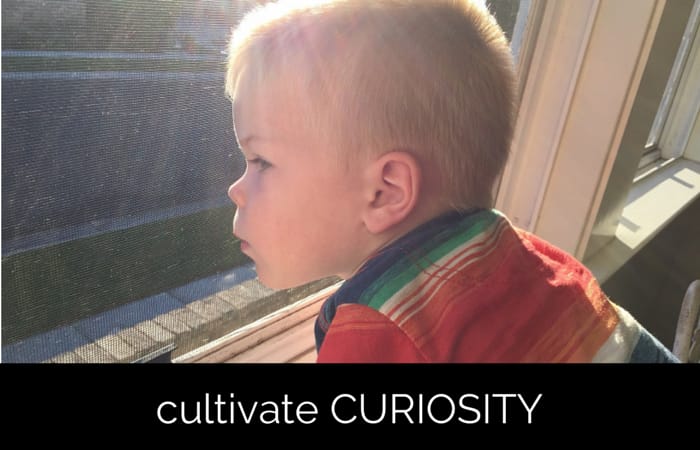
Our son has a new habit. He points at something he hasn't seen before and says, “Whaaaaaaaassssshhaaaatttt?”

For many parents, I know this stage is frustrating. I also recognize that there may well come a time when I'm not amused by it, either.

However, I'm delighted by it now. It's interesting to see what captures his attention and what things are new to him. The whole experience also makes me wish I could bottle his curiosity and administer it, when needed, in the higher ed classroom.

Dr. Mark Carnes joined me for the most recent episode of the Teaching in Higher Ed podcast (episode 21). He described how the role playing immersion game, Reacting to the Past, is transforming the way students engage in the college classroom. In Minds on Fire, his book on the same subject, he talks about his early experiences having students play one of the games.

He describes:

Never had students been so engaged and in such a weird way.

Someone piped up, ‘does anyone realize that class was supposed to end seven minutes ago?'

…We had lost track of ourselves.

Carnes seems to be describing students who are in what Mihaly Csikszentmihalyi calls being in a state of flow. Their curiosity is heightened and they're thinking critically about the class content.

Carnes has found a way to bottle the adventurous nature of a toddler and sparked the curiosity of his college students.

Not all of us will be able to use a Reacting to the Past curriculum for a particular class. However, there are steps we can take to cultivate curiosity in our classes.

Direct students solve a problem

Probably the most influential person on my teaching throughout my career has been Dr. M. David Merrill, Professor Emeritus from Utah State University.

I used to work for a computer training company. We hired Dr. Merrill to do some consulting for us. I remember how vividly he altered my view of teaching.

At the time, I thought I was teaching computer application skills. What I realized was that I was getting people to follow a series of steps that I prescribed and only assessing them on their ability to do what I instructed.

Throughout Dr. Merrill's career, he has emphasized the importance of having learners engaged in solving problems. I'm only skimming the surface of Merrill's principles of instruction here.

Our classes in higher education will promote greater learning opportunities if we direct students to solve a problem and not simply get them to regurgitate facts.

Instruct students to give advice to people (or characters) involved in the situation

I've previously recommended using the podcast Planet Money in teaching about business. One of the most interactive sessions I typically see in my introduction to business students is when I ask them to recommend a solution to the currency problem experienced in Brazil's history.

I play the episode up until the point when they have described the challenges with an unstable currency and how difficult that point in Brazil's history was for them. Then, I press the pause button and ask them how they would recommend that they solve the currency problem.

Resist the temptation to be a know it all

If students perceive that we already know everything there is to know on a topic, we can inadvertently diminish their curiosity about a topic.

The other day, I brought in an example from the NBA for my introduction to business class. There's a running joke about my lack of sports knowledge in just about all of my classes. One student had lamented that I use Apple in my examples too often and he was hoping for more sports.

After receiving his feedback, I changed an entire section of my module introducing various promotion strategies that companies use to be centered around the NBA's promotional efforts.

I shared about a website that the NBA had set up in 2010 to use direct marketing to appeal to Hispanics. Candidly, I admitted that I wasn't sure what had become of the website, or what more current efforts they were putting in to attracting Hispanic fans. It was the best example I had found when I was putting it together late the prior evening.

My lack of knowledge opened the door for sports fans in the class to share their knowledge. One student talked about how players will wear special jerseys to culminate their Latin nights celebrations. Other students piped in with their examples and a few asked questions to extend the scenario a bit further.

If I hadn't resisted the temptation try to know it all, the students have missed the opportunity to apply their newfound knowledge to a topic they are passionate about.

[reminder] How do you cultivate curiosity with your students?[/reminder]

Filed Under: Teaching Tagged With: curiosity, teaching

  • « Go to Previous Page
  • Page 1
  • Interim pages omitted …
  • Page 49
  • Page 50
  • Page 51
  • Page 52
  • Page 53
  • Interim pages omitted …
  • Page 70
  • Go to Next Page »

TOOLS

  • Blog
  • Podcast
  • Community
  • Weekly Update

RESOURCES

  • Recommendations
  • EdTech Essentials Guide
  • The Productive Online Professor
  • How to Listen to Podcasts

Subscribe to Podcast

Apple PodcastsSpotifyAndroidby EmailRSSMore Subscribe Options

ABOUT

  • Bonni Stachowiak
  • Speaking + Workshops
  • Podcast FAQs
  • Media Kit
  • Lilly Conferences Partnership

CONTACT

  • Get in Touch
  • Support the Podcast
  • Sponsorship
  • Privacy Policy

CONNECT

  • LinkedIn
  • Instagram
  • RSS

CC BY-NC-SA 4.0 Teaching in Higher Ed | Designed by Anchored Design