• Skip to primary navigation
  • Skip to main content
  • Skip to footer

Teaching in Higher Ed

  • Podcast
  • Blog
  • SPEAKING
  • Media
  • Recommendations
  • About
  • Contact

Productivity

Leveraging the Benefits of a Current Projects List

By Bonni Stachowiak | November 14, 2017 | | XFacebookLinkedInEmail

current projects list

Our university is embarking on a prioritization initiative, based off of Dickeson’s (2010) Prioritizing Academic Programs and Services: Reallocating Resources to Achieve Strategic Balance. For those who have not participated in an undertaking like this, to say it is time-intensive would be an understatement…

I have been asked to be a part of the team that evaluates the administrative programs and services. While I will confess to being a bit disappointed to see some of the priorities I have been working on be put on the back burner for a season, I am pleased to be collaborating with such a competent and dedicated group of people.

Importance of a Current Projects List

As we begin this process, I am more thankful than usual that I have a continually updated list of projects that I am working on. In Getting Things Done (2015), Allen considers a project anything that takes more than one action to bring about a desired outcome.

Here are just a few of the reasons I have found that a current projects list can be useful:

  • An unexpected commitment (like my recent involvement with the prioritization initiative at my institution) can be viewed in context with other projects
  • When formulating goals, projects can be used as a starting point for reflecting on desired outcomes (Robert Talbert’s post on The Trimesterly Review is worth referencing regarding goal setting, as well)
  • The weekly review can be enhanced by having a current list of projects, or even to nudge us in realizing that our list is out of date (Reference Robert Talbert’s post on planning)
  • Each project can be brought that much closer to reaching the desired outcome by reflecting on what the next action is to get it to that point

It really makes a tremendous different to have a list of projects that is always being worked on to remain current.
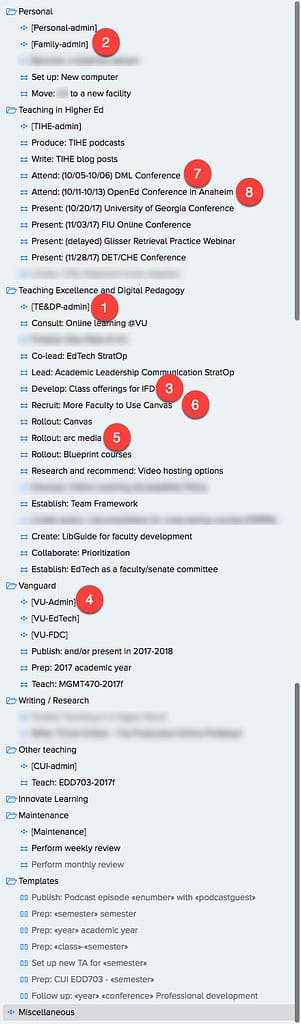
Current projects list
The numbers on this current projects list correspond with the numbers in the written text (#)

Structure of the Current Projects List

I use a Mac app called OmniFocus for my project and task management. It is a good tool for those people who really want to dig into the possibilities for what a task manager can do, but not for those who do not enjoy that kind of exploration.

As you will see from my current projects list, I have two types of lists I keep:

Admin lists (1): Those tasks that only have one step to complete and are associated with the various roles I play in my life (mother, professor, Director of Teaching Excellence and Digital Pedagogy, etc.)

An example of a task I would put on my family-admin (2) task list would be to set a doctor’s appointment for our daughter. Please pause for a moment while my husband laughs out loud, since he is unable to remember a time when I have ever done that. Let’s just say he is the one who typically makes appointments like that for our kids, but I was working on an easy example of what goes on admin lists.

Project lists (3): Anything that requires more than one step to complete ideally becomes a project.

My family member with dementia now needs to be transitioned over to a new facility, since she has faced a significant health decline this past month. At first, I needed to make contact with the placement person who helped us the last time around went in my Family-admin (2) list. However, as I realized that we would need to (at a bare minimum):

  • Contact the placement person
  • Receive recommendations of possible facilities
  • Schedule tours of facilities
  • Decide on a place and put down a deposit
  • Give 30 days notice at the current facility
  • Pack her things
  • Arrange for disposal or donation of items not moving to the new place

You get the idea (and now, so do I, since I had not yet started to write some of this stuff down). All of those tasks being listed under the general Family-admin (2) list would have started to get bogged down in there, mixed in with a bunch of other unrelated tasks.

OmniFocus does allow me to assign contexts to each task, so that all the calls that I need to make come up in a single list, even if they are otherwise unrelated. If I went to my @phone context, it shows me every task that can only be completed if I have a phone with me and am in a place where I can use it.

Projects can also be deferred (put off) until a future date in OmniFocus. The list of projects you see in the image are not reflective of all the projects I have identified. In fact, I know that with the addition of the prioritization work to my responsibilities, I need to go in and refine my current list of projects to have them represent ones I can realistically move forward in some way in the next 3-4 months.

Tips for Making a Current Projects List Most Useful

When creating a list of current projects, it can be helpful to structure them in such a way as to be able to quickly discern the kind of list being referenced and the desired outcome.

To that end, the following are tips for making your current projects list most useful:

  • Name [admin lists] (single item tasks) (4) with square brackets, in order to quickly distinguish them from multi-step projects.
  • Start all other project names with the verb that best describe your desired outcome for that item.

I have a project called Rollout: arc media (5). Once arc media is introduced to our faculty, they have had training on it, and we have transitioned over to regular maintenance and help desk support, we will have successfully rolled it out and this project will be marked complete.

Recruit: More faculty to use Canvas (6) – is a project that aims to have 95% of our faculty using Canvas in their classes. Once we achieve that aim, the project will be checked off.

  • Keep projects on the list until every task associated with them has reached completion.

I recently attended the Digital Media and Learning (DML) (7) and OpenEd2017 (8) conferences. While the “attending” part of the project is over (which was my main goal for the project), I am still waiting to be reimbursed for the registration fees and other expenses. Once I receive those checks, each of these projects will be considered done.

  • Include dates for items that have firm completion dates in parenthesis.

I did quite a bit of keynote speaking and workshop facilitation this Fall. Some of the events have already been marked as complete and do not show up on this current list of projects. As I was preparing for the talks and otherwise engaging with collaborators, it started to get really confusing as to when different conferences were taking place.

While the events were entered in my calendar, I then had to switch over to my calendar each time I was looking at dates for each of the tasks associated with these events. It made it much easier once I included all the dates in with the conferences and rearranged them in chronological order.

Get Started

If you do not have a current list of projects, but would like to experience some of the benefits described above, just start. Spend some time getting a list of projects together that you are aware of and reference it regularly over the next week or two, as you discover more multi-step projects that you are responsible for. Reflect on what the end goal is for each of the projects and name them using a verb that represents that desired outcome.

Your Turn

How do you manage your projects and tasks? What tools do you find most useful in these endeavors?

Filed Under: Productivity

The Trouble with Summer

By Bonni Stachowiak | May 16, 2017 | | XFacebookLinkedInEmail

We finished our Spring semester a little over a week ago.  Graduation came and went… We had our final, full faculty meeting of the academic year. Grades were submitted.

Summer is Here (Sort of)

My mind and body haven't made the shift over to summertime yet. Part of that is because I still have some work-related commitments to attend to… An academic retreat, some departmental hiring decisions meetings, and participation in a visit from an external reviewer.

Part of my not being entirely sure what season I'm in is because it can be difficult to shift into an entirely new way of working.

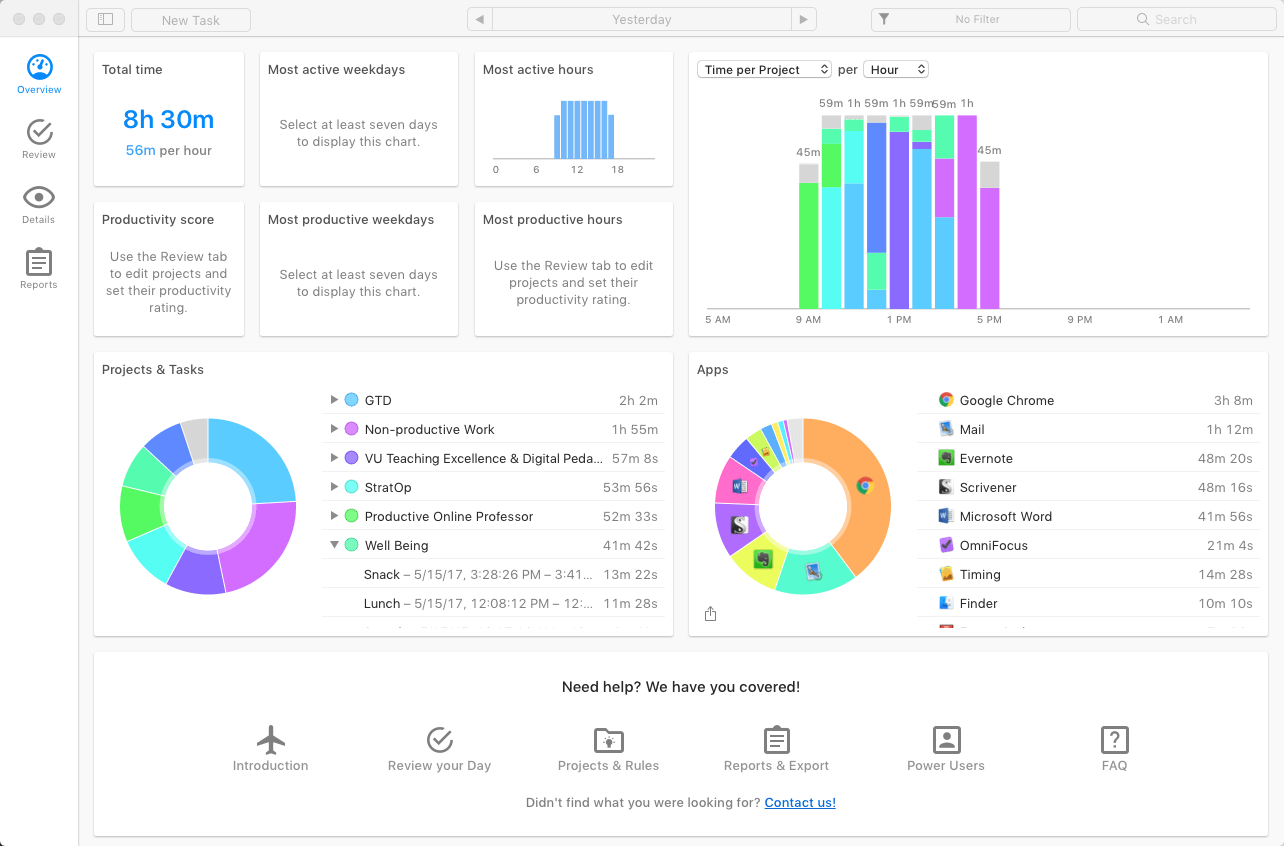
I'm writing a book this summer. My time is being steered by Pacemaker, a writing word-count web service, as well as a time tracker called Timing that watches what I do on the computer (and even when I leave the computer's side) and asks me to account for that time. But, I haven't quite gotten in a groove yet that has me at my most productive. I find myself looking at clutter that didn't bother me during the academic year, but has me convinced that I ought to overhaul our pantry, or perhaps re-organize my entire home office.

Timing App gives an overview of how my time is spent on and off the computer.

By no means am I complaining. I find such joy in teaching and am already missing the pace of the semester. Sometimes.

After bawling through John Warner's post on his “Last” Class in The Chronicle, I was all that much more aware of the joy that I find in having a tenured position at a university. It wasn't like John just gave up all of the sudden, but has chronicled his difficulties in the past. It was strange to experience that kind of sadness over someone whose class I never sat in, or ever even met.

Another recent post that brought me to tears was Sean Michael Morris' writing about what his Dad taught him about teaching. He writes:

To teach, we must believe in the potential of each person in the room. Unwaveringly. This is not to say we don’t get to have our bad days, our off days, the days when we really can’t stand to talk to another student or plan another lesson. But it does mean that we teach for a reason, and that reason lies in what lies in the heart of a student. What lay in our hearts when we were students. Hope despair melancholy desire passion hunger confusion. All the things it takes to learn to walk. All the things it takes to learn to do anything. All the things it takes to live in Los Angeles, or to love someone who is hard to love.” – Sean Michael Morris

I started reading Stephen Brookfield's book: Becoming a Critically Reflective Teacher. Brookfield asserts that if we commit ourselves to critical reflection, we will receive the following benefits:

  • Align your teaching with desired student outcomes
  • See your practice from new perspectives
  • Engage learners via multiple teaching formats
  • Understand and manage classroom power dynamics
  • Model critical thinking for your students
  • Manage the complex rhythms of diverse classrooms

It wouldn't be a book that I would recommend as a starting point for someone in their first year or two of teaching. However, after 14 years of teaching, and me having read only 20% of the book, I'm already being challenged in important ways.

The other trouble with summer is that there's always so much I want to do that it is easy to become stuck in the thinking of the possibilities phase. I'm still contemplating if I'll open an account on Patreon to try to find supporters of the podcast to cover some of the associated expenses for producing the show (web and podcast hosting, editing and production costs).

There have also been inquiries about transcripts over the years. If I could get enough supporters to cover some of the foundational costs of the podcast, it would be a good time to start including transcripts with each episode. That would only be if there was an expressed need for them that was compelling enough that people would want to give, financially, to support that effort.

I experimented this week with an automated transcription service called Trint that was promising. Here's what the episode #150 text output looks like, after exporting the basic transcript.

The transcripts can also be produced as something richer than plain text. I then used Camtasia to add a graphic of the logo, along with the audio file, together into a single .MP4 file and uploaded it to YouTube. Trint allows you to export a transcript in what is called .SRT format, which is one of the ways to import closed captioning into YouTube. If you view episode #150 on YouTube and click the button to view the CC (closed captioning), you'll see the transcript is included there, and has the correct timing settings without me having to do anything. It was pretty remarkable.

What are your plans for summer, or do you even get to take a break at all during this season?

As a small step, consider taking advantage of this free online subscription to the Washington Post (for those with .edu email addresses). Or, think through some aspects of your digital literacy, using this post from Catherine Cronin. If all that sounds like too much, maybe you just want to do some coloring in Julie Schumacher's Doodling for Academics?

Filed Under: Productivity

How to Manage During a Stressful Season

By Bonni Stachowiak | March 21, 2017 | | XFacebookLinkedInEmail

How to manage during a stressful season

As I share about in episode #145 (which airs on March 23, 2017), things have been more than a little hectic for me in recent weeks.

We're having a bit of a crisis with a family member who is experiencing cognitive decline. I've had some changes at work, but am still committed to my current teaching load for the remainder of the semester. And I've got a new writing opportunity that I'm plugging along on…

In this post, I'll share some tools that are helping me manage during a stressful season.

Reviews

This past Monday, I was having a really tough go of it. One of the people who cares for our children during the week had been unable to come for a couple of days during the prior week, because she was sick. I was unable to play catch up over the weekend, because of needing to attend to some urgent matters with the family member who is having mental health challenges. I arrived at work and felt all the stress of being so far behind on everything.

Initially, I made the mistake of opening my email (like it wasn't bad enough with all the stuff in my mind that I knew needed doing). 40-some odd emails flowed into my inbox and I started scanning the subject lines. My caffeine hit from the iced tea hadn't hit quite yet and I started feeling a bad combination of drowsiness and dread.

Then, I suddenly felt some sense coming to me. I quickly closed my email and opened up my task manger (OmniFocus). In it, I have a prescription of all the things I do each week to review where I stand. David Allen in Getting Things Done calls this the Weekly Review.

  • Read Robert Talbert's post on The Chronicle of Higher Ed on his weekly review process
  • Listen to me describe my weekly review process on Teaching in Higher Ed Episode #64
  • Listen to Robert Talbert and I discuss the weekly review and provide an overview of Getting Things Done on episode #120
  • Read Robert Talbert's post on GTD for Academics: Planning

I felt entirely different, once I had completed my weekly review. There was still a lot to do, I knew, but I was able to discern what most needed my attention that morning and what could wait until later in the day. I was able to capture all the worry I had in my head and translate it into actionable steps that could be attended to at the right time. The weekly review came through for me, once again, and I was ready to teach my class that morning with greater focus and sense of purpose.

Progress Trackers

Since we had missed two days of child care during a week that was supposed to be fairly writing-intensive for me (it was Spring break at our institution), I was behind on my writing project. Thanks to a new tool I had found called Pacemaker, I was able to regroup this week and modify my writing plan to accommodate those missed days.

As you read this post, you can see where I am in meeting my writing goals.

It's a flexible tool, which I've grown to appreciate. I have experienced so many regular reminders of just how many unexpected events can occur in our lives, after we have made the best laid plans. I have Pacemaker configured to avoid having me write on the weekend, to write more words on my non-teaching days, and to keep up a steady pace until I achieve my final word count destination in the summer.

Another tracker I've been enjoying is the Productive app, which I recommended on episode #139 with Stephanie Lancaster. I still only have one habit that I'm tracking: stretching. But, the daily reminder to take some time to stretch has been incredibly helpful in managing my stress levels.

Updates

One positive thing that happened during the last couple of weeks is that my new role was announced at my institution. I'll be serving as our Director of Teaching Excellence and Digital Pedagogy, another topic I share more about on episode #145. It felt good to have concluded the process of recommending the modified role (the job description for the position did not initially have a focus on teaching excellence, but I made a case for coupling that function with the emphasis on technology), being interviewed by a search committee, and negotiating some aspects of the position.

I'm also looking forward to celebrating 150 episodes of the Teaching in Higher Ed podcast in April. Please consider being a part of episode #150, which will be made up entirely of recommendations from the Teaching in Higher Ed community.

  • You can leave a message via this webpage from your computer, or record your own audio recording and send it to me. Your message might sound something like, “Congratulations on 150 episodes, Bonni. I'm recommending ___ today, which I think will help people ______.”

If you've been listening to the show for a while, now, you'll know that these recommendations can be anything. Books, music, movies, slow cookers, technology, or even just a general recommendation about life.

Final Thoughts

As I reflect on this stressful season, two final thoughts come to mind.

First, when things inevitably go wrong, we can decide to fix them, or decide that it just isn't worth it to invest the time. I discovered that last week's email newsletter went out with a boatload of broken links. I was going to resend the email, but didn't want to fill people's inboxes with an additional email.

  • Please consider taking another look at last week's post: Podcast greats for 2017 (this time, with working links)

Finally, when things inevitably go wrong, we can decide to make the best of it. In the case of our kids' care giver calling in sick, I decided that it must be a sign that we were supposed to head to LEGOLAND that day. Instead of spending my entire Spring break trying to play catch up, “life” decided that we were going to get some unplanned adventures out of the whole deal. As you can hopefully tell, we all enjoyed this change of plans.

LEGOLAND visit with kids
Hopefully you can tell from this picture that the kids thought this was a good idea, as well.


Filed Under: Productivity

Sticking with Getting Things Done (GTD)

By Bonni Stachowiak | July 26, 2016 | | XFacebookLinkedInEmail

Depositphotos_38239361_l-2015 2

One of the members of the Teaching in Higher Ed Slack channel shared of her struggles with sticking with the Getting Things Done (GTD) system, after she had read the book. It certainly can be challenging. I thought I would share a few strategies I've used for staying consistent with GTD practices and hope to hear what has worked for you, as well.

First, if you aren’t familiar with Getting Things Done, the following resources are highly recommended:

  • Getting Things Done, by David Allen
  • Getting started with GTD
  • Podcast: Lower your stress with a better approach to capture
  • Podcast: Practical productivity in academia
  • Podcast: What to do before you act on all you’ve captured
  • Podcast: Getting to zero inbox
  • Podcast: The weekly review

Here are a few thoughts about how to better integrate the Getting Things Done methodology into your life and stay with it:

Separate capturing and clarifying from doing

It is easy to fall into this temptation when presented with something that needs doing. We can get distracted from whatever we were in the middle of working on and start trying to do the new thing that now has our attention.

We need a system that every action item (task) goes into, so that we can better identify the most important work we should be doing at any given time.

Take time out to reflect

The busier our schedules get, the more we need time to reflect and review. I have a weekly review and a monthly review that I’m faithful to about 90% of the time.

Those practices help me identify areas where I need a better system, so that the next time I encounter a similar season in life, I am better prepared with tools to help me navigate.

Avoid taking an all-or-nothing approach

David Allen has indicated that it takes a few years to really get in the groove with GTD. That figure seems daunting, until you recognize that we’re hardly ever “perfectly” GTD.

I like has David Allen has grouped the entire GTD system into five distinct areas (http://gettingthingsdone.com/fivesteps/). Consider which area could use the most attention in your own productivity system and determine how to close any gaps that exist to having it work the way you want to see it work.

Ensure you have the necessary tools

Finally, be sure you have the tools you need to properly implement your GTD system. Here are what I consider to be essential tools, along with what I use in each area:

  • Calendar – I use Fantastical 2 on my Mac and the built-in calendar app on my iPhone.
  • Task list – The one I use is over-kill for most people, but in case you’re interested, it is OmniFocus. If you aren’t accustomed to using a task list, a good place to start is Todoist, or Wunderlist.
  • Projects list – My projects list is stored inside my task management system. I review it, regularly, to determine if I have properly identified the various projects that I’m responsible for…
  • Archive – We used to call these filing cabinets. I keep most of my record electronically these days. PDFs and other reference information that I am unlikely to want / need to share with others goes into Evernote. I also have a file/folder system set up in Dropbox that keeps my general course resources separate from students’ work from a specific semester.

What advice do you have for others who are trying to stick with GTD? Are there any essential tools you use that I missed in my list?

Filed Under: Productivity Tagged With: gtd

For when you need a break from your Spring break

By Bonni Stachowiak | March 15, 2016 | | XFacebookLinkedInEmail

FOR WHEN YOU NEED A

It is Spring break at my university, so it is the absolute perfect time to be sick (meant to be read in a voice dripping with sarcasm).

Instead of focusing my writing this week on approaches to help us become more effective teachers or tools to enhance our productivity, I've got some recommendations for those of you who might be looking for a break from all that.

Books

Savvy, by Ingrid Law – Sean Michael Morris recommended this book back on episode #087. It is a delightful book for middle-age kids (and adults who love a captivating story). I'm so glad to know there's more to the story than just this first book.

Spare Parts: Four Undocumented Teenagers, One Ugly Robot, and the Battle for the American Dream, by Joshua Davis – My colleague recommended this book and I knew I would enjoy it just from the title. It reminded me a lot of the hope offered in the book The Boy who Harnessed the Wind. Such a great adventure in learning and justice.

Videos

We, the Economy – 20 short films you can't afford to miss – I found these videos while on a bit of a Twitter exploration. Morgan Spurlock is just one of the many talented directors who contributed to these films.

Television

The Mindy Project – I've also been enjoying binge-watching The Mindy Project on Hulu. Her narcissism is fun to watch and we can tell that deep down beneath, she really does care.

TV: Last Week Tonight with John Oliver – While I have yet to find any students who watch The Mindy Project, many of them are regular viewers of John Oliver's show on HBO. Technically, most of them don't watch it on HBO and they don't watch the entire show. YouTube has the clips of his 19-minute monologues, including his recent dive into the encryption debate going on  between Apple and the FBI.

That's it for now.

My next work-related book is going to be James Lang's latest book – Small Teaching: Everyday Lessons from the Science of Learning. He's on the Teaching in Higher Ed Podcast this Thursday, so keep your ears on your podcast player. It's a good one!


Filed Under: Productivity Tagged With: break, productivity

  • « Go to Previous Page
  • Page 1
  • Page 2
  • Page 3
  • Page 4
  • Page 5
  • Page 6
  • Interim pages omitted …
  • Page 11
  • Go to Next Page »

TOOLS

  • Blog
  • Podcast
  • Community
  • Weekly Update

RESOURCES

  • Recommendations
  • EdTech Essentials Guide
  • The Productive Online Professor
  • How to Listen to Podcasts

Subscribe to Podcast

Apple PodcastsSpotifyAndroidby EmailRSSMore Subscribe Options

ABOUT

  • Bonni Stachowiak
  • Speaking + Workshops
  • Podcast FAQs
  • Media Kit
  • Lilly Conferences Partnership

CONTACT

  • Get in Touch
  • Support the Podcast
  • Sponsorship
  • Privacy Policy

CONNECT

  • LinkedIn
  • Instagram
  • RSS

CC BY-NC-SA 4.0 Teaching in Higher Ed | Designed by Anchored Design