• Skip to primary navigation
  • Skip to main content
  • Skip to footer

Teaching in Higher Ed

  • Podcast
  • Blog
  • SPEAKING
  • Media
  • Recommendations
  • About
  • Contact

Productivity

How to support our students’ productivity

By Bonni Stachowiak | April 21, 2015 | | XFacebookLinkedInEmail

how to help our students be more productive

I still have at least one of my planners from college. It's a comic-themed one. Each double-pages spread contains a Far Side comic on the left side and a week-at-a glance on the right.

Life was simpler then. My weeks looked mostly the same, with the occasional exam or paper thrown into the mix. My to do list was kept in the same place as scheduled events, on the corresponding day in my Far Side comic planner.

Things are so different for our students now.

College students are studying less than prior generations, to the tune of approximately ten hours less per week. More than half of them work while in college.

Then there's the 8-10 hours they're spending on their phones daily, according to one study.

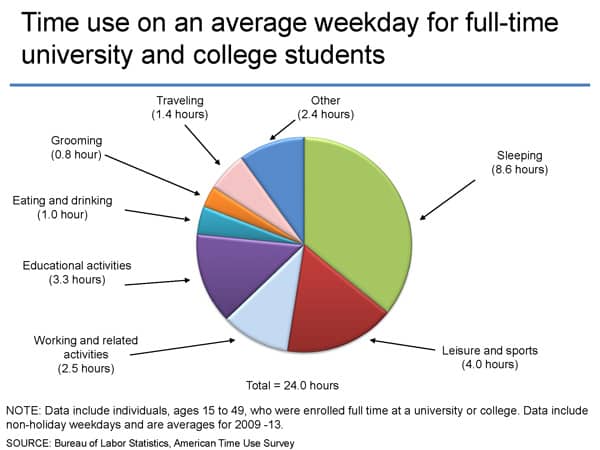
Here's how the BLS's American Time Use Survey shows that college students spend their time.

chart6


To my knowledge, no one at my university has surveyed the sleeping habits of our students. It is hard to imagine that our average is higher than 7 hours a night, however. I hope to be proven wrong on that someday.

It is more complicated for today's students to manage their time and their tasks than it was for me in college.

How can we support our students' productivity?

Some students are able to manage their lives in their heads. It depends on the types of classes they are taking and what's going on in the rest of their lives.

However, all students benefit when we structure our teaching to grow students' abilities to manage their time and tasks more effectively. Here are some ways we can support our students' productivity habits.

Leverage an LMS's capability to publish calendars

Most of the LMSs that I've used have some kind of master calendar for students to view all the assignments in their classes and their corresponding due dates/times. Some give the ability to copy/paste a calendar subscription, so that students can add it to whatever calendar they use (Google calendar, a Mac calendar, Outlook, etc.).

Our university uses Moodle, which has this option.

If students subscribe to a calendar with all their assignments in it, likely they'll be able to see it on their smart phone, as well as when they're on their computers.

Break assignments up into multiple parts

When Ken Bain was on the episode 36, he spoke about the importance of giving students feedback along the way toward the completion of a major assignment. Students have told me that my method of separating the research and writing processes causes them to be less tempted to take shortcuts. They also said it helped them learn the skill of researching and writing better by having them separated like that.

By having assignments broken up into pieces, we model for our students to think about larger projects in terms of the action steps that it will take to move it forward to completion.

Choose due dates/times to reduce likelihood of sleep deprivation

On the upcoming episode 45 with Aaron Daniel Annas (link will work after 5:00 am PST on 4/23/15), he asked me how to set better boundaries with students who are in crunch mode with their assignments. I advise having assignments due at 5:00 pm, since that tends to reduce the likelihood that students stay up all night to get them finished.

The bigger picture

Our university has a freshmen class called Cornerstone that introduces them to the university, helps build study skills, and creates a community of learners to improve retention.

One of the assignments most Cornerstone classes require is to submit their planners (or screenshots of their electronic system), with their schedules each week and each classes' assignments in it.

Once the class is over, many students go back to the method of relying on their professors to remind them of assignments.

I wonder if there isn't a better way for me to reinforce the continued discipline around having a planner or other means for tracking tasks and calendar items.

[reminder]What ideas do you have for supporting our students' productivity?[/reminder]

Filed Under: Productivity Tagged With: gtd, productivity

How to support our students' productivity

By Bonni Stachowiak | April 21, 2015 | | XFacebookLinkedInEmail

how to help our students be more productive

I still have at least one of my planners from college. It's a comic-themed one. Each double-pages spread contains a Far Side comic on the left side and a week-at-a glance on the right.

Life was simpler then. My weeks looked mostly the same, with the occasional exam or paper thrown into the mix. My to do list was kept in the same place as scheduled events, on the corresponding day in my Far Side comic planner.

Things are so different for our students now.

College students are studying less than prior generations, to the tune of approximately ten hours less per week. More than half of them work while in college.

Then there's the 8-10 hours they're spending on their phones daily, according to one study.

Here's how the BLS's American Time Use Survey shows that college students spend their time.

chart6


To my knowledge, no one at my university has surveyed the sleeping habits of our students. It is hard to imagine that our average is higher than 7 hours a night, however. I hope to be proven wrong on that someday.

It is more complicated for today's students to manage their time and their tasks than it was for me in college.

How can we support our students' productivity?

Some students are able to manage their lives in their heads. It depends on the types of classes they are taking and what's going on in the rest of their lives.

However, all students benefit when we structure our teaching to grow students' abilities to manage their time and tasks more effectively. Here are some ways we can support our students' productivity habits.

Leverage an LMS's capability to publish calendars

Most of the LMSs that I've used have some kind of master calendar for students to view all the assignments in their classes and their corresponding due dates/times. Some give the ability to copy/paste a calendar subscription, so that students can add it to whatever calendar they use (Google calendar, a Mac calendar, Outlook, etc.).

Our university uses Moodle, which has this option.

If students subscribe to a calendar with all their assignments in it, likely they'll be able to see it on their smart phone, as well as when they're on their computers.

Break assignments up into multiple parts

When Ken Bain was on the episode 36, he spoke about the importance of giving students feedback along the way toward the completion of a major assignment. Students have told me that my method of separating the research and writing processes causes them to be less tempted to take shortcuts. They also said it helped them learn the skill of researching and writing better by having them separated like that.

By having assignments broken up into pieces, we model for our students to think about larger projects in terms of the action steps that it will take to move it forward to completion.

Choose due dates/times to reduce likelihood of sleep deprivation

On the upcoming episode 45 with Aaron Daniel Annas (link will work after 5:00 am PST on 4/23/15), he asked me how to set better boundaries with students who are in crunch mode with their assignments. I advise having assignments due at 5:00 pm, since that tends to reduce the likelihood that students stay up all night to get them finished.

The bigger picture

Our university has a freshmen class called Cornerstone that introduces them to the university, helps build study skills, and creates a community of learners to improve retention.

One of the assignments most Cornerstone classes require is to submit their planners (or screenshots of their electronic system), with their schedules each week and each classes' assignments in it.

Once the class is over, many students go back to the method of relying on their professors to remind them of assignments.

I wonder if there isn't a better way for me to reinforce the continued discipline around having a planner or other means for tracking tasks and calendar items.

[reminder]What ideas do you have for supporting our students' productivity?[/reminder]

Filed Under: Productivity Tagged With: gtd, productivity

5 tools for when you're sick

By Bonni Stachowiak | April 7, 2015 | | XFacebookLinkedInEmail

sick_

I had a health issue come up this week that meant I couldn't teach on Monday, as planned. I'll spare everyone the details, but suffice to say once the medicine I needed kicked in, I knew it would only be a day or two of recovery time.

It got me thinking about the tools I'm grateful for, when things don't go quite as I've planned. No one likes being sick, but it sure can be easier to recover when you know that things aren't as likely to fall through the cracks.

5 Tools for When You're Sick

Here are five tools for when you're feeling under the weather, but you don't want your classes to fall apart:

Remind

The first thing I did when I knew I wouldn't be able to teach on Monday was to send a message out via Remind. This free service allows me to keep my cell number confidential, but have all the conveniences of a one-way text messaging service to my students. Sign-up is easy on all sides (for students and faculty). I wrote a more extensive review back in 2014.

They recently enhanced their feature set by adding the ability to chat with individual students back and forth. If you would prefer to keep the communication one-way, as you have been doing, you don't have to activate this setting. However, the ability to set up office hours makes it such that you can control exactly when students can initiate chats with you, or even make it only available to students that you initiate chats with… If you have more questions about how the new chat feature works, check out their FAQ.

FreeConference.com

Over these two weeks, I've been meeting with all the students in my Principles of Marketing classes. I had a few meetings scheduled for the afternoon that I really didn't want to postpone. That would only mean that the students wouldn't receive feedback on their progress on their marketing plans until quite close to when it is actually due.

I wound up scheduling conference calls with them on the FreeConference.com service. The company makes their money by charging for extras like call recording. If all you want to do is have a call, it's free.

TimeTrade

There were some students who preferred to wait until I was back on campus and we could meet in person. My scheduling tool, TimeTrade, made this process simple. I went to my list of appointments and clicked on the one for the group wanting to wait until next week. There's a reschedule option there that automatically sends a link to the student who scheduled the meeting, initially, and gives them a little nudge to remember to find a suitable time to reschedule.

Planbook

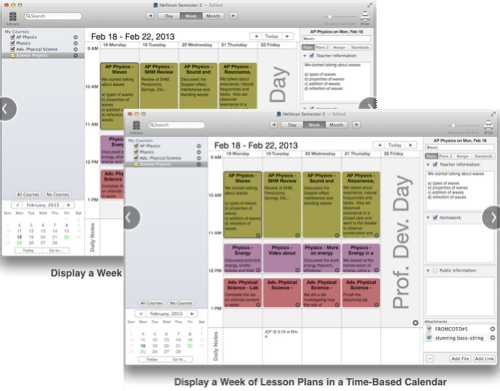
The tool I use to schedule all my class sessions is called PlanBook. It is available on Windows and the Mac, in addition to on the iPad. You can review what I wrote about Planbook in the past, as well as check out all the features.

timetrade

Planbook made it easy for me to see what my students would be missing, since we didn't have class on Monday. I could reschedule the remaining class sessions for the semester and easily get handouts and changes to them via the free Planbook Connect website that you publish with the Planbook software.

Netflix

I actually wound up working most of the day, despite not feeling well. The afternoon conference calls went well with the students. I was also able to write the remaining exams for the rest of the semester, using Cengage's exam creation software.

However, in the evening, I did indulge in an attempt to get caught up with Mad Men. I got through two episodes of season 7 and am on my way to being able to join all the chatter on social media about season 8.

[reminder]What tools do you use to keep things from falling apart too much when you're sick?[/reminder]

Filed Under: Productivity Tagged With: productivity

5 tools for when you’re sick

By Bonni Stachowiak | April 7, 2015 | | XFacebookLinkedInEmail

sick_

I had a health issue come up this week that meant I couldn't teach on Monday, as planned. I'll spare everyone the details, but suffice to say once the medicine I needed kicked in, I knew it would only be a day or two of recovery time.

It got me thinking about the tools I'm grateful for, when things don't go quite as I've planned. No one likes being sick, but it sure can be easier to recover when you know that things aren't as likely to fall through the cracks.

5 Tools for When You're Sick

Here are five tools for when you're feeling under the weather, but you don't want your classes to fall apart:

Remind

The first thing I did when I knew I wouldn't be able to teach on Monday was to send a message out via Remind. This free service allows me to keep my cell number confidential, but have all the conveniences of a one-way text messaging service to my students. Sign-up is easy on all sides (for students and faculty). I wrote a more extensive review back in 2014.

They recently enhanced their feature set by adding the ability to chat with individual students back and forth. If you would prefer to keep the communication one-way, as you have been doing, you don't have to activate this setting. However, the ability to set up office hours makes it such that you can control exactly when students can initiate chats with you, or even make it only available to students that you initiate chats with… If you have more questions about how the new chat feature works, check out their FAQ.

FreeConference.com

Over these two weeks, I've been meeting with all the students in my Principles of Marketing classes. I had a few meetings scheduled for the afternoon that I really didn't want to postpone. That would only mean that the students wouldn't receive feedback on their progress on their marketing plans until quite close to when it is actually due.

I wound up scheduling conference calls with them on the FreeConference.com service. The company makes their money by charging for extras like call recording. If all you want to do is have a call, it's free.

TimeTrade

There were some students who preferred to wait until I was back on campus and we could meet in person. My scheduling tool, TimeTrade, made this process simple. I went to my list of appointments and clicked on the one for the group wanting to wait until next week. There's a reschedule option there that automatically sends a link to the student who scheduled the meeting, initially, and gives them a little nudge to remember to find a suitable time to reschedule.

Planbook

The tool I use to schedule all my class sessions is called PlanBook. It is available on Windows and the Mac, in addition to on the iPad. You can review what I wrote about Planbook in the past, as well as check out all the features.

timetrade

Planbook made it easy for me to see what my students would be missing, since we didn't have class on Monday. I could reschedule the remaining class sessions for the semester and easily get handouts and changes to them via the free Planbook Connect website that you publish with the Planbook software.

Netflix

I actually wound up working most of the day, despite not feeling well. The afternoon conference calls went well with the students. I was also able to write the remaining exams for the rest of the semester, using Cengage's exam creation software.

However, in the evening, I did indulge in an attempt to get caught up with Mad Men. I got through two episodes of season 7 and am on my way to being able to join all the chatter on social media about season 8.

[reminder]What tools do you use to keep things from falling apart too much when you're sick?[/reminder]

Filed Under: Productivity Tagged With: productivity

Getting things done gets redone

By Bonni Stachowiak | March 24, 2015 | | XFacebookLinkedInEmail

I met with a student yesterday who was completely overwhelmed. She used to be a faithful user of a paper planner, but had not used it this semester and was feeling the consequences.

gtd

The student had come to the conclusion that while she might often be able to carry everything that needed doing around in her head, that any “change in plans” threatened to bring her whole system down. An illness earlier in the semester had thrown her off in most of her classes and she was having trouble getting away from constant chaos.

Of course, it isn't just our students who can get overwhelmed. One of the truest stereotypes that so many of us academics have earned is that of the absent minded professor. The practices recommended by experts in learning design can seem impossible to pursue, since just keeping status quo is hard enough.

I've just started reading David Allen's revised Getting Things Done: The Art of Stress-free Productivity. He shares in the first chapter about what has changed since he first wrote the book and what is still the same.

If you're not familiar with the Getting Things Done system, this is a good overview. Additionally, Dave (my husband) recently interviewed David Allen for his Coaching for Leaders podcast.

As I think about the key lessons I gained from the first time I read it all those years ago (not to mention the times I re-read portions of it), the following principles stand out:

  1. Get it out of your head. Our brains are not at their best when we try to carry our to do lists in our minds.By having some proactive and reactive means of capturing all that is coming at us, or otherwise occupying our thoughts, we can more easily tap into our creative capabilities and experience less stress.
  2. Separate the processing from the doing. When we are going through our various inboxes to sort through our tasks, we need to avoid the temptation to try to actually start tackling them.If a task requires less than two minutes to accomplish, it is ok to go ahead and get it done. However, those actions that require more time will be better served if we consider them in the context of everything that needs doing.
  3. Get better at saying no by allowing time for reflection. If we are simply “doing” machines, we lose the opportunity to cultivate those activities that provide the greatest meaning for us in our lives. If our system for managing our time and tasks includes reflective thinking about our dreams, goals, and priorities, we gain the courage and confidence to say no to things that aren't aligned with our sense of purpose.
  4. Only use due dates for actions that truly have due dates. I used to carry a Franklin Planner with me everywhere. I relied on it heavily to keep me organized. One faulty part of my approach, though, had to do with deadlines.Theoretically, if I didn't get enough done in one day, I should have copied the tasks to the next day's page. That quickly became tedious and I would have to do lists that I was consulting from three weeks ago, since I hadn't taken the time to copy them over to the current page.

    It can be that same way with electronic task list item due dates. We tell ourselves that it is due by this Friday, because there's a sense of urgency around it. however, if we don't get to it by Friday, we either reset the due date, or have a growing snowball of overdue tasks.Our productivity approaches should be ones that we trust. If we regularly look at outstanding tasks, we can prioritize as we go which ones are most important to us. That helps us avoid putting due dates on things that we no longer trust, since we know that so many of them aren't actually due on the day we say that they are.

  5. Invest time each week considering what's most important in the coming week. I perform a weekly review at least 75% of the time. The weeks when I'm disciplined enough to go through this activity, there's a noticeable difference in my stress levels and my productivity. I've decided, in advance, what is most important to focus on during the week and made any contingency plans for areas where there may be trouble ahead.

One of the chapters that David Allen added to the revised version of Getting Thing Done is a section on personal mastery. We don't ever “finish” GTD, but rather are continually developing and adapting.

Peter Senge writes of personal mastery:

People with a high level of personal mastery are able to consistently realize the results that matter most deeply to them–in effect, they approach their life as an artist would approach a work of art. The do that by becoming committed to their own lifelong learning.

We don't someday wake up and completely follow a system like GTD every day of our lives from then on out. Instead, we continually strive to incorporate habits into our lives that will maximize our effectiveness and cushion the blows when times get tough.

The quest is a worthwhile one to me and one I am continually seeking to cultivate even further than I have already…

[reminder]Do any of you have an interest in doing an informal book club on the revised edition of Getting Things Done: The Art of Stress-free Productivity? If so, put a comment on this post. If there are at least five of us (including me) who want to commit to reading it within the month of April and having some informal, virtual dialog on it, I'll put something together to connect us.[/reminder]

Filed Under: Productivity Tagged With: gtd, productivity

  • « Go to Previous Page
  • Page 1
  • Interim pages omitted …
  • Page 4
  • Page 5
  • Page 6
  • Page 7
  • Page 8
  • Interim pages omitted …
  • Page 11
  • Go to Next Page »

TOOLS

  • Blog
  • Podcast
  • Community
  • Weekly Update

RESOURCES

  • Recommendations
  • EdTech Essentials Guide
  • The Productive Online Professor
  • How to Listen to Podcasts

Subscribe to Podcast

Apple PodcastsSpotifyAndroidby EmailRSSMore Subscribe Options

ABOUT

  • Bonni Stachowiak
  • Speaking + Workshops
  • Podcast FAQs
  • Media Kit
  • Lilly Conferences Partnership

CONTACT

  • Get in Touch
  • Support the Podcast
  • Sponsorship
  • Privacy Policy

CONNECT

  • LinkedIn
  • Instagram
  • RSS

CC BY-NC-SA 4.0 Teaching in Higher Ed | Designed by Anchored Design