• Skip to primary navigation
  • Skip to main content
  • Skip to footer

Teaching in Higher Ed

  • Podcast
  • Blog
  • SPEAKING
  • Media
  • Recommendations
  • About
  • Contact

Personal knowledge mastery

Pinboard.in | A great bookmarking/archiving tool

By Bonni Stachowiak | December 22, 2014 | | XFacebookLinkedInEmail

When it comes to new apps, Dave is often a bit more willing to experiment than I am.

He's gone back and forth between the two read-it-later services: Pocket and Instapaper, more times than I can count. On the other hand, I made the switch to Pocket upon his suggestion and am not willing to re-learn a new system, just to capitalize on a couple extra features that Instapaper now offers.

That's why I think I was so suspicious about making the switch to Pinboard.in.

Dave had made the move and kept recommending it to me. At first glance, I wasn't sure how it would be better than the Delicious bookmarking system that I had been using.

However, I finally decided to take the plunge when I saw that I could have Pinboard.in bookmark/pin everything both inside their system, but also on my Delicious account. There just wasn't that much to lose.
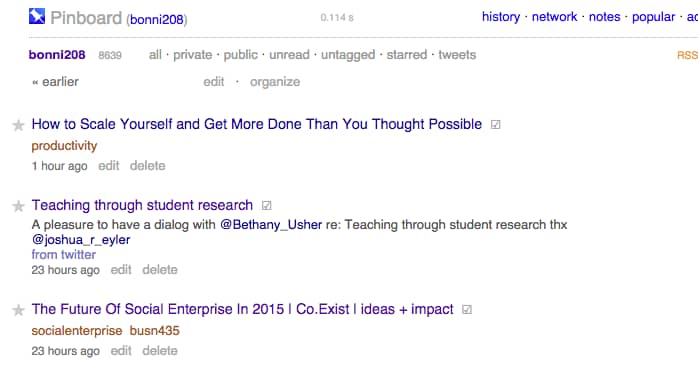
pinboard

What is Pinboard?

From their FAQs:

Pinboard is a personal archive for links you find online. You save bookmarks to the site and can find and search them later from any computer. The site can automatically import your links and tweets from a number of outside services.

Pinboard also offers an archive feature that will save a local copy of everything you bookmark in case the original page goes offline, and let you search all your bookmarks by their full text content.

How do I use Pinboard?

Pinboard is so easy to use that a person might suspect that it only has one application: to save stuff. However, I wind up using it in a number of ways, including:

As a source for inspiration and ideas for blog posts and social media interactions

Once a week, I go onto my main Pinboard page that has all my pins in one long list down the middle. I take a look at the pins I've added in the last week and determine whether they might fit into my main blog post for the week, or if they might be good individual Tweets or Facebook links.

When people ask me for resources on a given topic

The power of Pinboard comes in when you set up a system of categories, or tags with your bookmarks. As soon as you save a bookmark, you have the option to add one or more tags at that time.

Later on, if someone asks me for my advice or resources regarding educational technology, I have an easy link to send them that has all the resources I've saved on a given topic.

https://pinboard.in/u:bonni208/t:EdTech/
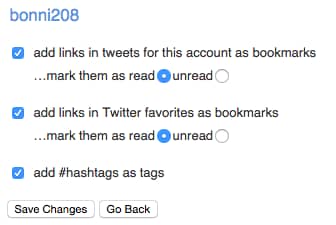
twitterAs a way to capture resources from Twitter with one click or tap
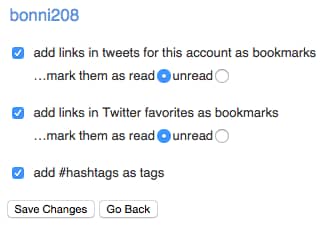
I have Pinboard set up to automatically add any Tweets that I favorite to my pins.

While that sounds like it would get crazy to try to keep all those favorites organized, it really isn't all that necessary. I have it set to use any Twitter hashtags as tags within Pinboard. In most cases, there aren't tags, though, and they just wind up going in a category called untagged.

If I were inclined, I could manually go in there and tag them all at a later time. However, I haven't found that necessary, given the robust search features in Pinboard and the nature of the kinds of things I favorite on Twitter.

Recommended steps

If you are going to take advantage of Pinboard, be sure you have:

  1. Set up your account
  2. Added the button/extension to your browser's toolbar, so you can easily add pins while you're on your computer
  3. Add the Pinboard extension/share button to your iOS device, so you can easily add pins while you'er on your iPhone/iPad

[reminder]Do you use a bookmarking/archiving tool? If so, which one is it and why is it your preferred tool?[/reminder]

Filed Under: Personal knowledge mastery Tagged With: bookmarks, pkm

Working out loud in higher ed

By Bonni Stachowiak | September 9, 2014 | | XFacebookLinkedInEmail

Someone asked me the other day if it was strange listening to myself on podcasts.


working out loud

I'm now doing a monthly Q&A show on Dave's (my husband's) Coaching for Leaders podcast, as well as the weekly Teaching in Higher Ed podcast. I listen to many of them before they air, so that I can create the show notes. All of them wind up in my listening queue on Overcast (my preferred podcast app). My weekly routine has me often listening to them in the car, or when feeding our baby girl at night.

There are often moments when I listen where I wish I would have phrased something differently, or not laughed when I talked about something quite serious. Lately, I'm frustrated at the number of times I'm saying the filler word “so” on the show. Prior to that, the recordings were littered with “you know”s. I'm always working on some aspect of my speech patterns that could potentially be distracting to the listening audience.

Yes, it can be uncomfortable to hear myself, especially during some of my less-than-stellar recording moments.

However, there are so many great things that have come from “working out loud,” a phrase first coined by Bryce Williams. When we work out loud, we make our work visible to a network of people with similar interests and missions as our own.

John Stepper describes working out loud as:

…making your work visible in such a way that it might help others. When you do that – when you work in a more open, connected way – you can build a purposeful network that makes you more effective and provides access to more opportunities.

Robbin Good has a content curation guide that explores emerging practices in content curation and how to get started. There's also this interview with Maria Popova, the editor of Brain Pickings, one of the greatest examples of content curation that exists. It almost feels wrong to refer to it as content curation, or even working out loud. She refers to her work in a far more descriptive and eloquent manner as she writes on her “about” page:

Brain Pickings is my one-woman labor of love — a subjective lens on what matters in the world and why. Mostly, it’s a record of my own becoming as a person — intellectually, creatively, spiritually — and an inquiry into how to live and what it means to lead a good life.

It is risky and takes dedication to work out loud, but the benefits are plentiful.

[Read more…] about Working out loud in higher ed

Filed Under: Personal knowledge mastery Tagged With: curation, pkm, working out loud

Stop yourself from becoming a digital hoarder

By Bonni Stachowiak | August 26, 2014 | | XFacebookLinkedInEmail

How do we know when we have truly gained the trust of a colleague in academia? For some of you, it may be when you are asked for advice. For others, perhaps it is when your help is requested. For me, it seems to be when people are willing to confess that they have become digital hoarders.

Digital hoarder

This first happened about four years ago. My friend admitted that she had been letting people down and not following through with her commitments. Let's call her Laura. I'll admit to having been sometimes frustrated that she didn't get back to me on stuff, since we were on committees together and our paths crossed regularly in our work. It was easy to forgive her, though, because I know Laura cared so much and had so much on her plate. What I didn't realize at the time was her big secret as to why she was getting increasingly worse at managing her life as a professor.

We were in my office and she finally broke down and cried one day. Laura had forgotten about a meeting she was supposed to attend and had no idea how on earth she was going to get things together for an end-of-the-year event. She said she just couldn't keep up with it all, particularly the email. We talked around the issue for a few minutes, but then got to the heart of the matter. She had more than 7,000 emails in her inbox, much of which she associated with unfinished business.

The costs of having a lot of digital clutter aren't immediately evident. Storage costs for data have come down so much that IT departments keep raising the storage they make available to us and it is easy for us to buy another hard drive or sign up for another cloud service. The costs come when we think about how much time we spend trying to find what we need, or having to start over again with something. There's also the stress of having a system we don't trust.

Here are four steps to stop yourself from becoming a digital hoarder:

[Read more…] about Stop yourself from becoming a digital hoarder

Filed Under: Personal knowledge mastery Tagged With: pkm

How to leverage the bookmarks you've saved

By Bonni Stachowiak | May 26, 2014 | | XFacebookLinkedInEmail

I've been teaching the practice of Personal Knowledge Management to my doctoral students this term. One thing I didn't anticipate was just how challenging it would be for some of them to select tools to use in the process. I didn't want to dictate that they had to use particular apps, but I'm thinking that I need to create an “essentials” or “basics” set to provide for those on the lower end of the digital literacy spectrum.

computeroutside


[Read more…] about How to leverage the bookmarks you've saved

Filed Under: Personal knowledge mastery Tagged With: bookmarks, create, curate, edtech, pkm

How to leverage the bookmarks you’ve saved

By Bonni Stachowiak | May 26, 2014 | | XFacebookLinkedInEmail

I've been teaching the practice of Personal Knowledge Management to my doctoral students this term. One thing I didn't anticipate was just how challenging it would be for some of them to select tools to use in the process. I didn't want to dictate that they had to use particular apps, but I'm thinking that I need to create an “essentials” or “basics” set to provide for those on the lower end of the digital literacy spectrum.

computeroutside


[Read more…] about How to leverage the bookmarks you've saved

Filed Under: Personal knowledge mastery Tagged With: bookmarks, create, curate, edtech, pkm

  • « Go to Previous Page
  • Page 1
  • Interim pages omitted …
  • Page 9
  • Page 10
  • Page 11
  • Page 12
  • Page 13
  • Go to Next Page »

TOOLS

  • Blog
  • Podcast
  • Community
  • Weekly Update

RESOURCES

  • Recommendations
  • EdTech Essentials Guide
  • The Productive Online Professor
  • How to Listen to Podcasts

Subscribe to Podcast

Apple PodcastsSpotifyAndroidby EmailRSSMore Subscribe Options

ABOUT

  • Bonni Stachowiak
  • Speaking + Workshops
  • Podcast FAQs
  • Media Kit
  • Lilly Conferences Partnership

CONTACT

  • Get in Touch
  • Support the Podcast
  • Sponsorship
  • Privacy Policy

CONNECT

  • LinkedIn
  • Instagram
  • RSS

CC BY-NC-SA 4.0 Teaching in Higher Ed | Designed by Anchored Design