• Skip to primary navigation
  • Skip to main content
  • Skip to footer

Teaching in Higher Ed

  • Podcast
  • Blog
  • SPEAKING
  • Media
  • Recommendations
  • About
  • Contact

Personal knowledge mastery

My Votes for the 2026 Top Tools for Learning

By Bonni Stachowiak | July 7, 2026 | | XFacebookLinkedInEmail

2026 Top Tools for Learning

Most people who know me well are aware that I'm a person who is quite motivated by streaks. Whether it is my current 93 days going strong in the Bend stretching app, or my current 1,027-day streak going with closing my rings of my Apple Watch, I enjoy seeing how far I can go.

Sadly, I haven't done quite as well with keeping my streak with votes for Jane Hart's annual Top 100 Tools for Learning. I was too late to be included in the votes for last year, but decided to write up my 2025 Top Tools post, regardless. Before that, I had posts for the following years:  2015, 2016, 2017, 2018, 2019, 2021, 2022, and 2024.

My Method

Each year, I write up my top ten without looking at the prior year's post, lest I be overly influenced by what the prompt evoked in past years. I center my thinking around Harold Jarche's Personal Knowledge Mastery (PKM) framework each time. Harold Jarche defines PKM as:

Personal knowledge mastery (PKM) is a set of processes, individually constructed, to help each of us make sense of our world and work more effectively. PKM keeps us afloat in a sea of information — guided by professional communities and buoyed by social networks.

When I consider which tools fuel my learning the most, it is those which contribute to my ability to practice PKM on a consistent basis.

My Top 10 for 2026

It is always hard to narrow down my list to a top ten, though I know how important constraints can be for our creativity and focus. To that end, here are my top tools for learning for 2026, as well as how I link them to my PKM practice of seeking, sensing, and sharing.

Seek

The following tools support my process of seeking, defined by Harold Jarche as:

… finding things out and keeping up to date. Building a network of colleagues is helpful in this regard. It not only allows us to “pull” information, but also have it “pushed” to us by trusted sources. Good curators are valued members of knowledge networks.

Overcast

Overcast tends to be the very first thing that comes up in my mind when I consider my top tools for learning. It is a podcast player with a wonderful free plan, supported by non-invasive ads, for people who want to try it. But the low cost of the annual subscription is a no-brainer for me, given all that it contributes to my learning.

I listen to podcasts on a daily basis. It still is so incredible to me what is available across all of my learning interests. I have custom playlists set up for news, politics, productivity, business and economics, teaching, technology, and more recently for audiobooks.

Overcast not only lets you subscribe to podcasts that you want to listen to and keeps track of ones that you've listened to or want to listen to in the future, but it also lets you upload audio files, and I find it helpful to have my audiobooks be available to me in the interface that I'm already so familiar with using, and it is such a well-thought-out interface from the developer Marco Arment.

Libby

As it relates to my learning through audiobooks and digital books, I can't say enough good things about Libby. Libby works with the two local library cards I have: my adored Mission Viejo Library card, and a second one I acquired this past year from the Orange County Public Library system.

And through Libby, I'm able to put e-books on hold and audiobooks on hold that I want to listen to, and it allows me to read those books in the Kindle app, and then I can listen to the audiobooks via their app as well. The nice thing about using Libby, which again then ports e-books over to Kindle, is that my highlights are still able to be saved in Readwise, and that way all the highlights that I create across all of my digital reading can be synced up and made available regardless of whether I purchased an e-book or checked it out from my library. I still think this is so remarkable. If it has been a while since you have checked out what's available through your public library, I highly suggest that you give it a go, especially in terms of what digital resources they may make available.

Unread

Unread has been my preferred RSS reading experience for a growing number of years. I use it primarily on my iPad, although any time I want to pull up the RSS feeds that I subscribe to on my iPhone, it works seamlessly there as well. What makes Unread unique to me from all of the other readers that I have tried in the past is that you can operate it with just one thumb doing your swiping.

I can go in and out of stories that I want to read more of as I am skimming through headlines and finding things I want to check out, and I'm able to therefore have such a seamless reading experience. Unread works with Inoreader, which I'll mention later on in the share section.

Sense

I often think of the sense-making part of my PKM as the wrestling with ideas and magnifying the power of learning out loud, despite often not feeling like I have any clue what I am doing. As Harold Jarche describes, when we are sensing:

…we personalize information and use it. Sensing includes reflection and putting into practice what we have learned. Often it requires experimentation, as we learn best by doing.

Obsidian

In this past year, I have switched to a new note-taking system. A long time ago, I used to use Evernote, but they started charging the most ridiculous prices, which eventually pushed me to move off of it. The application was also incredibly bloated. I then moved to a few others and finally made the move to Obsidian.

There's so much that I could say about it, but this is supposed to just be a top ten short look at them, but it is incredible what is possible through Obsidian. What I like about it is it's relatively easy to get started just to take notes, but it is incredibly expansive as you continue to learn more about it.

I have all of my notes for things like this very blog post that I'm writing to you now, along with my notes for classes that I teach or am preparing to teach, to notes for conferences that I attend, or workshops or keynotes that I offer. It's an amazing note-taking tool, and the most beautiful part about it is if I ever change my mind about that, every single note that I've taken in Obsidian doesn't live exclusively in Obsidian.

It is simply a plain text note sitting on my computer. So I never have to worry about being locked in to anything. By the way, if you're wondering how images show up in my notes if it's plain text, well, I have a single folder for all of the images that can easily then be embedded or otherwise pointed to from within a given note. I also like the ways that it links to other notes in some pretty incredible ways. I have notes for people who have come on the podcast, and then I can link to the episode notes for the time they came on the show, or over to the notes that I took on their book, or over to a quote that they shared that is now on my quotes list.

Raindrop

Raindrop is another tool that has long been on my top ten lists. It is a digital bookmarking tool. I have over 35,000 digital bookmarks that have all been placed into various collections, which you can think of as folders, and have been extensively tagged.

So when I'm reading an article or listening to a podcast, I can very easily add that bookmark to my Raindrop, place it in a collection, and add tags to it to make it that much easier to surface in the future. I'm still surprised more people don't use digital bookmarks for all the ways in which they can help us make sense of all the things that are coming at us that might be particularly relevant to us in our future learning and sense-making.

Zotero

Zotero is a reference manager and has been my go-to for academic references for a long while. I can be viewing a scholarly journal article, for example, and click on the Zotero button in my toolbar, and it automatically then adds all of the metadata for that source into my Zotero library.

And then later on, when I want to write about the sources that I have gathered, it has an add-in inside of Microsoft Word, which I still use for my scholarly writing, and I can easily cite the sources, search for them, create a bibliography off of all of the things that I've cited in a particular piece.

It makes that all seamless. I also like the way that Zotero easily lets me create collections for groups of people or join other people who are doing the same.

It is a wonderful tool, and I'm going to be teaching in our master's program in organizational psychology this fall, and am looking forward to introducing the students to Zotero from the very beginning of their experience and easing the road for them when it comes to doing scholarly writing.

Many of them will not have used a references manager before, and I'm excited to help them be proactive in making their own seeking, sensing, and sharing of their learning in the program that much easier through the use of Zotero.

Zoom

Zoom has been on my list most years for a long while now. The reason I especially didn't want to leave it off this year, though, is that I had a wonderful opportunity to learn from Said Saddouk, The Facilitainer, as part of his Virtual Facilitation Masterclass.

And while he offered the program through Zoom, he easily could have offered it through other online meeting platforms (as in the learning is applicable across a broad scope of tools). Said taught us hands-on how to be more effective in our facilitation, overall, including teaching us how to use OBS (an open-source tool that had previously been challenging for me to use effectively, before meeting Said).

If you facilitate often (online, or on campus), I highly suggest having a tool that allows you to set and modify agendas/class plans. I've been using SessionLab* for a couple of years now and highly recommend it. I set up all my courses within SessionLab, which then helps me stay organized and make shifts when things change. I pay for SessionLab, but if you use that link to sign up, you can help to defray some of those costs via the affiliate link.

Share

When we commit to sharing, we can extend our learning in unpredictable ways and sustain and extend relationships that can continue to enhance our growth. As Harold Jarche explains about this part of PKM, sharing involves:

…exchanging resources, ideas, and experiences with our networks as well as collaborating with our colleagues.

WordPress

WordPress continues to be what drives the Teaching in Higher Ed website, and I blogged a lot more this past year than I had in a long time. I participated in Harold Jarche's Personal Knowledge Mastery workshop and challenged myself to blog all the way through it.

I am happy to report that this went well and that I have deepened my learning because of my commitment to do that. I'm currently undertaking a redesign of the Teaching in Higher Ed website with my friend and web developer, and I'm excited that WordPress will still be the foundation for what drives so much of my ability to share, whether it be through the podcast feed, which runs through WordPress, as well as my blogging and other efforts.

Kit

New to the list this year, although not new to me, is Kit*, which is the email platform that allows me to stay in contact with the Teaching in Higher Ed community through the field journal.

The Field Journal allows me to share what I read, listened to, noted, and wondered about the prior week, and then get replies on what I wondered back from the community. And the Kit platform just makes this all seamless and gives an opportunity for people to see past posts, for if they join, they can always go back and look at some of the older posts, and it's just a great platform that I'm happy to have as part of my ways that I'm able to share.

Inoreader

And then finally, I mentioned Inoreader earlier. This is still my key RSS aggregator, and it is one of those things that is easy to get started with, but there's so much that you can do with it. Your creativity is kind of the limit here.

The Final Vote

I started this post, mentioning how motivated I can get while sustaining a streak. As I finalized my list and went over to the page for the 2026 voting, I noted a new word has been added to this page that wasn't there in prior years. That word is final. What a round number to wrap up with…

Looks like Jane is running her 20th annual and final survey in 2026. I saw on her LinkedIn page that she isn't consulting any longer and has mentioned being semi-retired. To get a sense of the depth and breadth of her work, see this profile in knowledge about Jane Hart by Stan Garfield on LinkedIn. What a resource she has provided to those of us in teaching and learning professions for decades now. I am glad that I had already determined that I wouldn't let this year's opportunity to vote pass me by and look forward to coming across others' posts with their top tools, not to mention the results of the final count.


* The Kit and SessionLab links above are affiliate links. Dave and I pay for both Kit and SessionLab, but if you use my link to sign up, you can help to defray our costs a bit.
Filed Under: Personal knowledge mastery

What I Learned About What We Should We Know About AI?

By Bonni Stachowiak | May 26, 2026 | | XFacebookLinkedInEmail

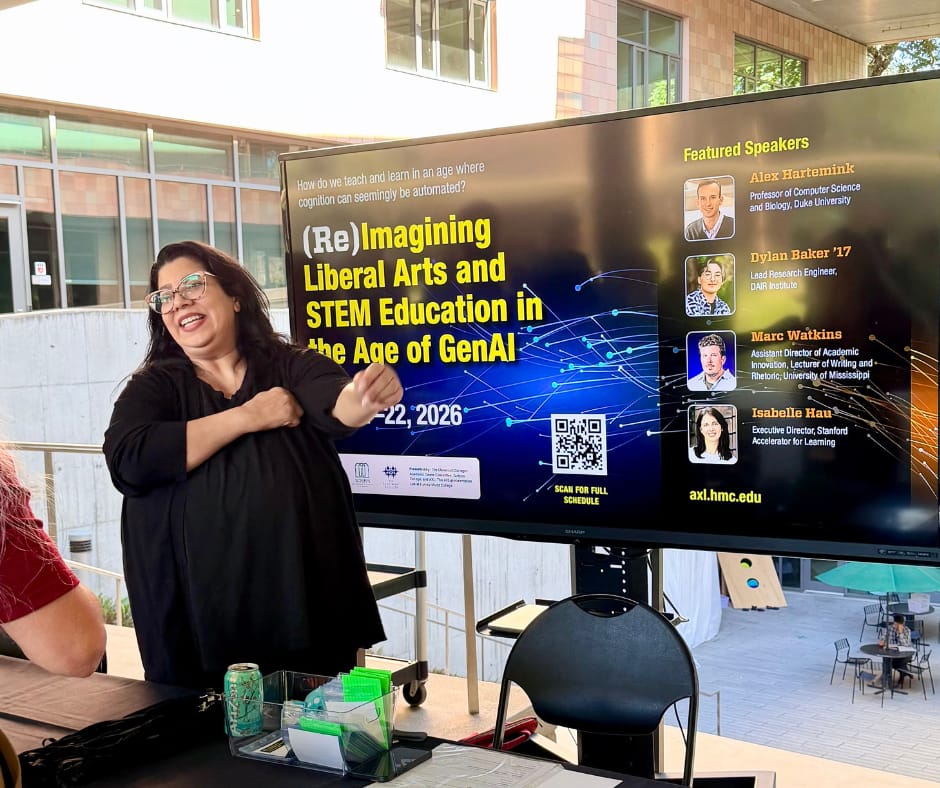
Woman stands in front of a large display with information about the conference

I had the privilege of attending the (Re)Imagining Liberal Arts & STEM Education in the Age of GenAI conference at Harvey Mudd College on May 21st and 22nd of 2026.

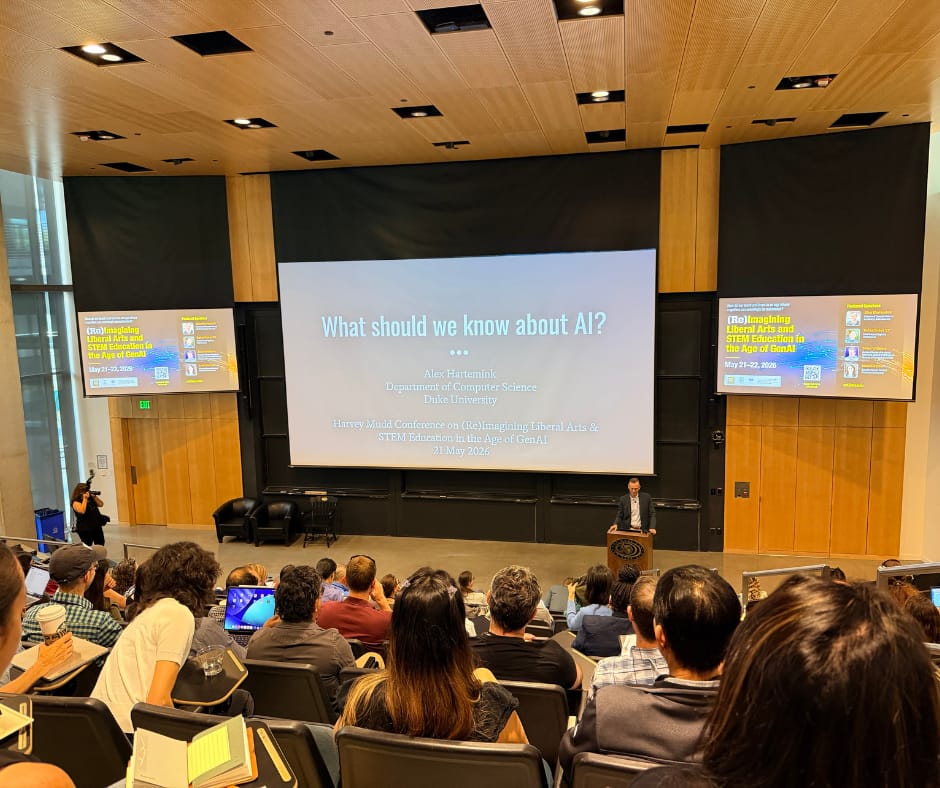
The first keynote was Alex Hartemink, Professor of Computer Science (and Biology) at Duke University. He titled his keynote What should we know about AI? A lot of people have been talking about AI fluencies and AI awareness lately, and I was intrigued from the start to see what his talk would center on.

A large crowd of conference attendees fills a lecture hall, facing the front where Alex Hartemink's title slide reads "What should we know about AI?"

Some Common Questions

Alex focused on a set of common questions that, he posited, would help us establish common ground. He asked things like, “Is AI intelligent, or does it only seem to be intelligent?” “How is AI made today and who makes it?” And one of his last questions was:

Why is AI suddenly everywhere, everything, all at once?

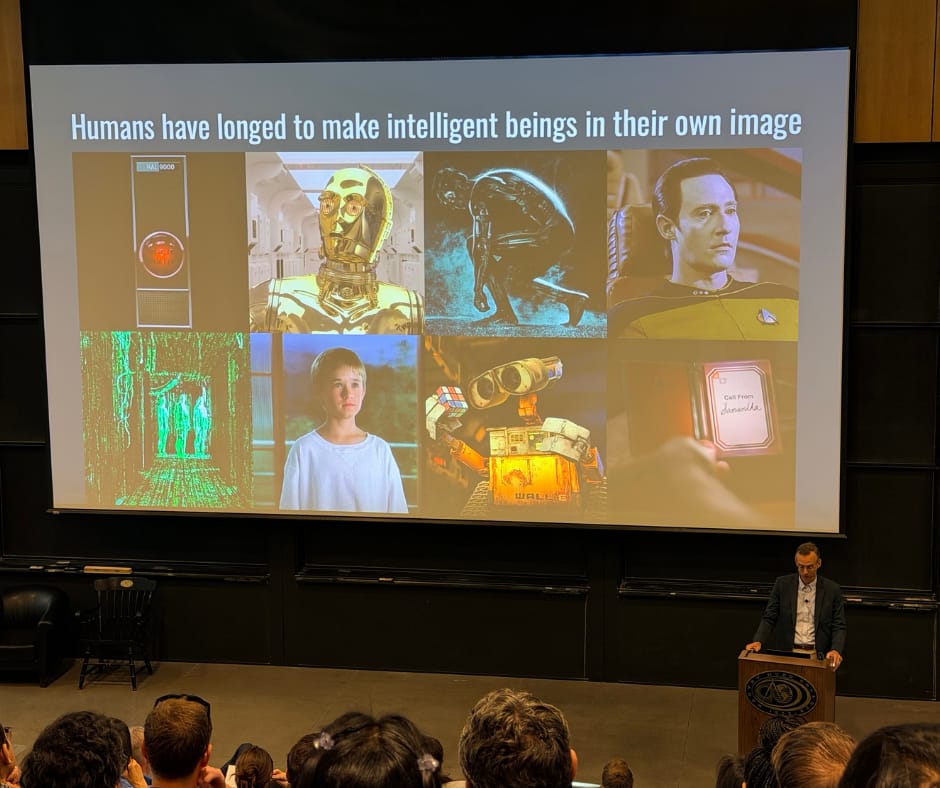
When a slide showing screenshots from a bunch of relatable movies came up, I heard lots of murmurs from the audience. I looked at the image and recognized C-3PO, a familiar figure from my childhood, alongside HAL 9000, TRON bent down in a smoky blue background, Data from Star Trek, WALL-E holding a Rubik's cube, and a movie I had just seen the night before.

The lower right-hand corner is from a movie called Her. I had not seen it before that week, but I had played a clip of it in a number of talks I have given, accompanying the “Go Somewhere” AI metaphor card game. I had finally decided to bump it up in my movie-watching queue because some geeky podcasters that Dave and I both subscribe to did a member special on the movie. I did not want any spoilers, but I was very much looking forward to watching it on the drive home from the conference.

Another image worth a comment is WALL-E. What a memorable movie. I can see why Alex included it in his collection, at least in moviemaking, of our desire to make intelligent beings in our own image.

Alex Hartemink presenting from the front of a large lecture hall. His slide is titled "Humans have longed to make intelligent beings in their own image" and shows a collage of film stills, including HAL 9000, C-3PO from Star Wars, TRON, Data from Star Trek, a young boy in a white sweatshirt looking out a window toward mountains and trees, three shadowy green-iridescent figures in a room with glowing floors, walls, and ceiling, WALL-E holding a Rubik's cube, and a hand holding a foldable device showing a call from Samantha in the film Her.

Enthusiastic Ups and Downs

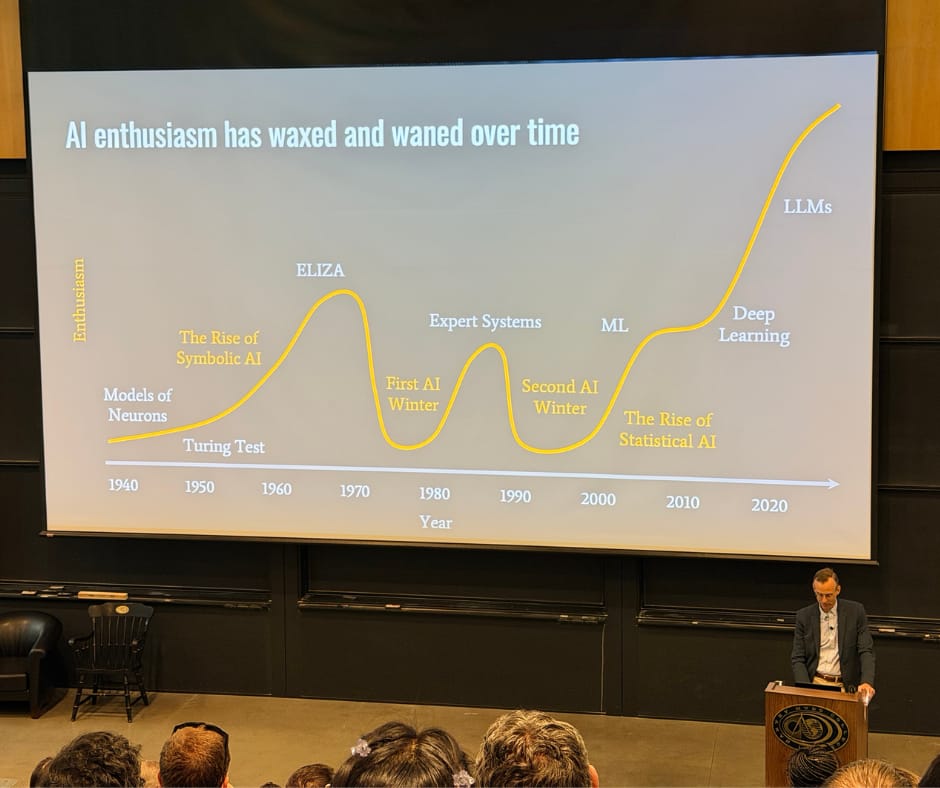
Alex then showed a timeline. He joked that he was charting enthusiasm and admitted, with a self-deprecating tone, that the exercise was less than scientific. His point was clear, though. Artificial intelligence has been around a long time, and there have been many waves.

We started in the 1940s with models of neurons, moved into the 1950s with symbolic AI and the Turing test, saw an upsurge in the 1960s with ELIZA, and then hit the first AI winter in the 1970s. Expert systems rose in the 1980s. The second AI winter came in the 1990s. Machine learning followed, statistical AI plateaued in the 2000s and early 2010s, deep learning came along, and then in the 2020s and beyond, large language models.

Many of us in the room seemed to know about ELIZA, the early attempt to turn a computer program into a therapist. Alex showed how interest waned after that, all the way to a big surge around deep learning. After 2020, the chart climbs sharply on interest in large language models.

A line chart with "enthusiasm" on the y-axis and decades from the 1940s through the 2020s and beyond on the x-axis. The line starts with models of neurons in the 1940s, rises in the 1950s with symbolic AI and the Turing test, peaks in the 1960s with ELIZA, drops into the first AI winter in the 1970s, climbs again with expert systems in the 1980s, falls into the second AI winter in the 1990s, moves through machine learning and statistical AI in the 2000s and early 2010s, then rises sharply into deep learning and large language models in the 2020s and beyond.

Alex did a lot of definitions of terms, and it was nice for me since a lot of them were familiar. What his talk did was help center me on where we find ourselves today in relation to the past.

Algorithms, Models, and Products

Alex explained that we need to be able to distinguish between AI algorithms, AI models, and AI products. That information was not entirely new to me. It did get me more curious about when people say they are against using AI entirely, wanting to ask them more about what they mean by that, to see if we are sharing a common understanding of these various concepts.

How Stochastic Parrots Produce Human-Sounding Output

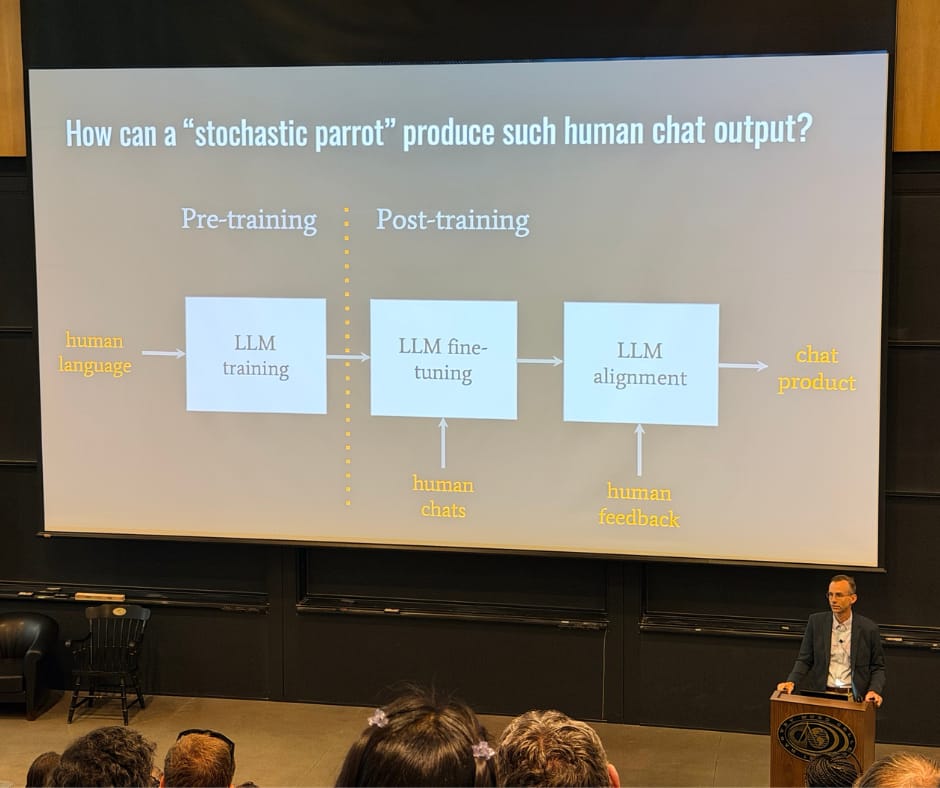
Alex gave examples of the different ways that AI gets referred to when we try to describe how it works or does not work. One example came from Emily Bender and her co-authors and their now-well-known stochastic parrots paper. The metaphor asks how a random parrot, telling us back what it hears, can produce such human chat output.

The diagram Alex shared helped illustrate for me a piece I want to remember, for when I'm attempting to describe how AI works. After models have been trained, the output of LLMs is shaped by more than just human chats. That is the large language model fine-tuning that happens after pre-training. There is also large language model alignment, and that is where human feedback comes in.

A slide titled "How can a stochastic parrot produce such human chat output?" with "stochastic parrot" in quotation marks. On the left, a box labeled "Pre-training" shows "LLM training" with human language as the input. A dividing line separates pre-training from post-training. On the right, two stacked boxes read "LLM fine-tuning, enabled by human chats" and "LLM alignment, enabled by human feedback," with an arrow pointing right to "Chat product."

Two Large Misconceptions

Alex wanted to be sure to address two large misconceptions.

The first, and he said probably the largest, is that when we receive output from an AI tool, we assume that the AI means what it says. I am quoting from his slide here (in describing what it isn't actually doing, despite us thinking that's what's happening):

It's guided by meaning, purpose, truth, knowledge or intention.

The second misconception had to do with the future of AI being inevitable. Alex wanted to remind us that we have a lot of power to shape and imagine a future for artificial intelligence and how it should look. That is particularly true in the context of higher education.

Education and Imagination

Alex reminded us that the roots of the word education come from “to lead out or draw forth,” and in Latin, ex plus ducere. Lead out of what, and draw forth into what? The second word he broke down was imagination. To imagine is to “represent or form an image,” from the root word imago, in the mind. What kinds of minds are necessary to preserve our imagination?

Alex closed his talk with a couple of questions, and I will close this post with them as well.

On imagination, he asked:

What kinds of minds are necessary to preserve our imagination?

And on formation: people are formed. How? By whom? And for what end?

Who forms a person's intellect, imagination, character, will, desires?

I'll be sharing more about the conference in the coming weeks, but want to close this post by thanking the conference planning team for a wonderful event. It was a rough time to be traveling, even if I only drove 1.5 hours to get there. I'm still glad I took the time to be there, though, given how much I learned through the experience.

Filed Under: Personal knowledge mastery

Why Naming Things Matters and Why TiHE Recommendations Are the Best

By Bonni Stachowiak | April 9, 2026 | | XFacebookLinkedInEmail

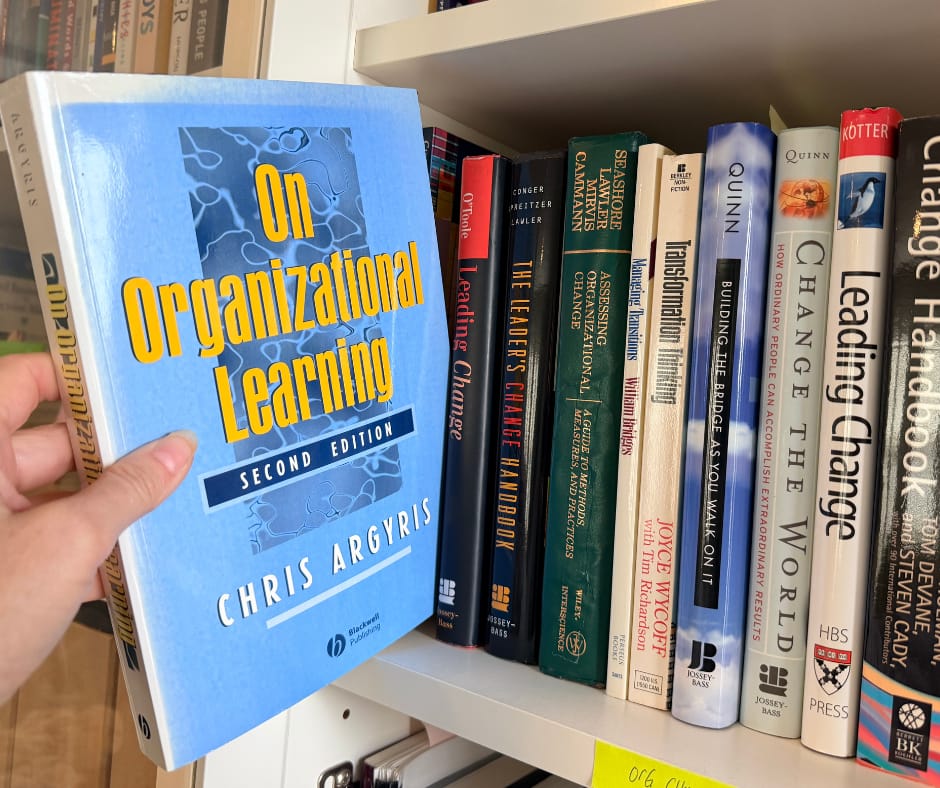
Bookshelf with a book being held out from the rest. Chris Argris' On Organizational Learning

Many people have told me how much they get out of the recommendations segment of Teaching in Higher Ed each week. I feel that way too, and candidly can even find those recommendations overwhelming with all of the delight they bring me. Like eating at a delightful buffet, while still realizing most things can best be taken in moderation. So many good books to read, just as one example.

On Teaching in Higher Ed Episode 616, Katarina Mårtensson recommended the Academic Imperfectionist podcast, hosted by Dr. Rebecca Roache. I have listened to a couple of episodes and am so excited that so many more are in store for me, given how late I am to this particular podcast-listening adventure.

I have talked for a long time, in both my leadership and my teaching, about the importance of naming things. It has come up across so many different dimensions of what we do as educators. So when I heard Rebecca address it directly in episode 122 of the Academic Imperfectionist podcast, “Write It Down, Make It Happen”, it stopped me in my tracks.

Here is what Rebecca said at that point in her episode:

Not knowing exactly what it is that's causing you distress makes things worse than they need to be. This is what led the psychiatrist Daniel Siegel to come up with the expression “name it to tame it,” to describe the effectiveness that noticing and naming strong negative emotions has on making them less intense. If you ever talked through your fears or anxieties or journaled about them and ended the process feeling a little bit more positive, then you've experienced this effect.

Naming it in my teaching

I am looking forward to sharing that episode of the Academic Imperfectionist the next time I teach an elective course I have been teaching for well over a decade: Personal Leadership and Productivity.

In Getting Things Done terminology, what Rebecca describes about making lists maps onto what is known as a mind sweep. Sometimes called, a little less formally, a brain dump. You can use a trigger list to help surface those open loops and get them out of your head. David Allen reminds us:

Our mind is for having ideas, not holding them.

I have had students who struggled with this process, and over the years I learned why: they were reluctant to begin exploring what had been causing them stress until they knew there was a plan for what came next. Once I started naming that for them (letting them know we were going to learn what to do with what landed on that metaphorical or literal page) everything shifted.

The naming creates the conditions for the mental work and enough trust to begin the process of unpacking the often-heavy burdens of all the stuff that is not yet done.

Naming it in our organizations

The other reason this section of Rebecca's episode 122 stood out to me is how much it matters in our leadership.

Speaking of recommendations, I do not want to spoil an upcoming episode's recommendation, but I cannot resist a small preview. I recently discovered Libib, a service for cataloging books, and have been cataloging a bunch of volumes I had not touched in years. Picking up books I had not looked at in a while has led me down a series of delightful rabbit trails, including one connected to this very topic.

Chris Argyris's On Organizational Learning describes something he calls skilled incompetence. Reading from chapter 7, Argyris writes:

In handling these problems, the executives use highly honed skills, yet create consequences they do not intend. Hence, their skillfulness is tightly coupled with incompetence. Moreover, this skilled incompetence not only operates at the individual level, it permeates the entire organizational culture as well.

He goes on to explain that skills are usually associated with accomplishing what we intend. Skilled incompetence is different: it is about unintended consequences we do not see (and may be actively working to avoid seeing).

Before I try to recap the entire book here, I will stop and just say how powerful Argyris's description of organizational defensive routines is. We can cover up our naming of problems in profound and precise ways. He also offers some paths toward unlearning those defensive habits, which I am looking forward to sitting with more, as I continue the process of revisiting all treasures my library cataloging has unearthed.

Naming things matters in our self-awareness, in our classrooms, and in our leadership. I am looking forward to continuing to learn from the Academic Imperfectionist podcast, and from all the wisdom shared by guests on Teaching in Higher Ed. If you have a few minutes, I suspect you'll find something worth exploring on the TiHE recommendations page.

Filed Under: Personal knowledge mastery

SIFT + AI for Fact-Checking: What I Learned Testing a Claim About Nursing Pay

By Bonni Stachowiak | February 8, 2026 | | XFacebookLinkedInEmail

Male, African American nurse assists a patient in a wheelchair

I used to be among the people who thought that privacy wasn't really much of a thing to be overly concerned about. What did I have to hide anyway? What did “good” people have to hide if what they're doing is all on the up and up? I hope I don't lose potential readers with the naiveté of that mindset. I have very much changed my mind over many decades now and do what I can to help students, friends, family members, and anyone who might otherwise be persuaded by what I share through my podcast and writing to recognize the issues surrounding privacy that affect all of us and what it means to be a free nation.

I was listening to The Ezra Klein Show, as he discussed the “internet none of us asked for” with two experts matters of ethics. I'm teaching business ethics right now, so my ears were perked even more than they might have otherwise been. The episode is titled: We Didn't Ask for This Internet and features Cory Doctorow and Tim Wu. From the episode description:

Ragebait, sponcon, A.I. slop — the internet of 2026 makes a lot of us nostalgic for the internet of 10 or 15 years ago.

What exactly went wrong here? How did the early promise of the internet get so twisted? And what exactly is wrong here? What kinds of policies could actually make our digital lives meaningfully better?

Cory Doctorow and Tim Wu have two different theories of the case, which I thought would be interesting to put in conversation together. Doctorow is a science fiction writer, an activist with the Electronic Frontier Foundation and the author of “Enshittification: Why Everything Suddenly Got Worse and What to Do About It.”  Wu is a law professor who worked on technology policy in the Biden White House; his latest book is “The Age of Extraction: How Tech Platforms Conquered the Economy and Threaten Our Future Prosperity.”

In this conversation, we discuss their different frameworks, and how they connect to all kinds of issues that plague the modern internet: the feeling that we’re being manipulated; the deranging of our politics; the squeezing of small businesses and creators; the deluge of spam and fraud; the constant surveillance and privacy risks; the quiet rise of algorithmic pricing; and the dehumanization of work. And they lay out the policies that they think would go furthest in making all these different aspects of our digital lives better.

I thought that a claim made during this episode would be a good one to use in my continued efforts to grow my own information literacy, as well as to pass on what I can to the faculty and students I get to teach and learn alongside…

The Claim: Contract Nurses Are Discriminated Against, Based on Their Likely Desperation to Accept Lower Pay

When I teach Mike Caulfield's SIFT framework, one of the most challenging hurdles for students is to be able to assess the claim being made. They often think that the article's headline is the claim. In this example I'm using today, there's the claim that was made, combined with my feelings about what I was hearing (or what I interpreted being said, as I listened to the podcast, in the middle of doing other things).

Here's how I remember the claim:

Contract nurses are discriminated against, based on their likely desperation to accept lower pay. Their credit scores and other indicators of just how desperate they might be to take less compensation than someone else competing for the same job allow potential employers to discriminate against them or otherwise game the system toward a race to the bottom for pay.

While listening, I was in the middle of cleaning out our refrigerator and had my hands covered in muck, so wasn't able to capture the notes of this scholar and her work. Once I got back to my computer, I was able to find the name of the researcher they mentioned (Deborah Rhode). Tim shared an examples from her scholarship regarding the ways in which nurses' financial data is mined and analyzed to predict for how low a wage they will accept on an hourly contract type of arrangement.

Two Methods of Fact Checking

I thought it would be helpful to document the process I would go through of fact checking this in two ways:

  1. Using the SIFT fact checking framework
  2. Via Mike Caulfield's emerging “Critical Thinking/Doing with AI” experimentation

So two ways of assessing how likely it is that what I heard was true. I am going to start with SIFT and then move on to the AI tools that Mike Caulfield has been working on.

Fact Checking the Claim via SIFT

If you're not familiar with the name Mike Caulfield, he created the fact checking framework known as SIFT. Here's what that might look like in testing this claim:

  • STOP // “S” stands for stop, as in we shouldn't immediately pass on what we hear when we're listening to the Ezra Klein show with our hands covered in food waste. We should hang on to a moment and wait to see if it is actually accurate.
  • INVESTIGATE // The “I” stands for investigate the source. In this case, I would be thinking about Ezra Klein and his podcast and fact checking process done by the New York Times. They credit a fact checker for the podcast. I don't know much about that process, but I just know in the credits, they always list a person as well as the researcher themselves that was mentioned.
  • FIND // “F” stands for find trusted coverage. So I would want to be looking at other news organizations and what they may have shared to support the claim of nurses being discriminated against in this way regarding their compensation.
  • TRACE // And finally, T for trace back to the original source. In this case, I imagine the researcher would be fairly easy to find and would be likely to have done quite a bit of scholarship assessing this claim.

If you would like to see me walk through how I approached this fact checking using SIFT, watch the Using Mike Caulfield's SIFT Framework to Test a Claim About Wage Discrimination Against Nurses video on the Teaching in Higher Ed YouTube channel.

Watch: Using Mike Caulfield's SIFT Framework to Test a Claim About Wage Discrimination Against Nurses

Some of the resources and references mentioned include:
  • Mike Caulfield's Get it in, track it down, follow up: Critical thinking with AI YouTube Channel
  • Play: Save Videos Watch Later app
  • AdFontes Media Bias Chart
  • Nurses whose shitty boss is a shitty app: “Uber for nurses” is even worse than it sounds, by Cory Doctorow
  • Uber for Nursing: How an AI-Powered Gig Model Is Threatening Health Care (2024), by Katie J. Wells & Funda Ustek Spilda
  • Wikipedia: Ezra Klein
  • Stanford Law School – In Memoriam: Deborah L. Rhode
  • NYT: The Ezra Klein Show – We Didn't Ask for This Internet (gift article)

Fact Checking the Claim via Mike Caulfield's Critical Thinking/Doing with AI Experimentation

Some of you may know that Mike Caulfield has been experimenting with what artificial intelligence can and cannot currently do when it comes to our fact checking efforts. The short version is that the standard AI response that comes as a result of a Google search with a question mark after it, the AI summary, if you will, is not particularly good at an individual's fact checking efforts. However, he has built a custom GPT and other tools that put some parameters around the prompts and he also encourages us to have more of a back and forth as we consider our own pursuit of knowing if what we are looking at is what we think we're looking at and whether or not it is accurate.

This is the second of two videos exploring different approaches to fact-checking a claim I heard on The Ezra Klein Show (“We Didn’t Ask for This Internet,” featuring Cory Doctorow and Tim Wu). In the first video, I used Mike Caulfield’s SIFT framework. In this one, I experiment with his emerging work on how artificial intelligence can — and cannot — support fact-checking.

Watch: Fact-Checking w/ AI: Testing Claims Using Mike Caulfield’s New Critical Thinking with AI Approach

Some of the resources and references mentioned include:

  • Kagi
  • Gig Economy in Nursing, by Riya Parth Shukal & Urmila Ravliya
  • Algorithmic wage discrimination on Wikipedia
  • The End(s) of Argument, by Mike Caulfield
  • SIFT for AI: Introduction and Pedagogy, by Mike Caulfield
  • NYT: The Ezra Klein Show – We Didn't Ask for This Internet (gift article)
  • Mike Caulfield's Get it in, track it down, follow up: Critical thinking with AI YouTube Channel

Learning Out Loud

As I wrap up this post, I'm reminded of how challenging we can make it for ourselves when we commit to a life filled with learning out loud (or maybe that's just me?). I'll admit that part of why I went down a less-than-helpful rabbit trail not once but twice was because I am afraid of looking foolish (or dare I say outright wrong?) in my experimentation with this stuff.

Mike Caulfield reminds us that we should always remember what our aim is in our fact checking and overall information literacy efforts. In this case, I'm an average person who knows hardly anything about how nurses are paid (except for at the university where I work). I'm pretty much the perfect candidate to kick the tires on these tools and resources to see what it looks like when we check claims we see online (or, in this case, hear on a podcast).

My goal is to equip others to be better able to assess if what they're looking at is what they think it is and to determine the credibility of what's being shared. Given how quickly AI is changing the fact-checking landscape and the consequences of living in a society in which lies are so blatantly propagated, continuing to get better at this stuff and share with others seems an important and necessary thing to do.


Filed Under: Personal knowledge mastery

Digital Tools for Note Taking and PKM

By Bonni Stachowiak | December 17, 2025 | | XFacebookLinkedInEmail

Digital tools for note taking old fashioned typewriter in the background

My friend Kerry left me one of her infamous voice messages today. These are the fancy kinds that go beyond voice mail, but instead show up in my text messages app, only I get to hear her voice. Apple nicely transcribes these messages for me, too, though it cracks me up what it sometimes thinks Kerry says in these messages. This time, it thought that she called me “Fran,” but instead she was calling me, “friend.”

She's going to be on sabbatical next semester, so is wanting to get going with a note-taking application. In my over two decades in higher education, I've never had a sabbatical, but I imagine that if that time were to come, I would really want to get a jump on the organization side of things, as well. I've enjoyed following Robert Talbert's transparency around his sabbatical as he seeks to be intentional with his sabbatical, even subtitling one of his blogs: Or, how my inherent laziness has made me productive on a big project. He also suggests that we regularly carve out time to reflect on whether where we are spending our time and devoting our attention is in alignment with the things that are most important to us.

I like reading Robert's blogs in which he geeks out about the tools that he uses. Like me, he's evolved what applications he uses, most recently documenting the digital tools he is using for his own sabbatical project (part 1 and part 2).

Even though Kerry asked me about my suggestions for a note-taking tool, I can't help but zoom back out and make sure we both understand that bigger picture. I can't really answer the question as to giving my advice related to taking notes, unless I'm sure she's got the other vital pieces going that she will need to maximize her time. Not to mention, giving herself permission to wander and be entirely “unproductive” for at least some portions of this time away.

The Tools

For any sabbatical, I'm making an assumption that at least some portion of it will involve doing research and some writing.

References Manager

There are many good references managers out there. I haven't changed mine really ever, since landing on Zotero many years ago. I didn't have a references manager when doing my master's or doctorate, so when I talk about the power of one, I tend to sound like an old person talking about having to walk uphill to get to school, both ways, with a bit of “get off my lawn” sentiment, throughout.

Hands down, if you're going to research, or plan on doing some academic writing, it makes zero sense not to be capturing sources in a references manager. Off the top of my head, be sure you know how to:

  1. Add sources using the Zotero extension installed on your preferred browser. Zotero must be running in the background as an application, at least for how I have things configured on my Mac, but it will nudge you, if you forget.
  2. I choose to check each source, as I add it, though this isn't necessary. Zotero is great because much of the time, it will grab the metadata associated with the item you have saved, including the author's name, date of publication, URL, etc. However, sometimes websites don't have their information set up such that some of the information gets missed. I would always way rather just add it, manually, in the moment I'm already on that page. Others just figure they'll wait to see if they actually wind up citing that source.
  3. Cite sources within your word processor, which for me is Microsoft Word. I use the toolbar for Zotero when I need to cite a source, as I'm writing, I easily search for it, and then press enter and away I go.
  4. Create a bibliography using Zotero. This would have been a game changer, had I had this tool when I was in school. Some years back, they made this auto-update so each time you add a new source, your references list automatically updates, as you go. If you delete a sentence containing a citation, it is removed from your references. So cool.

Digital Bookmarks

For any other type of digital resource (ones I doubt I'll wind up citing in formal, academic writing), I save them to my preferred digital bookmarking tool: Raindrop.io. I can't even imaging doing any computing in any context without having a bookmarking tool available to save things to…

I've got collections (folders) for Teaching in Higher Ed, AI (this one is publicly viewable as a page, and as an RSS feed), Teaching, Technology, and ones for specific classes, just as an example. Take a look at my Raindrop blog post, which talks more about why I recommend it and how I have it set up to support my ongoing learning.

Note-Taking

Now we're finally getting around to Kerry's original question. I had to first talk about a references manager and digital bookmarks, since I wanted to ensure that she will have at least Zotero (or similar tool) for the formal, academic writing, including citing sources and doing the necessary sense-making required for academic writing.

Chicken Scratch (Quick Capture) Notes

There's a place in many people's lives for quick-capture notes. You're talking to someone and they mention something you want to remember. You don't first want to figure out where to put that information; you just want to grab it, like you might a sticky note in an analog world.

Hands down, for me, that app is Drafts.

At this exact moment, I would consider myself a “bad” Drafts user. I've got 172 “chicken scratch” notes sitting, unorganized. That said, I don't put anything there that it would be terrible if the notes got “lost” from my attention for a while. These past three months, I was a keynote speaker at a conference in Michigan, and did a pre-conference workshop for the POD Conference in San Diego. Being on the road means lots of opportunities for me to hear about something, or have an idea, that I just want to quickly capture in that moment, and get back to, later.

I submitted grades late last night, so today means getting back to a more regular GTD weekly review, at which point I'll be emptying my inboxes, including my Drafts inbox. If you're curious about the process I use to accomplish this, I couldn't recommend more another post by Robert Talbert: How and why to achieve inbox zero.

One other thing I'll mention about Drafts is that it is incredibly easy to get started with… and once you're up and running, there are a gazillion bells and whistles you could discover, should you want to get even more benefit out of it.

One fun thing I enjoy is using an app on my iPhone and Apple Watch (via a complication) called Whisper Memos, which lets me record a voice memo and then receive an email with my “ramblings turned into paragraphed articles.” However, instead of cluttering up my email inbox, I have it set up to send an email to my special Drafts email, which then sends the transcription (broken into paragraphs, which I find super handy) to my Drafts inbox, for later use.

I also keep a Drafts workspace (not in my inbox) dedicated just to my various checklists, such as packing lists, a school departure checklist (which we haven't had to use in a long while, since our kids keep getting older and more independent), password reset checklist (where are all of the different apps and services I need to visit, anytime I get forced to reset my password for work), and a checklist for all the places I have to change my profile photo, anytime in the future I get new headshots or otherwise want a change.

Primary Note Taking Tool

Now we're finally to the real question Kerry was asking: What app should she use to take notes? Well, as I mentioned, I actually have a fair amount of them, but since I'm at least attempting to stay focused on the sabbatical needs, I had better get back to it now.

My primary notetaking tool these days is Obsidian. Robert Talbert again does a great job of articulating how and why he uses Obsidian. A big driver for me is that if I ever want to switch things up down the road, I don't have to worry about how to get stuff out of Obsidian. As it is just a “wrapper” or a “view” of plain text files that are sitting on my computer. If they ever decided to jack their users around by significant increases to their pricing model, without the added value one might expect, I wouldn't be locked in at all. There are plenty of other note-taking apps that would know how to “talk” to and display the plain text files on my computer in a similar fashion as Obsidian.

That said, some people might be intimidated by becoming familiar with writing using Markdown, which is the formatting used in plain text files. Since the text is “plain,” that means you can only make something bold by using other indicators that a given word or phrase is meant to be bold. However, I find you could get up and running with the vast majority of Markdown in less than five minutes, such that this isn't as big a barrier as it might seem.

As an example, I don't have to type the formatting for bold, I can just high light those words and then press command-B on my keyboard, same as I would in any other writing context. Headings are just indicated by typing the number of pound signs at the start of a line. So the heading for this section of this post required four number signs, because it is a heading 4 (H4), and then I just press space and type the subheading, like normal.

That said, you couldn't go wrong with Bear, or Craft, if you aren't as concerned about being able to get stuff easily out of them, should you ever change note taking tools in the future.

Getting Started

The tool we select is important, yes. But more important is how we set them up to help us achieve the intended purpose of wanting a note taking tool in the first place.

Daily notes. I am not as disciplined about this as I once was, but hope to get back to doing daily notes. Carl Pullein talks about the history of the “daily note” and how to use them to keep yourself organized and focused.

Meeting notes. I am close to 100% disciplined about taking notes during meetings (really helps me stay focused, as otherwise my mind can wander quite a bit), or when attending conferences or webinars. I keep a consistent naming convention for these notes, as follows: yyyy-mm-dd-meeting-name and then move the note to a dedicated folder in Obsidian. I only move the note into the follow after I have reviewed it for any “open loops” and then captured those in my task manager.

Other writing. I've got folders for other types of writing that I do, as well. To me, the key is having a “home” for where things belong and to be super disciplined about consistent naming conventions, so I don't get overwhelmed with the messiness of the creative process.

That said, Kerry will first want to play around with any note taking tool she is considering just at the note level, before she worries about how she will organize things. Otherwise, it is way too easy to get overwhelmed and not cross over the finish line of getting started using a note taking tool, consistently.

The University of Virginia Library offers ideas for how to organize research data across all disciplines. Don't miss the part where they say to write down your organization system before you start, or in my experience, it is too easy to forget how I set things up in the first place.

Filed Under: Personal knowledge mastery

  • Page 1
  • Page 2
  • Page 3
  • Interim pages omitted …
  • Page 13
  • Go to Next Page »

TOOLS

  • Blog
  • Podcast
  • Community
  • Weekly Update

RESOURCES

  • Recommendations
  • EdTech Essentials Guide
  • The Productive Online Professor
  • How to Listen to Podcasts

Subscribe to Podcast

Apple PodcastsSpotifyAndroidby EmailRSSMore Subscribe Options

ABOUT

  • Bonni Stachowiak
  • Speaking + Workshops
  • Podcast FAQs
  • Media Kit
  • Lilly Conferences Partnership

CONTACT

  • Get in Touch
  • Support the Podcast
  • Sponsorship
  • Privacy Policy

CONNECT

  • LinkedIn
  • Instagram
  • RSS

CC BY-NC-SA 4.0 Teaching in Higher Ed | Designed by Anchored Design