Follow the Teaching in Higher Ed Podcast
About this Episode
Maria and Ben share about educational technology across the disciplines on episode 167 of the Teaching in Higher Ed podcast.
What’s often driving these really unique, innovative uses of technology is a desire to connect with students.
Maria Erb
On episode 167 of Teaching in Higher Ed
Voices on this Episode


Show Notes + Resources
- University of Portland TechTalk Podcast – What is Digital Pedagogy?
- VoiceThread
- FlipGlid
- Michelle Pacansky-Brock
- Kaltura CaptureSpace
- Tapes
- SnagIt
- Jing
- Padlet
- Genius
- Kendrick Lamar
- Hypothes.is
- Techtalk: To Reddit or Not to Reddit, That is the Question
- Techtalk: Bringing Ancient Texts to Modern Life (touches on screencasting and VoiceThread)
Recommendations from this Episode

Transcript
Bonni: [00:00:00] Today on episode number one 167 of the Teaching in Higher Ed podcast Ben Kahn and Maria Erb join us to talk about educational technology across the disciplines.
Production Credit: [00:00:13] Produced by Innovate Learning, maximizing human potential.
Bonni: [00:00:23] Welcome to this episode of Teaching in Higher Ed. This is the space where we explore the art and science of being more effective at facilitating learning. We also share ways to improve our personal productivity so we can have more peace in our lives and be even more present for our students.
Bonni: [00:00:50] I’m thrilled today to have Ben and Maria joining me from the University of Portland. And I had a chance to meet Maria at the Lilly Conference that was held out here in Orange County, California earlier this year. And also got to get connected with Ben. He listens to the show regularly so it’s just fun to be connected with both of them and learning from them and sharing in community.
Bonni: [00:01:16] Ben is an instructional technologist and graduate student. He’s based in Portland Oregon. He specializes in training and consulting with faculty on educational technology Web 2.0 tools. The creation of digital instructional multimedia and digital literacy as you’ll no doubt hear in his stories he really believes in strong relationships with faculty as the best way to support effective integration of technology into higher ed curricula. And in his spare time, he likes movies reading and writing travel baseball and hanging out with his wife and two dogs.
Bonni: [00:01:54] ALso on the show today is Maria. She’s an instructional designer for also for the University of Portland and she is the co-host of their University of Portland Tech Talk podcast. And I was so excited to be on their show I’ll be posting a link to that in the show notes if you want to go have a listen to that episode about What is Digital Pedagogy. And in addition to being the co-host of their podcast her mission is to make learning ubiquitous and painless for everyone. And certainly in this episode she does that for me and I know she does it for so many of her faculty.
Bonni: [00:02:30] Maria and Ben welcome to Teaching in Higher Ed.
Maria: [00:02:34] Thanks Bonni. Glad to be here.
Ben: [00:02:36] Thanks for having us.
Bonni: [00:02:37] I feel so much like this is a little bit of I’ll scratch your podcast you scratch mine. I had a great time coming in on the University of Portland Tech Talk podcast and getting to talk about digital pedagogy and had such a great conversation with the two of you I thought you’re going to come on my show. Let’s talk some more so thanks so much for being willing to spend some time sharing your stories.
Maria: [00:02:59] Sure.
Ben: [00:03:00] Definitely.
Bonni: [00:03:01] We were starting to talk through the outline a little bit and some of the things you were going to share and I started to turn into a little bit of a kid in a candy store so I’m going to start talking right now and kick this thing off. I want to start out.
Bonni: [00:03:13] Ben if you could share a little bit about some of the tools that your faculty are using. And then Maria I know you’re going to talk a little bit more about sort of the instructional design piece of it and how your students are experiencing this. Let’s start off with the experience that some of your professors have had with sub. Read it. First maybe you should talk about what the heck reddit is before you get to subreddit.
Ben: [00:03:34] Well Reddit is basically a link sharing site where you can go and make different posts and share different content that you found online or create your own content. And so we have a professor here at UP who’s a bit of a younger guy and he’s actually just very involved on Reddit day to day anyway and he’s basically branded as the number one productivity killer in his life and decided that I could probably work this into my teaching instead of just you know wasting much time on it.
Ben: [00:04:06] So basically what he did is he went and created a small kind of a sub Reddit So that’s basically a community within Reddit and he’s able to control that and have it be private and invite his students into it. And the reason that he wanted to set it up is to create sort of a community online that was for his class and his goal he said was that he felt that he kept getting older and the students kept getting younger.
Ben: [00:04:29] He was basically starting to lose touch and the references he brought into class weren’t resonating as much as they had at one point. So he was able to have the students go there and then share things that were relevant both to them and to their class work together. And he found that to be just a very successful way to get students to engage critically with the course material but in a way that made sense to them.
Bonni: [00:04:53] I have not been up on Reddit very often and there’s a couple of things that come to mind. One would just be to describe it it sort of looks a little bit almost text based and very much old school discussion threads sort of thing that sound right. Yeah that’s definitely right. And then the second thing that comes up a lot in my head is I do associate and I can’t explain why but I associate a lot with some online bullying and just kind of the worst of comments on the Internet but that may not be an accurate perception. I had no idea even that you could create your own community that was private within that so this is already very insightful for me.
Ben: [00:05:28] Yeah I mean I think it’s just kind of it’s one of those sites that’s just sort of out there on the Internet and so it does have a reputation as being a little bit more of a wild west kind of place where some not so appropriate things are not so desirable things might take place. And that’s why it’s so important for him to be able to kind of create that sub community that was a little bit more walled off in terms of you know no he was able to moderate the students post before they went live. But at the same time he was able to kind of integrate his curriculum with the broader world which I think was important to him.
Maria: [00:06:01] Right. And it’s a tool that he picked specifically because a lot of times you know when you have an email at your institution it doesn’t really meet all your needs. I mean it does a lot of things really well. But in his case he wanted to build this community that lasted beyond the life of the class. And so that his students who went through the class could then still be in that community and participate and kind of grow along with the newer students that they may never never meet face to face but still be a part of this community so it allowed him to do that.
Bonni: [00:06:31] I really appreciate that you mention that because so much of the ethical criticism around the mass is that it’s really built around sort of the selfish things that an institution needs to have grades you got to have a record of things but it’s not really built around the needs of the students and so much of that if we really are teaching our classes well and we’re really able to build that kind of community why shouldn’t it continue on. And why should it even extend beyond the class which if the if the students were able to really have experience using a tool like Reddit no doubt they could then find other communities that really resonated with them as well.
Maria: [00:07:09] Yeah and that’s one of the great things about just the way the web is now that you can augment your elements mess with all these really great supplementary resources that are out there and you can kind of cobble together and pick and choose what really does add that value that you that you’re looking for with a faculty member.
Bonni: [00:07:27] Are they just within the learning management system linking out to the breadth or is it embedded in any way in the elements.
Ben: [00:07:35] No it’s completely standalone and I think it’s just important to point out that his choice of that tool is just based on his own experience and preference and that it could have just as easily been you know a Facebook group or whatever else that’s going to allow students to you know be on more familiar ground.
Bonni: [00:07:53] So this next one you want to share a little bit about is Voice Thread.
Ben: [00:07:58] Yes. So VoiceThread is it so hard to describe because it’s so simple that it can be used in a wide array of different ways. But essentially what it allows you to do is to start with some form of media and that could really be anything from an image to a piece of text to a picture that you snap with your devices camera to a video that you create or to a video that you source and then it allows whoever is involved in that conversation and that can be teachers and students to have a multimode conversation. That’s centralizes around that piece of media as a starting point.
Ben: [00:08:35] So those comments can be video cam based or they can be text based. What it really allows is much more freedom of expression to kind of continue that conversation that gets started with some central piece of media. So we’ve seen that use just as teacher to student communication. So a teacher might just post a video to a voice or I’d kind of walking on like excuse me like a good example would be a teacher did a syllabus orientation over you using voice read. So she started by uploading a PDF of your syllabus and then went over that in video form. And we’ve also seen it used as an alternative to your more traditional text based forums and we’ve seen it used to have students submit their written work to it. And then the teacher will give more personalized and authentic voice feedback directly to the student using voice right.
Bonni: [00:09:25] What you said is really powerful because it is hard to explain. And I feel like I lack imagination when it comes to using boys right. They haven’t used it before and those examples you just gave are fabulous. I would never have thought of oh I could put my syllabus up there and explain it can you talk a little bit more about as a student than what I would see if but I’m assuming it’s a multi-page PDF that I would see.
Ben: [00:09:50] It can be you so it kind of treats any document that you upload as a slide and every voice thread can be a multimedia slide digital artifact. So you can start with maybe a PDF that’s two pages and upload it and they’ll be a slide for each page. But then you can continue adding slides on top of that if you want. And each one of those slides can have multiple comments and you can file replies on it as well. So the thread part really comes into play when there’s a conversation that’s really going back and forth that’s usually related to the piece of media but of course can get off topic as well.
Bonni: [00:10:26] And in the case of the student if I am hearing you talk about your syllabus for a class then I might have a question about how does this get graded. Or or or or some aspect of the the class structure. And then I could post a video of myself asking that question or I could put some text up there and then. Exactly. And you get notified that someone’s done that.
Ben: [00:10:50] Yeah. So it will send you a notification of a comment on your voice thread and then optional you can reach out to that student either through email or you can make a private reply rate in voice thread or if it’s something that’s going to be pertinent for all of the students and of course you can make a public reply to it right there.
Maria: [00:11:07] And you can see how easy and flexible this is for students like you said if you have a question about the syllabus all you’ve to do is press the little microphone icon and say you know what I’m not clear about this section can you please explain it. Boom you’re done. And then you know the faculty member will reply to you again could be another voice or video or text reply or whatever it is for everybody else to see it. If it’s unclear to the whole class.
Ben: [00:11:31] And just to point out as a recording you’re able to annotate on top of whatever you have on the screen as well. So it really can make things just crystal clear when you speak about it. You can draw a little circle or an arrow straight to it. So it’s really an opportunity I think to clear up some of the confusion that just abounds when you’re trying to communicate asynchronously online.
Bonni: [00:11:52] One of the things that you said that it can do is that you could post a video up there. Do you have any examples of what kind of a video someone might put up there and then how students might comment on top of the video that’s what that’s the part you talked about slides and that really made a lot of sense to me but now I’m trying to conceptualize how video might work and a usable case.
Ben: [00:12:14] Yeah well I mean I think often of the video which has to be something that can be brought in from YouTube. I mean to be honest I haven’t really seen our faculty doing this but I have tested it out myself so you can embed a YouTube video and then record your own commentary over it. And as you’re recording your commentary I mean that could be a webcam or just audio. You can pause the video and then use those annotation tools on top of it or you can even use the annotation tools as it’s still playing along. So if you wanted to really look at the video in depth and break it down it would be a great way to capture that.
Maria: [00:12:49] You know great for film history classes or you know chemistry lab experiments or whatever. You know you really need to look at it as class together video. You know.
Bonni: [00:12:59] I’ve taught sales and sales management class before and we do a lot of role plays and there’s different types of questions that they might ask and so I could see us even on top of the video what kind of question was just asked and then ask other people and the students to put comments up there of what kind of question they think it was. And I could see it. I’m starting to see the picture one of the other tools that I wanted to just quickly mention because it’s under the same thread of voice thread is one called Flip Grid. And Ben I know you and I corresponded a little bit on Twitter about this. I was introduced to Flip Grid by Michelle Pacansky-Brock and Mitchell I apologize if that’s not how you pronounce your name but I’m giving it a go.
Bonni: [00:13:40] She is the author of humanizing an online learning. Among many other wonderful work that she’s doing and she invited me to participate as in a conversation she was having using flip grid around what is enjoyable about teaching online classes. And it was really a very enjoyable experience just to get to be exposed to all these people I wasn’t familiar with and the videos are kept to a limit. We had a limit of I believe two minutes or less it could have been 90 seconds or less.
Bonni: [00:14:10] But I do like when tools limit it like that because when you’re sitting there on line two minutes is actually could be an agonizingly long time depending on what’s happening on the screen and especially you’re trying to have a conversation you sort of want to give people the idea of a conversation not a monologue and so that was really helpful. There were just all these creative ways. There was one woman who was on the thread who was doing something active like she had a helmet on it some time I did a while ago but it’s just funny that people can be anywhere in the world and participate with these kinds of tools on their mobile devices. And it’s fun to sort of catch people in action that way.
Ben: [00:14:49] I just got a little bit of exposure to Flip Grid as part of the class that I was taking and I didn’t get to participate in one but I definitely think it’s going to be a contender for that kind of voice thread type of tool. And the one impression that I took away because it actually has it creates like a grid of people’s video kind of portraits as they’re talking and it reminded me of the Brady Bunch.
All: [00:15:09] Yeah yeah.
Bonni: [00:15:11] That’s a great description. And when you and I were corresponding I was going to look at the pricing is approximately the same. So probably you know I’m always watching what I subscribe to and try not to get too carried away with those expenses. And I think I’d pick one or the other or whatever is the best use case but they’re really pretty reasonable as far as pain annual subscription and then being able to use that in our teaching. So I’m I’m probably going to dive into one or the other.
Bonni: [00:15:37] And of course we always when we’re thinking about these tools I want to say what is that we’re trying to accomplish and I think that will help me then decide which of these two I should embark on this fall. Well the next topic is very near and dear to my heart. I do it quite a bit and I’m excited to hear you share a little bit about how your faculty are using screen casting.
Ben: [00:15:57] Yeah. And so I think screencasting is just one of those fundamental tech methodologies at this point and it can be in any type of classroom or any subject as a useful way to do fliping of a classroom and a lot more time in class or if you’re an online class. Just to add so much more presence from the instructor into the course. So this is something that we because we don’t really have a lot of online courses that it’s almost all face to face.
Ben: [00:16:25] So something we’ve really seen take off in the last few years and I mostly attribute it to a new tool that we got brought on called Kaltura Capture Space. If you’re not familiar with Kaltura they’re kind of like a video platform vendor. So it almost creates like a private version of YouTube for your institution. I mean we’re lucky enough to have that at UPI but they introduced this capture space tool which makes it so easy to get started screen casting.
Ben: [00:16:51] It really simplifies the production workflow so rather than having to worry about like different resolutions and export into different video codec formats or things like that you hit a button to record and hit a button to stop if you need to do any lightweight editing you can trim the beginning and the end off and then you just hit a button to upload and it goes to your account that you’re able to just sign in with your institution credentials. So I think that really eliminated a lot of barriers for people and got them started with the screen casting kind of mojo. So this is great. Yeah it’s a great jumping off point.
Ben: [00:17:25] So I mean there’s really no end to the ways that screen casting can be used. Obviously everything from full on video lectures to you know short tutorials to just check in is really just a great great technology for teaching.
Maria: [00:17:39] Right and we’ve got some real heavy usage in the school of nursing. I mean a lot of them really flip a lot of their curriculum so that students can review it at any point in time. We we have some of our faculty recording you know in class lectures and annotating on top of those and again students can review that at any time. It’s a you know a piece of media that stays with them as long as they need it.
Maria: [00:18:03] The School of Engineering. We’ve seen them go up or problem sets and you know again produce flip media for their students so that when they come to class they’ve already got a basis and an understanding of what the topic is going to be on and they can use that class time of course for for different purposes. School of Education is doing things so we’re really seeing a broad usage across many disciplines.
Bonni: [00:18:24] One of the things that has just surprised me about screencasting and it kind of used to be at least my impression I used to work in the computer training industry. And so we’re talking many moons ago here more than 20 years ago where we were you just you know try to teach somebody Microsoft Word so you would record here’s the steps that you take in order to do this. And but but now there’s such a wider range of how we might use screen casting when someone just has a quick question for me. I’ll just go record you know 30 seconds of showing them how to do it versus how long it would take me to type out those instructions and also then on their end of things how long it would take them to read and then try to reproduce that into what visual interface they’re trying to work with.
Bonni: [00:19:11] I mean how much easier is it just to watch it and then replicate those steps. And so I use one called tapes and this is unfortunately only on the Mac. But tapes is literally click record drag What part of my screen I want to record and as soon as I’m done recording and press stop it’s on the clipboard ready for me to paste into an email. I don’t have to worry about where it’s going to go because it’s on their servers. Now that’s not ideal if I want to reuse something in a class I don’t want it living on someone else’s server I want to live on inside my file so if I want to modify it later Iran or use it in another class you know it’s that much easier to do. So one other go to tool that I’ll just mention real quick before we go on to your next choice is called SnagIt and SnagIt’s been around for a long time. A super long time
Ben And Maria: [00:19:59] We love SnagIt here. Yeah.
Bonni: [00:20:02] It blows me away because SnagIt used to not really be in the world of screencast and they have a product that’s higher up called Camtasia that is you know more designed for screencast. But if you just have some quick needs I mean Snagit used to just be take a picture of something on your screen put an arrow. You’re done but now you can do video just what’s on your screen but also click back and forth so they can see your face on your webcam.
Bonni: [00:20:28] You might want to make a really important point and then click back so that they’re back looking at your screen. I mean it’s it’s really come a long way. And then there’s a lot of different ways where you can set it up that I automatically want it you just save it to Google Drive or automatically won’t you just save it to whatever cloud storage preference you haven’t set those up in advance and then make it that much speedier to produce these kinds of things and anything we can do to speed them up.
Bonni: [00:20:54] You talked about how Kaltura Capture Space really speeding up that process for you. That’s an important choice. And then screencast is just I mean it’s wonderful. Absolutely.
Ben: [00:21:05] I’m glad you brought up that kind of range of examples because I think that’s so true about something like Snagit where you can even just grab a quick screenshot and draw a quick red arrow to it and to say you know for the love of God just look here. Can’t explain it any more clearly than this.
[00:21:24] But then you go all the way up to something like Camtasia and we have a couple of our professors in the business department who are a little bit more gregarious and they’ll they’ll make some more involved videos of themselves just kind of hanging out in their office talking about whatever theory they need to talk about that day and calling out the ukulele and manipulating their video so that it’s coming in and out of different like bring in newspaper clippings on top of the screen. And so if you want to get more advanced and put a little bit of production into it you can make some really fun and really effective learning materials that way too.
Maria: [00:21:57] Right but as you pointed out with Snagit which is just a really nice easy to use always is that the ready tool that just works great for those little 30 to 50 second one offs you know I need to get this out and show somebody something and here I can you know explain it with just by talking and showing a picture and sending it out you know that’s that’s great. And that really that will be an entry point for a lot of people to get them started.
Bonni: [00:22:23] So this next one is another great tool to experiment with and are teaching It’s called Padlet. What can you tell us about that.
Ben: [00:22:30] So with Padlet it’s it’s actually kind of similar to like a Pinterest. This lets you set up a board but it also allows you to really easily create a collaboration link and then just post that to a gurney management site or to just send out their e-mail. And then when it has that link can go out and find images videos you know podcasts whatever and they can put those on the board with you. So that allowed her to I think have the students take like brief amounts of time to go do some research and then share that what they found with the class in a collaborative way.
Bonni: [00:23:04] I’ve used Padlet in similar ways too. And it’s I mean it’s just a virtual bulletin board pictures text video and it treats those things really well you can set up your boards to be in grid format or in a hodgepodge format like you would expect a bulletin board to be. And a lot of different ways. And that’s also really mobile friendly too. So that’s when you’re in a group of people and you want to just say pull out whatever device you have with you if they’ve got a mobile phone great if they’ve got a tablet great computer great and it’s just a great way of collaborating and discovering and people really seem to get energized whenever I’ve used it because they just love both the experience of sharing but also then seeing what the other people are sharing as it comes on the board.
Ben: [00:23:50] Yeah I think it has a really good ratio of early effort or learning curves for a word. So when you’re able to go out and find something really cool and then it’s so easy to put it on the board and then when you see it projected on the screen for the whole class to look at I think that’s a really energizing feeling.
Bonni: [00:24:06] Do you have any guidance for faculty who want to use this as in to what extent should we be separating out. Oh now we’re going in trying to look for stuff and then now we’re trained to go look what other people found and discover what’s on the board. Do separate those things and some sort of a formal way. Or is it just more let people share what they want to and go up there. They might.
Maria: [00:24:36] Yeah I feel like people or use it in the way that they use you as a wiki. You know it’s like here’s our collaborative space we’re all going to contribute to it. We’re going to keep updating it or as the project moves forward we can add and pull things in and create other resources. So I kind of feel like in a lot of people’s minds that it’s performing that function still.
Bonni: [00:24:55] Yeah when I when I used it in class they there were a couple of videos that students had found that I hadn’t seen at all and talk about I didn’t do it for this purpose but it sure was a gold mine. Then the next time I taught the class to pull up those lids and go oh this two minutes was priceless. On this topic and I don’t know that I could have found as good of stuff as they’ve found. So it was also helpful for me in terms of archiving artifacts from a given class and being able to revisit them again.
Ben: [00:25:26] Yeah it can be a crowdsourcing tool for sure. I mean if you think of something like Pinterest people might use that to plan you know say a wedding and get not just their own ideas but ideas from thousands of other people that are thinking about the same thing. And it can really be used in the classroom. So you know instead of planning a wedding you’re constructing an understanding around a certain subject or topic.
Bonni: [00:25:46] Well this next one is brand new to me I think I can pronounce it but that’s as far as I can get. So tell us about Genius.
Ben: [00:25:54] Yeah Genius is a bit of a wild card here. So when we were kind of conceptualizing what we’re going to talk about we kind of broke the other tools down into some more well-known sort of archetypes so it’s kind of like a curation app and so genius kind of most closely I think falls into the social bookmarking sort of category but what it started out as is is a place where the lyrics to songs and music can be posted and then really broken down and analyzed in depth and annotations and comments can be added to actually each line of the song and the lyrics could be looked at.
Ben: [00:26:30] So this was actually something that one of the professors or the professor that was using Reddit also used and he was having his students listen to an album a hip hop album by Kendrick Lamar and he was having them draw parallels between some of the biblical texts that they were looking at. And then Kendrick Lamar is kind of on life and different struggles and observations. So he was actually having them use it mostly as a resource. But if you go on to Genius and look at a song you’ll see some really incredible in-depth annotation and analysis of some of these lyrics. And so basically you highlight the line of the song and then on the sidebar will pop up all of this information about it and that can be everything from text to like I saw someone who had posted a soundcloud interview with Kendrick Lamar where he was talking about what he was feeling and why he wrote the lyrics that way. And then this can then be kind of similar to read up voted. So the most relevant content kind of floats to the top so to him it was just a way to have the students get really much more closer to the cultural kind of artifacts that they were using to relate to their learning.
Maria: [00:27:38] All right. And there were pictures posted of his neighborhood where he grew up in streets nearby that he’s referencing in his song lyrics. And you know they could really get visuals on what these places look like and where where they were all the settings.
Bonni: [00:27:52] Well it’s amazing. I was thinking about a really brilliant storyteller who has since retired at our institution but who used to build giant biblical maps in the classroom building to bring in all these giant blankets and pillows so it wasn’t just a flat map it was a topographical mess in the way to move all the tables and everything was just the whole event. But it really created a memory for them.
Bonni: [00:28:16] And yet I have ever been in this class so I’m certainly I know he was very highly regarded. But I’m thinking this is yet another way instead of just a memory about an old text or quote unquote old places that maybe don’t have any association with but connecting with something I might have an association with and people and music and things I might have an association with and then help me draw me in to make those connections then with these more historical texts.
Bonni: [00:28:43] I just love that idea of helping our students find their little footholds for for where they might connect with us. We’ve talked about on this show before. Hypothesis which is another social application tool. And I know a little bit about that history in fact surprise spoiler alert. More than likely have one of the founders or the people running the show. Their hypothesis on their show in the future because I think they’d have a lot to contribute to the conversation as well.
Bonni: [00:29:11] But I’m just intrigued though by Genius in terms of its roots being in music. I’m resisting the temptation right now sitting on my hands so that I don’t take my mountain over there and start to look at what other musicians because I’m really into music and what a fun place to go and explore and I just love that bringing together people that have an appreciation for an artist and then finding out more about the lyrics and what they really mean or people’s interpretation of that sounds amazing.
Bonni: [00:29:39] Well Maria before we go on to the recommendation segment I just wanted to take a pause and ask you if there’s anything from an instructional design standpoint or from how our students might experience some of these tools that are important to mention before we go on to the next part.
Maria: [00:29:56] Well I think we’ve been hitting a lot of the key points you know in that that these tools are flexible for faculty the barriers to using them are low you know they don’t take a lot of training. The endlessly creative ways that you can use them. I mean I love being able to put these ideas out there because you know people will hear these things and say you know what I can do that too in my class or gee I never thought about using it that way you know. That’ll work for my students or whatever.
Maria: [00:30:22] I feel like people will try these things because you know they’re low stakes. They’re fun. Again we’ve got three options in most cases for everything and there’s really no reason not to give it a try. You like it in all cases that we’ve mentioned today. We’ve heard feedback from students via the faculty and we’ve gotten you know many positive comments about the way that these tools are impacting students. You know they’re creating that community they’re creating a more intimate space and a lot of times for collaboration and sharing and they really are having an impact.
Bonni: [00:30:57] There’s an article that’s been floating around social media quite a bit in recent days and that is about a study that they did on anthropology professors and why they didn’t adopt more quote unquote proven teaching practices. And a lot of why they didn’t experiment with these more research based teaching approaches were because they were afraid of failing. I’ve been having lots of conversations about this both on social media and also on the phone and in person but just this idea of all of us have that possibility to hold ourselves back because we’re afraid of failing.
Bonni: [00:31:37] I mean anthropologist is not they’re not alone in this. This fear of failure that holds them back from some of these things that all worked so I know a lot of times with technology I hear that where people go oh I’m just not good with technology I don’t want to try it. I don’t want to look stupid in front of my students. All of that where where do you think is a good place to start. I mean do we have to start with a tool that’s a little bit more forgiving. Or do we just have to kind of get our mindset that you know everything is not going to work the way we think it’s going to.
Ben: [00:32:07] Yeah I think there’s something to both of those kind of mindsets. And really I think something to keep in mind is that no one understands all of technology and can keep up with all of that. I mean this is my full time job and I learn new things every day. And I think another thing for faculty is just don’t try to go it alone. You know we’re on those relationships that you have at their institution there’s probably someone whose job it is to help you with technology and to talk about it with you. And if those aren’t fruitful relationships there’s people online that you can reach out to like this upon his podcast. Excellent. And join the slack and the associated with the podcast. So I just think you know don’t try to go it alone because there’s just such a great community out there that wants to help and wants to kind of push people to find new ways to teach.
Maria: [00:32:55] Well let me just add that in the case of the theology professor that we were talking about he used tablet what’s often driving these really innovative unique uses of technology is a desire to connect with students to make your class more engaging to provide students with with a more interactive experience that that that resonates with them. And this faculty again started out with no technical knowledge you know no basis for even wanting to do these these projects but she just wanted to connect with her students. And these were the tools that enabled her to do it. And I just I just got to see her succeed and pull all these projects off has just been amazing. And that’s what it takes. That you know that desire to connect with your students.
Ben: [00:33:41] Absolutely. She teaches a theology course called suffering and death. And she would joke well it’s time for my daily bout of suffering. She was trying to kind of work through some of the things like but we’ve developed a great relationship and working on this together. And it was just so rewarding to see not only what she was able to get out of it but what her students were able to get out of it as well.
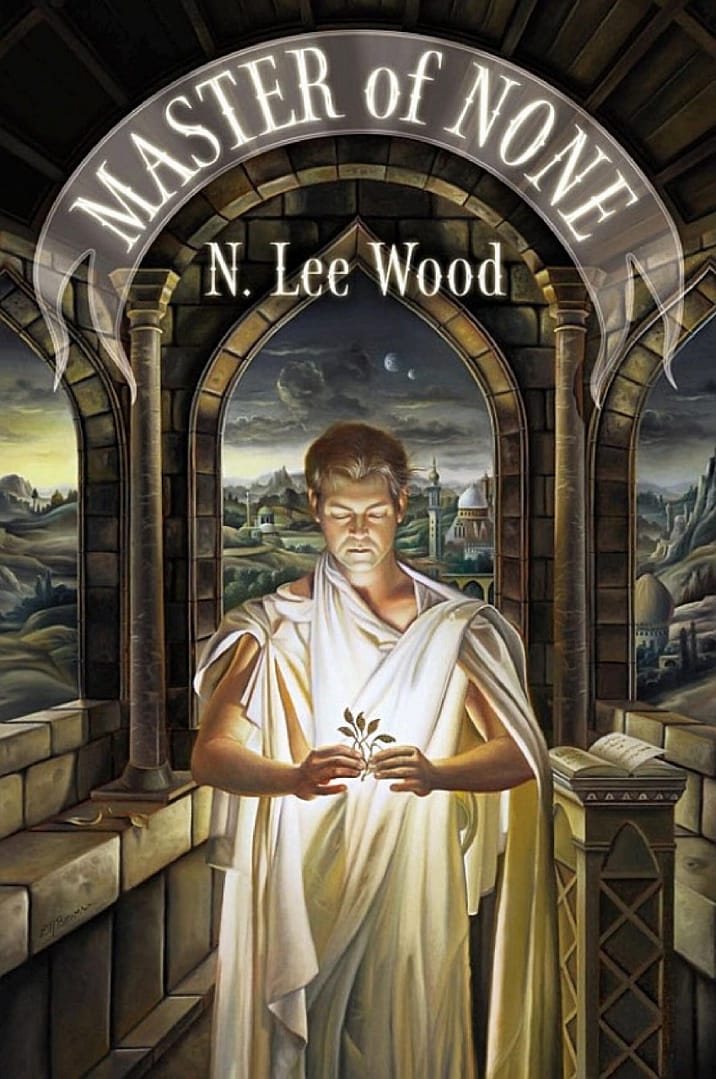
Bonni: [00:34:03] Now this is the point in the show where all three of us get to give our recommendations. Things that have been on our minds and have grabbed our attention in recent weeks. And for me it is a Netflix original series called Master of None. And this is a show created by Aziz Ansari and Alan Yang. And it tells the story of the personal and professional life of Dev who is played by Aziz Ansari, a 30 year old actor in New York.
Bonni: [00:34:34] And it’s one of those that is just such a fun look at life there’s a lot of themes around diversity. Azeez is of Indian descent and so there’s sort of some tension sometimes between his parents who are Indian and then women that he wants to date and whether or not they’re approved by his family. And there’s a lot of cultural differences that come up throughout the various characters. There’s professional things that come up about doing what you really love. There’s lots of ethical questions there’s travel there’s I mean it’s just a great great show. And for those of you that have never seen any episodes of master of none. There are two seasons that you will dive through in about two and a half seconds. We have to hope that there is a season 3 coming because I was so sad when it got over because like what’s going to replace that just it’s you know it’s like every episode made me laugh but it also made me think.
Bonni: [00:35:26] And his approach to educating us just about cultural differences was not one of shaming or guilt. It was done most frequently through humor and wit and insight. And I just I thought it was I thought it was great. It’s really well-written. The acting is not overdone it’s very subtle and it’s a really great show so I’m going to recommend especially for people who are in what we sometimes call summer. You know it’s just a kind of a fun break even if you’re not literally. Does we do anything fun this summer well. Oh yeah. Yeah it’s a nice little fun way to take a break during your day. Master of None. And I’m going to kick it over to Maria who I know has something for us as well.
Maria: [00:36:10] Well I do. Now I’m sure you’ve heard of Dualingo and this has been around for quite awhile which learning app and I you know had fits and starts with it I’ve tried to learn Spanish and you know I’d kind of go a little while and then just drop it.
Maria: [00:36:25] But I was recently just overcome with the fact that I’m the only one in my all Italian family who does not speak Italian and I was just so embarrassed by this that I finally decided to make a commitment and learn Italian view to lingo. Well here’s what I like about it. You know you can say the daily challenge for yourself you know 15 minutes a day or whatever it is you can you know specify that. I like that it reminds you every day that it’s time to do your Dooling go. I like that the feedback you get is is you know very present you get the sound cue when you get something right. You get a visual on the screen and it comes up. The little owl comes up and says you know great job or whatever it is in Italian of course it’s telling you this. And you know I just feel like they’ve done such a good job of just building in those cues and the incentives and the motivations and when you finally make that commitment to learn you actually can learn.
Maria: [00:37:22] And I was telling them right before the show that I’m surprised that they took an approach to kind of immersing you in the language rather than a typical sort of language learning program where you were you’d learn how to conjugate a verb and here’s you know all the different tenses and whatever they just kind of throw you in there and start you know speaking and you’re trying to figure out what what are they saying and they give you you know a couple of choices in things you choose but you really do learn that way and I wouldn’t have thought necessarily that it was a great approach but it is working. So I’m I’m impressed with it I’m using it and I’m learning. So I think it’s a win.
Bonni: [00:37:58] One of our relatives subscribed to highlights magazines for our kids and magazines.
Maria: [00:38:03] Do they still have Goofus and Gallant in there?
Bonni: [00:38:09] I think so but I’m not positive because I don’t know the names of all the characters. I’m going to have a name for that. But they have a little story every month that also has phrases in Spanish. And so I’ve been saying those to my daughter and trying to help her learn those although it’s just her. I’m not going to be recording her and playing those clips on this on the show anytime soon as evidence of her mastery.
Bonni: [00:38:34] But I thought like oh if I have a regret in life it’s that I never learned Spanish and how there’s something like this that’s still present for us. We don’t have to live with our regrets. We could dive right in. It looks great. You know in that instance I couldn’t sit on my mouse fingers. On my hands for that when I had to go check out the website because it’s not one that I’ve explored before it looks it looks fabulous in Spanish and French and German Italian Portuguese any language just yeah it just keeps going OK even off my screen all right. All right now we can pass it over to Ben now.
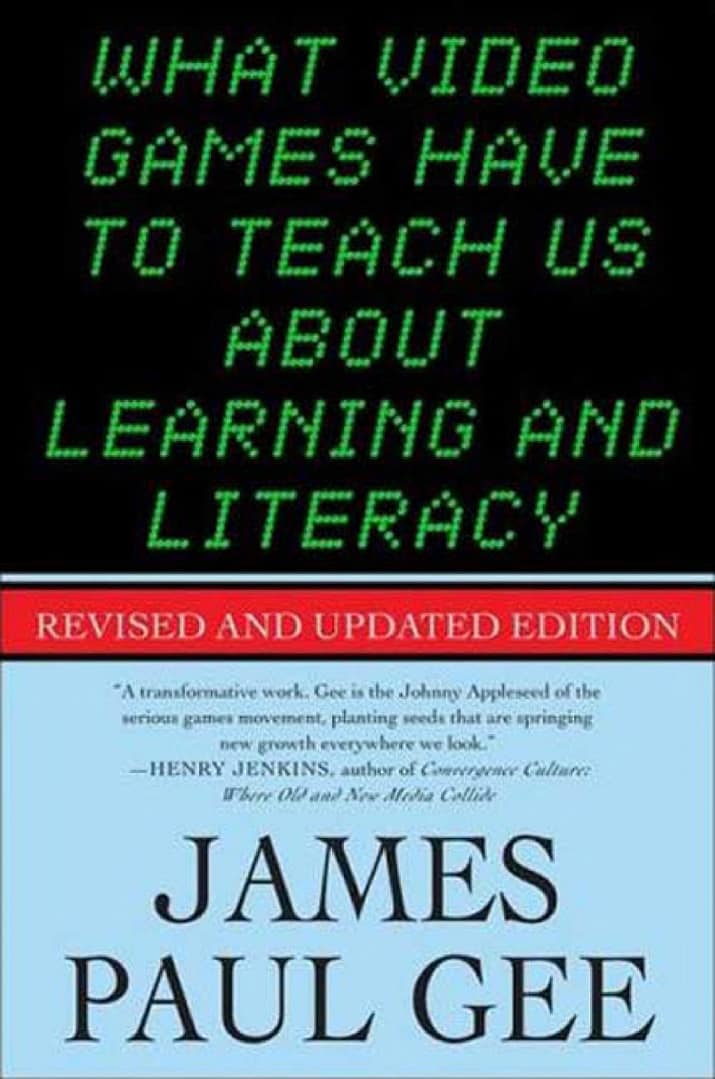
Ben: [00:39:03] Yeah well Bonni as you hinted at I’m a student right now. So I chose a book and as you may know for me at least as a student I don’t get to read for pleasure. But often my time gets pretty full of assigned reading so I have a book that was actually a sign for a course but that I really kind of fell in love with. And it’s called What Videogames Have to Teach Us About Learning and Literacy. This was by Professor James Paul Gee who’s a psycho linguistics faculty.
Ben: [00:39:32] So his take was really interesting it wasn’t what I expected because I mean I am a fan of both learning and videogames but when I think of educational videogames I think of these kind of like mechanical like math blaster’s kind of things where it’s like yeah. You’re like pretty colors and flashy things going on. But really it’s just trying to get you to cram through a bunch of math studying. And that wasn’t really the approach that he took in this book at all. Rather he was kind of asking the question you know what is it about video games that draws people in and increases the challenge and they scaled their skills with it and keep practicing and get really engaged with it and they become attached to characters and to stories. And what is it that we don’t do in schools. But they do do in videogames that gets people to just become super engaged with their learning in a deep way. So over the course of a couple of hundred pages he actually goes into I believe it’s thirty six principles of learning that he’s identified that are present in videogames that don’t really have anything to do with video games. When the theory behind them is drawn out and discussed that you could think about applying to your teaching inter-relationship with students. So it’s just a super fascinating book that I wasn’t really expecting to get so much out of but I can’t recommend it enough.
Bonni: [00:40:46] It sounds fabulous. I’m going to have that you guys both gave me something to check out for for the show. So thank you so much and I’m so glad to have had a chance to connect with both of you and thanks for coming on the show and investing your time and sharing all these great resources with the community.
Maria: [00:41:02] Thanks for having us Bonni.
Ben: [00:41:03] Thanks so much Bonni.
Bonni: [00:41:07] Thanks to Ben and Maria for coming on Teaching in Higher Ed and for sharing all these amazing tools with us. Reddit, Voice Thread, screencasting, Padlet and Genius so much we can go and follow up on and thanks also for your recommendations. If anyone wants to go check out the show notes for this episode. Make a comment let us know other ways that you’re using educational technology in your teaching. You can do that at teachinginhighered.com/167.
Bonni: [00:41:36] And if you have never left a review for the show before whatever service it is you use to listen if it’s Apple podcasts or something else. When you leave a review it not only touches my heart but also helps other people be able to discover their show so I’m just given that regular pitch that I have to go out there and leave a review so we can get other people join me in the teaching in higher ed community. Thanks for listening and I’ll see you next time.
Teaching in Higher Ed transcripts are created using a combination of an automated transcription service and human beings. This text likely will not represent the precise, word-for-word conversation that was had. The accuracy of the transcripts will vary. The authoritative record of the Teaching in Higher Ed podcasts is contained in the audio file.