Follow the Teaching in Higher Ed Podcast
About this Episode
Travis Thurston shares how to engage learners with digital powers on episode 295 of the Teaching in Higher Ed podcast.
The virtual classroom doesn’t necessarily signal to students how the interaction is going to take place.
Travis Thurston
On episode 295 of Teaching in Higher Ed
Voices on this Episode


Show Notes + Resources
- Digital PowerUps Scaffolds and Hashtags to Empower Higher-Order and Humanized Student Engagement in Online Discussions, By Travis N Thurston
- 5-minute Recap of Travis’ 2017 Presentation on Digital PowerUps
- Pumpin’ Up with Hans & Franz – SNL
- Renegade Leadership, by Brad Gustafson
- Young Girl-Old Woman Illusion
- Everything is a Remix
- Everything is a Remix: Part 3 – The Elements of Creativity
- Sample PowerUps
- Sample Discussion PowerUp Prompt
- Sample Digital PowerUp Discussion Post
- Sample Student Post with Create


Recommendations from this Episode
Article
Meaningful Gamification with Freerice by Travis N. Thurston
Resource
Freerice

Movie/TV
Making It
Transcript
[00:00:00] Bonni: On today’s episode of Teaching in Higher Ed, episode 295, Dr. Travis Thurston joins me to discuss online engagement through Digital PowerUps.
[00:00:13] Announcer: Produced by Innovate Learning, maximizing human potential.
[music]
[00:00:23] Bonni: Hello and welcome to this episode of Teaching in Higher Ed. I’m Bonni Stachowiak and this is the space where we explore the art and science of being more effective at facilitating learning. We also share ways to improve our productivity approaches, so we can have more peace in our lives and be even more present for our students. Joining me for today’s episode is Dr. Travis Thurston. He’s the assistant director of Empowering Teaching Excellence at Utah State University. Travis directs all instructional development programming and facilitates the ETE 10 professional learning pathways, micro-credentialing program to support instructors in evidence-based and reflective teaching practices. Travis is also a visiting professor for Digital Age Teaching at Universidad Casa Grande in Ecuador.
His research interests center on structuring and architecture of engagement for educational development through instructional development, instructional design, and instructional practice. With over a decade of experience as an educator in K through 12 and higher education, Travis holds a master’s of educational technology degree from Boise State University with a grad certificate in online teaching and a PhD in curriculum and instruction from Utah State University. Travis and his wife Jenny have four children, whose athletic and academic endeavors contribute to his perspectives on teaching and learning. Travis, welcome to Teaching in Higher Ed.
[00:02:05] Travis: Thank you so much. I’m happy to be here.
[00:02:07] Bonni: Let’s begin discussing some of the challenges that both of us have seen with those of us that teach online really wanting to engage our students. As online discussion boards, we’re so excited to have these conversations and then what barriers do we typically run into?
[00:02:24] Travis: I’ve been working as an instructional designer and instructor online for a while. One of the things we talked about that I like to talk about with instructors is this idea that came from a paper I read from Riggs and Linda talking about an architecture of engagement. Students, they know how to interact in our classrooms currently because the physical classroom or the architecture actually signals to them how they’re going to interact.
If they walk into a lecture hall, they understand those social norms that have been established. They’re going to be sitting there and they’re going to be listening. Whereas if they come into a small classroom with chairs set up in a circle, that signals to them, “Okay, this is probably going to be more interactive and this is going to have more of– I’m going to have to be more of an active participant in this situation.” As we’re creating the architecture of our course, as we’re creating that structure, we have to make some of those expectations explicit because the virtual classroom doesn’t necessarily signal to students how the interaction is going to take place.
They may have had some experiences in the past where an online discussion comes across more as a question that’s been posed by the instructor and then all of the students are asked to answer it. We wouldn’t do that in a face-to-face classroom.
[00:03:53] Bonni: We also wouldn’t tell them, “All right, so now that you’ve answered my question once each of you rather robotically please go reply to three other students’ comments. [laughs] It needs to be at least 300 words and it needs to make–” What is some of the other requirements? I see 300 words–
[00:04:11] Travis: Citation.
[00:04:12] Bonni: Yes and then needs to add new ideas to the conversation. It feels very transactional. In fact, I took a professional development course, about a year and a half ago and I was so irked by that because they did the same thing and also I’m thinking, “I paid to do this class, I clearly have a desire to learn this. This is not something I’m doing because I “have to” and yet you’re applying those same really rigid, very transactional rules to me.” It just makes me bristle and I know it has to make our students bristle because they really do get confronted with it more than I think we might hope.
[00:04:48] Travis: Absolutely. Along those lines, there’s three things that we see that are often challenges. We see that we’re not engaging our students to higher-order thinking. That comes with the way that we’re phrasing questions. We’re asking one question and expecting one answer, perhaps. So we’re not moving students if we’re thinking about Bloom’s taxonomy. We’re not getting out of the remember and understand lower levels and reaching up into those higher application and higher-order levels.
We’re also not allowing for the co-construction of knowledge and reflection, where they’re actually engaging in discourse. It’s this social constructivist perspective, where the idea that the students interacting is the learning, or it’s at least part of the learning that’s going on in the classroom. Then third, of course, especially in an LMS, with discussion posts, oftentimes, the most quality posts end up getting buried in the threads and the students don’t see some of perhaps the better discourse that’s going on. Those are three inadequacies, three challenges that we often see with online discussions.
As I was preparing to teach a new class, I had these things in mind as I came across really just this idea in one of the textbooks that I was reading for the class I was going to be teaching. I guess a little bit of context there, like this class is for K12 in-service teachers and the topic of the course is diverse learning strategies, different ways to engage our students. Then the textbook that I was reading that I was going to have the students engage in, mentioned this idea of Digital PowerUps as a way to engage students in some of these, which actually addresses some of these challenges that we see. At first, my inclination was, “I need to tell my students about this.” [laughter]
I need to tell them about the strategy. I took a step back and thought, “Wait, why don’t we actually try it out? Let’s try this out in our class and see how it works. That’s what actually led me to trying out this idea of Digital PowerUps in an online discussion.”
[00:07:09] Bonni: Let’s break down the term PowerUps. I think most of us will know what you mean by digital but PowerUps, it sounds like a workout to me. Are you working us out here, Travis? [laughter] Are you going to get pumped up?
[00:07:22] Travis: We’re going to pump up to this higher order elements.
[00:07:24] Bonni: [laughs] A little Saturday Night Live reference from I think the ’90s, possibly, I just made there. I don’t know. I’ll see if I can look it up and put that in the show notes. [laughs]
[00:07:33] Travis: Hans & Franz, I think. Pumpin’ Up.
[00:07:35] Bonni: I’m definitely going to be including that because people don’t want to miss the Saturday Night Live reference. [laughter]
[00:07:41] Travis: Absolutely.
[00:07:42] Bonni: Yes. I love it. PowerUps, what does that even mean? What is a Digital PowerUp?
[00:07:48] Travis: That’s a perfect question. This originally came from Brad Gustafson in his book, Renegade Leadership. The reason he’s using the term PowerUps is because he actually used digital badges as the different levels for the students to engage in. I adapted it from digital badges and rather than using badges, I actually used hashtags. A very basic definition of a Digital PowerUp is a hashtag that’s a keyword that ties to a level in Bloom’s taxonomy. The hashtag itself is like a Q. It’s our keyword or our tag that’s identifying this level in which we’re engaging in the discussion.
[00:08:39] Bonni: Can you give us an example of a hashtag that might be used?
[00:08:43] Travis: Yes. The very basic one would be #remember. That’s this lower level of Bloom’s and the hashtag or the keyword is associated with a prompt in your discussion. When the students see #remember, the prompt that is tied to it is list or restate something you just read, then add an opinion to your response, a very basic prompt. Typically what we see in online discussions. One thing that I did with the Digital PowerUps is I made sure that I had each of those listed in every week of the discussion to remind students what the cue or what the powerup was and also the associated prompt.
[00:09:29] Bonni: Let’s back up just a moment. There might be some people listening who haven’t heard of Bloom’s taxonomy, so could you walk us through that and then some of the hashtags that you use for each of the pieces of the taxonomy?
[00:09:41] Travis: Bloom’s taxonomy is this idea that there are varying levels in which we can engage in learning or what’s described as the cognitive process dimension. That starts with remember and understand at the bottom, so remember would mean, I’m retrieving a relevant piece of knowledge or something from the long-term memory. This is tying back to some of these learning sciences. Remember is that retrieval. Understand is where the student is starting to construct some meaning. They’re understanding a larger concept, something of that nature. Then you would move up to #apply. That’s where we’re actually trying something out.
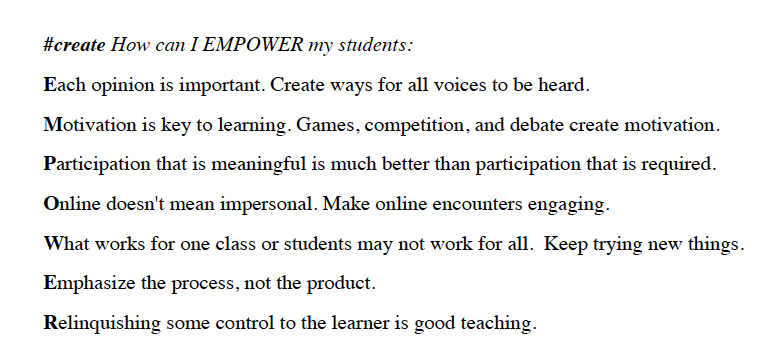
With my students, a #apply would be we talking about a learning strategy, and then they actually try that out in their class. Analyze then moves up into– Actually, analyze and evaluate go into this more critical aspect. This starts moving from this application into this higher order where we’re really critically thinking about what this is and the consequences that are associated with this concept. Then we move all the way to the top, what we call this higher order which would be like create, where the students are then taking some knowledge, some basic understandings, or some concepts and then actually creating their own deliverable or their own experience for their learners.
[00:11:09] Bonni: I will mention to listeners that the Bloom’s taxonomy I have heard criticized back and forth. I think sometimes people find it to oversimplify learning. If I’m remembering correctly, speaking of remembering. One of the things I saw was we should start with create instead of starting with remember. I tend to, on most of these things, be somewhat in the middle that I can see that might not be the perfect approach for all types of learning. One thing you’re reminding me of now is, I’m teaching a business ethics class, and we do tend to get into some pretty heavy topics in this class. Rather than just starting out with the analyze and evaluate and getting into some debates, specifically, in this case around issues of discrimination based on different protected classes. Rather than go right on what their opinions are about that, let’s just start with do they even understand what some of these concepts are and get them comfortable using a set of vocabulary. Then we can actually analyze and evaluate and have those heavier conversations. I’d just rather them be equipped to have them.
I started out the first class, many people will have seen this picture. It’s done all over the place talking about communication and perception really. It’s a picture that you can see two faces in, you can see a face of a really young woman but if you look at another part of the picture, you look at it with a different lens, then you see an older woman who’s looking down. I’ll put a link to that in the show notes in case there’s one person listening [laughs] who hasn’t seen it. That’s because most of my students had already seen it but there were a couple who it was new for.
I liked introducing that idea to them so that they could understand that in a lot of these cases, there’s going to be discussions where there isn’t a right or wrong answer, but that we could appreciate what each other had to bring of differing perspectives. I think I’m going to bring that picture with me for future discussions, and if we get into those kinds of heated debates or whatever, I can get to hold that up and just remember there are more than one way to look at this situation. I don’t know if you’ve ran into those criticisms around Bloom’s taxonomy. Perhaps you can speak about it more intelligently than I just did.
[00:13:16] Travis: No. That’s a great thing to point out. I think one of the things we run into with Bloom’s Taxonomy is it’s oftentimes portrayed as like a pyramid. With remember as the base and create clear up at the top is this little portion. You’re absolutely right that we shouldn’t fall into that trap of thinking that we need to start with remember and build up to create. A lot of times, engaging students in what we would call maybe a naive task, where they haven’t actually been exposed to this information or this concept yet, but we’re pushing them into an inquiry or a space where they can engage in some discovery on their own, can be really valuable. There’s all sorts of pushback with Bloom’s oftentimes because of the way in which we decide to implement it.
[00:14:11] Bonni: Yes. I thought I’d just mention it, but it is used extensively in K-12 and if there was someone teaching in that context or trying to equip themselves to teach, you wouldn’t want them not to know about it as well. [laughs] That’s a good thing that you’re using that where they can get regular practice and understanding how they might construct their own classes using the more active verbs that are inside of Bloom’s taxonomy.
Take me into one of your classes. I want to picture it in my mind because I would be used to going in and seeing some kind of a discussion board, and I’d be used to seeing a series of titles for discussion prompts and then like we mentioned earlier I’d see some criteria that you have to have so many words you have to, “This is how you’re going to get graded on this.” Give us the picture of what your class looks like if we come into it.
[00:15:01] Travis: Yes. That’s a good point to make. When I have the students come in week 1, we first start out by getting to know each other with an icebreaker. The discussion starts with sharing an inspirational video that’s associated with teaching. I introduce the Digital PowerUps that week and that very first week, I model what that looks like in the discussion thread. When you’re actually looking at the posts you see, for example, a #create and if I created a video that week talking about the concept, I would do #create and then I would post my video with it.
[00:15:50] Bonni: When I as your student see that #create, that’s my cue to know that I’m going to be expected to create something?
[00:15:57] Travis: Yes. I’m glad you asked that. An important aspect to this as well is that we’re providing students with some choice. That first week when I introduce it, I give them the rationale like, “This is why we’re using Digital PowerUps and this is the value that it can add to our discussions.” For me it’s really important for our learners to know why we’re having them engaged in something. It’s that expectancy value. Do they also see the value? Then I also introduce choice. Within the seven prompts, these seven PowerUps, the students choose two to three of those each week in their initial post. What that provides for me– It also changes the way that we start the discussion. Instead of just asking one question, I instead introduce a concept or talking about some of the readings from the week and tell them in the initial prompt what that sparks for me, what comes to mind when I start reading those things, and how that applies to our content. It’s not necessarily a question. That’s how the PowerUps come into play.
I introduce the concept and then the students pick two to three of the PowerUps as entry points into the discussion, which provides some really interesting variation because the students are coming at the prompt or the initial discussion concept from all sorts of different angles. Then I also prompt the students to use one or two PowerUps in their comments to their peers. What that does is instead of saying– I think we’ve all seen this where the students respond like, “I agree,” or, “Thumbs up. That’s so great.” What that does is it actually really encourages that back and forth discourse and some of that co-creation or co-construction of knowledge within the threads.
[00:18:02] Bonni: Could we talk about a specific thread and then how the replies might bring back in the Digital PowerUp, so maybe a remember or understand prompt that you might use and then how people might reply with their own Digital PowerUps.
[00:18:16] Travis: Sure. A great example is from that course that we’ve been discussing. In one of the weeks, I actually tell the students– It’s actually at the very end of the class. All right, so we’ve been doing Digital PowerUps all semester. I tell them, “How do we reinvigorate online discussions for our students? What are some experiences you’ve had and how have you seen online discussions work well and how have you seen them not work so well?”
Of course, we have some readings that they’ve been engaging in associated with this topic. A student would then take that remember hashtag, and they would say, “#remember. I really enjoyed the reading this week because it pointed out specifically that I don’t always go through a metacognitive process when I’m looking at reading because I’m usually just thinking about how am I going to find the right answer. Whereas when I use the Digital PowerUp strategy, I start thinking or start approaching the discussion in a very different way. I’m thinking about how to apply and how I can use this in my own teaching.”
[00:19:25] Bonni: Then I might reply to that as a student and say, “#apply. I actually tried this on my online class and here’s where I struggled a bit and still have some questions and would love to hear others advice on some of the struggles I ran into or celebrate their success.”
[00:19:41] Travis: Then the next student would comment, and they’d say, “#create. I created this great deliverable. It’s a graphic organizer, so the students can start thinking through some of their ideas before they actually post in a discussion.”
[00:19:55] Bonni: Now, normally when we talk about hashtags, there may be people listening who aren’t necessarily as familiar, so Twitter is a social media where a lot of it’s built around hashtags. It’s a pound sign and then you might be looking for people who do hashtag. Digital literacy is one or DigLit for short. You can find certain topics. Instead of just finding people that you want to learn from, you can also find topics that you want to explore on social media such as Twitter. Now, are the hashtags within the learning management system, do they serve any purpose in terms of, “Could I search off of them?” I mean, are they purely just trying to get them used to– Like, a way of identifying that this is a thing versus just a simple word? I’m really not asking this question very well, but I think you’re going to know what I mean. [laughs]
[00:20:44] Travis: I think I know exactly what you mean, Bonni.
[00:20:47] Bonni: I’m thinking too, because I remember some people criticizing certain LMSs which I think both you and I used the same one, at least in some contexts, that doesn’t allow for a lot of search. That’s making me wonder like, can you search inside these discussion boards?
[00:21:01] Travis: In LMS we use, that’s not a thing. You can’t search for hashtags.
[00:21:05] Bonni: Kind of have this feeling. [laughs]
[00:21:09] Travis: For us, we found a workaround. If you want to find the remember hashtags this week, we’re going to do a Control F or a Command F on our keyboard and search the term, so that became a workaround for us. What that also did is for students, and this came out– I did a number of anonymous surveys with my students too to get their insights. They started using the #remember, on things that they wanted to be able to go back and find like, “This is a key thing that I want to make sure I remember.” They actually started using the PowerUps in ways that I hadn’t anticipated. It became something of value for them.
[00:21:49] Bonni: That is interesting, although they would run into some limitations if the thread wasn’t expanded. For example, maybe if it’s buried somewhere in week seven and you’re not on week seven, it’s not like is going to cascade across all of your weeks of discussion board, so there would be some limitations just within the LMS.
[00:22:05] Travis: It’s true. Absolutely.
[00:22:07] Bonni: I’ve taught on three different LMSs in the last two or three years, and I can say it. I think they all have this limitation if I’m not mistaken. Now, I’m laughing because here come the tweets and the emails about how wrong I am right now. Bring it on. I’m ready. I’m ready to be corrected but yes, though, Canvas and Blackboard, I do not believe have the search term. I think it’s a limitation at least of both of those.
[00:22:29] Travis: I think you’re right there. One thing we did as well, because we know one of the challenges with online discussions is those quality posts do get buried in the threads.
[00:22:38] Bonni: Yes, tell us about this.
[00:22:40] Travis: I utilized a feature in Canvas. It’s kind of a two-part feature. One is, you can like a post. You give it a thumbs up. The second is sort by likes. I introduced this to the students at the start of the semester, and I told them to approach the likes in a way in which their like, because they’re going to only like one post, is kind of like a currency. You’re putting your stamp of approval on one post each week. Each student will like the post that they thought was the highest quality each week, and then Canvas counts those up and then sorts or organizes the posts by most likes to least likes.
Our most quality post as determined by the students each week would float to the top of the thread. I incentivize that with the student who ended up earning the most likes each week, would earn a bonus point so that was kind of a fun thing. Also, one of the things that came out in the surveys with the students is it also made them feel very accountable to their peers in the course like, “I need to make sure that I’m actually really contributing, because not only do I want to have the highest quality post, but I don’t want to feel like I’m letting my peers down.”
[00:24:02] Bonni: I have not used the like feature very much. I know that it’s there but I’ve seen other examples even where it’s not necessarily which one did you like the most but it even could be you could vote on things this way. If you wanted to have students in a discussion board propose [crosstalk].
[00:24:18] Travis: The vote-up idea?
[00:24:19] Bonni: Yes. I’m thinking about this business ethics class I’m teaching, of course, because we tend to relate these things to ourselves, but there’s never enough time to explore all of the Applied Business Ethics topics that we possibly could. I could see asking students to propose which ones that they would most like to explore a little bit deeper than the class affords us. We could do two or three or something like that. Then let that voting process give the students a voice.
Kind of like that same accountability thing you just said, they’re going to go, “She actually cares. She’s responding to the things we most want to learn in this class.” I’ve talked before on the podcast about the tension between having everything laid out in the beginning, all your learning outcomes. Very scripted, very rigid but to the other extreme, there’s some that just say, “Hey, what do you want to learn?”
I feel like I need to be somewhere in the middle where there’s some predefined goals because it’s part of a broader overarching goal of the whole program or the whole major, but then also leaving enough room where we can go down rabbit holes when we discover new things we’re curious about. It’s always so different based on– Especially when you’re teaching upper-division classes or in a master’s or a doctoral program.
[00:25:32] Travis: I love that you said that. In fact, I would call that being autonomy-supportive in your approach. You’re providing options for your students, these are different areas so that there’s structure. You’re saying these are the topic areas that we’re looking at, but then you’re providing that choice and that autonomy for the students to explore and see what they think that they’re most interested in and allows them to be agents of their own learning.
[00:25:59] Bonni: What have been some of your students’ reactions when they’re first introduced to the idea of doing this, and then they get to get their feet wet and start to experiment with Digital PowerUps in their learning?
[00:26:11] Travis: I’ve had really positive experiences with my students. I’ve also helped a number of other instructors, over a dozen other instructors tried this out with their classes and they have had mixed results. Some students kind of push back and say, “I don’t understand why we’re doing this in this class,” and some students push back on this idea that– One of the ideas with Digital PowerUps is that we’re pushing students from those lower level– Remember, understand up into the higher-order thinking ideas, and students will sometimes push back and say, “Well, it makes more sense for me because I’m just trying to understand this. I’m trying to learn this information. I’m not really trying to apply it.” That’s led to some interesting conversations with both students and instructors on how we can adapt this strategy to fit different content areas and to fit different student needs.
[00:27:10] Bonni: You’re really matching together well the theory and I want to let listeners know that there will be some links that Travis has provided us in the show notes at teachinginhighered.com/295. If you’re going for a walk right now, or driving or taking the subway. I will repeat that link again at the end of the show, but you’ve given us a lot if we want to follow up and learn more. Parts of your dissertation and a wonderful recap video.
We’ve got a lot if we want to start experimenting, but it’s really grounded in theory, but it’s a way of taking that theory and then putting it into practice. Like you said, you really do have to be willing to be playful and experiment and see what’s going to work within a given group of students and a given topic. I can see this especially with the class you’re talking about teaching. You’re really modeling for them a very important aspect of their teaching and thinking because many of the difficulties with parts of our educational system is that we spend way too much time on memorization and the standardized test. You’re really helping them in a more playful and engaging way experiment beyond just things we memorize and having things that just have right or wrong answers.
[00:28:26] Travis: Absolutely. For me, there’s this really interesting documentary from back in like 2010 called Everything Is a Remix. The producer talks about the elements of creativity as copy, transform and combine. Copy is this idea that we can’t do things well until we become fluent in the language of our domain. That’s emulation, that’s looking at some evidence-based teaching strategies, seeing what others are doing in their classrooms and then trying to copy it, trying to duplicate it in our own class. Sometimes that’s helpful but oftentimes, it’s helpful to transform or combine some of the things we see into the context that makes most sense for our content and for our students.
[00:29:16] Bonni: I really enjoy that too because copying is often the first part of learning. That’s wherever you go, it doesn’t matter what level you’re teaching at. If we’re new to something, we need to start by remembering and understanding and yes, copying. Thank you for that example. I’ll put a link to that in the show notes as well. Before we get to the recommendations segment for today’s episode, I want to thank our sponsor.
TextExpander has been sponsoring Teaching in Higher Ed for a couple of years now. They really help me unlock my productivity, and they can help you do the same. It lets us manage everything that we type repetitively, things like e-mail addresses, phone numbers, common replies and more. It saves it all in its app and lets me type in just a few characters, they call it snippet and as soon as I press the space bar, it expands out to whatever was hard for me to remember. Or things that are harder to compose like letters of recommendation, or I can even use TextExpander for teams and be able to manage snippets for an entire organization, or an entire team. To get the consistency, the professionalism and make sure that we’re communicating well with the people that we serve. TextExpander’s available for Mac, it’s available on Windows, on Chrome the browser and on the iPhone and iPad. I’d like to encourage you to visit textexpander.com/podcast which will get you 20% off your first year.
I’ll just ask that you make sure and mention that you heard about them through Teaching in Higher Ed. Thanks so much, TextExpander for supporting Teaching in Higher Ed and thanks for giving me such a great tool to keep enhancing my own productivity. This is the time when each of us gets to give our recommendations. I have one I have been feeling guilty lately because on recent episodes, I have recommended some entertainment that had rather adult themes and now I have one that is friendly for the entire family. It does not matter the age. So here we go. I’m so excited about it and my daughter Hanna loves it too and it’s a television show called Making It.
Making It is reality TV in all of the best things that it has to offer. It’s a contest type of show with host Amy Poehler and Nick Offerman, and they’re so much fun. What they do is every show has a little mini project where they get something like three hours to build something. One episode, for example, was to build a three-dimensional invitation to a party. Oh my gosh, the ideas– I don’t want to give too much of the show away because I recommend everyone go and watch this with the whole family. It was just wonderful because when you think of invitations that usually wind up in the trash and these were invitations that you could actually see being a part of someone’s life, for many, many years to come.
A lot of them made them practical, too, that you could actually use beyond the purposes of just being invitation.
[00:32:11] Travis: I love that.
[00:32:12] Bonni: It was so great. Then the second challenge for that same episode, they’re longer ones and so they let you build upon something. Building upon the invitation, they actually had them make a party. What kind of backdrop would you have and if yours is going to be like a photo booth or something at the party, and then is there a refreshments table? What would be at the refreshments table? How would it be decorated? It was so much fun.
Then they do have somebody who goes home at the end of every episode. It’s always just so sweet because they’re just so glad to have been on the show and they all become friends. They help each other if they’re running out of time. It’s just the best of what teamwork has to say and the puns are delightful. Amy Poehler and Nick Offerman, they’ll do pun competitions with each other.
[laughter]
I’m so curious, I wish I could see some behind the scenes to know how much of that is impromptu and how much of that was scripted because they’re hilarious. My daughter Hanna loves to watch it with me, and actually the family was out visiting a while back. The inlaws and everybody just love this show. It’s kind of universal so I suggest that people go check out Making It. It is on Hulu and originally aired on NBC. I’m hoping that they will have season three because we have already watched seasons one and two, and we’re just waiting to hope there will be another one. I’m going to pass it over to you, Travis, for your recommendations.
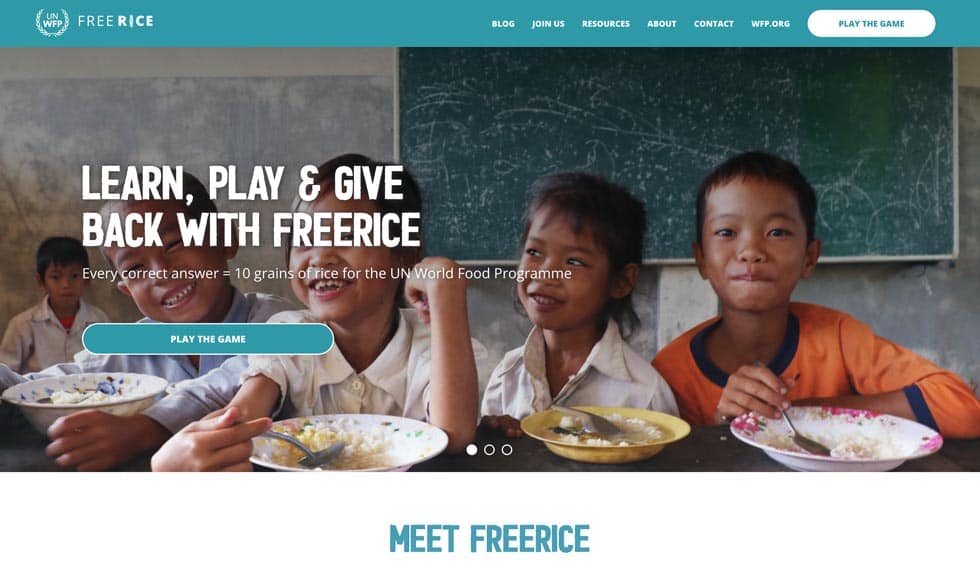
[00:33:33] Travis: That sounds so great. I wrote that one down. I want to check it out. I’m really excited to share this one with you, Bonni. This is called FreeRice Have you heard of FreeRice before?
[00:33:44] Bonni: It’s been a long time, I didn’t even know it was still around.
[00:33:47] Travis: It’s amazing. It’s so great. Okay, it’s sponsored by the World Food Program and it’s this quizzing game. They have different bings of questions from the humanities to the sciences, all these different things. For every correct answer, they put 10 grains of rice in this virtual bowl for you. What’s so fantastic about this is that the grains of rice that you earn in the game actually are donated through the World Food Program to communities and individuals that are in need. You get to play the game, you get to have fun, trying to earn as many grains of rice as you possibly can, and you are also helping them make a difference in the world.
[00:34:30] Bonni: It’s the best of all world. I feel like when I saw it, it was literally maybe 10 years ago possibly. Then you just clicked on things. [laughs] When you clicked on something, maybe you got some rice. I don’t remember the quiz element, that sounds so much fun. It’s asking me magnanimity means and then I give the answer and if I get it right, then I’ll get some free rice.
[00:34:49] Travis: Yes. They have like a web-based version and they have apps now in the App Store and GooglePlay as well. Speaking family-friendly things, my kids love playing this, but I have also implemented this into my classroom in different ways. One of the funniest things I have done is you can also create groups with FreeRice. I will create different groups for may different classes, and then my students join the group, and then we kind of compete between classes to see which class can earn the most rice.
[00:35:20] Bonni: That’s amazing. It really has come so far since I saw it all those years ago and what a fun thing. I had no idea you can make groups and it looks amazing. So inspirational, thank you for this one. No one has recommended that. [laughs] All these years doing the podcast, all these years of FreeRice. We got great recommendations, you got Making It and you got FreeRice. Travis, thank you so much for coming on Teaching in Higher Ed. It’s been a delight. I was telling, we actually had some technical difficulties as we were getting started today, so we got to catch up maybe more than we might normally before an interview. We’ve met in person twice now. I’d met you probably four or five years ago or something.
[00:35:58] Travis: That’s true.
[00:35:58] Bonni: In fact, I remember the first presentation I saw you give was about choose your own adventure within an element– I was just so inspired. I’m still not up to even where you were back then. [laughs] It’s always good to have people that are stretching you. Then the second one I saw was on Digital PowerUps. You’re just someone who is so innovative and so encouraging to your students and really want to engage us, and I consider myself one of your students, so thanks for coming on and sharing today.
[00:36:26] Travis: Thank you so much. It was my pleasure.
[music]
[00:36:31] Bonni: Thanks once again to Dr. Travis Thurston for joining me on today’s episode of Teaching in Higher Ed. That is teachinginhighered.com/295. If you want to see the links to find out more about Digital PowerUps and the other things that Travis and I spoke about, including that Saturday Night Livereference to Hans and Franz Pumpin’ Up. Sorry, I couldn’t resist. If you have to hear about my book, please go over to the website teachinginhighered.com, scroll down a little bit and learn more about other ways besides TextExpander to increase your productivity. I’d love it if you check out the book and have a read. Thank you so much for listening, and I’ll see you next time on Teaching in Higher Ed.
[music]
[00:37:25] [END OF AUDIO]
The transcript of this episode has been made possible through a financial contribution by the Association of College and University Educators (ACUE). ACUE is on a mission to ensure student success through quality instruction. In partnership with institutions of higher education nationwide, ACUE supports and credentials faculty members in the use of evidence-based teaching practices that drive student engagement, retention, and learning.
Teaching in Higher Ed transcripts are created using a combination of an automated transcription service and human beings. This text likely will not represent the precise, word-for-word conversation that was had. The accuracy of the transcripts will vary. The authoritative record of the Teaching in Higher Ed podcasts is contained in the audio file.