Follow the Teaching in Higher Ed Podcast
About this Episode
Bonni Stachowiak shares her top ten tools for learning, and the seek-sense-share practice behind them, with Dave Stachowiak on episode 637 of the Teaching in Higher Ed podcast.
One of the nice things with the premium version of Overcast is you can upload any audio file to your account and it will show up on your podcast app, ready to play.
Dave Stachowiak
On episode 637 of Teaching in Higher Ed
Voices on this Episode


Show Notes + Resources
- My Votes for the 2026 Top Tools for Learning, by Bonni Stachowiak
- Overcast
- Libby
- Reading Libby Books in the Kindle App
- Readwise
- Unread
- Obsidian
- Raindrop
- Zotero
- Zoom
- Said Saddouk, The Facilitainer
- Virtual Facilitation Masterclass
- SessionLab (affiliate link)
- WordPress
- Kit (affiliate link)
- Teaching in Higher Ed Field Journal
- Inoreader
- Harold Jarche’s Personal Knowledge Mastery (PKM)
- The Seek, Sense, Share Framework
- Personal Knowledge Mastery Workshop
- Jane Hart’s Top 100 Tools for Learning
- Jane Hart: Profiles in Knowledge, by Stan Garfield
Recommendations from this Episode

Person
Sunita Sah

Person
Maggie Appleton
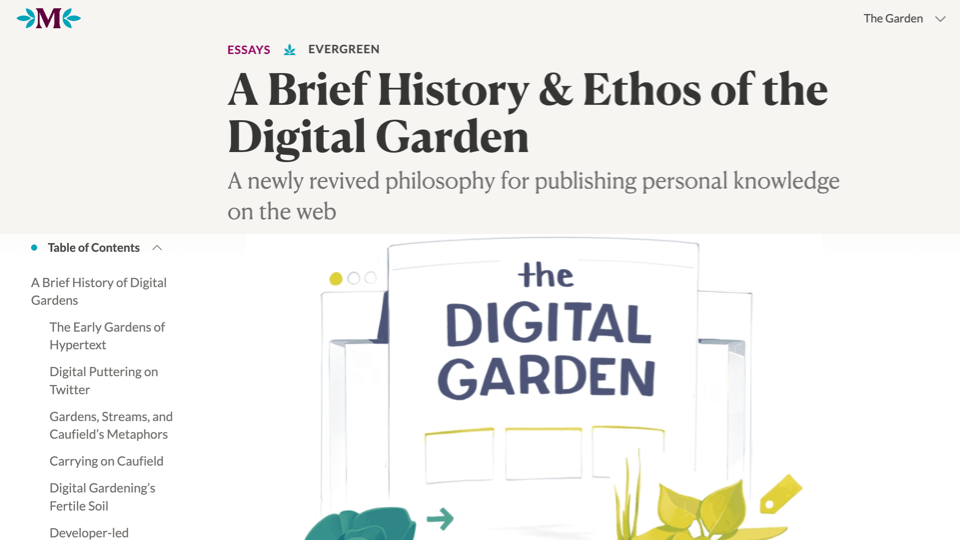
Article
A Brief History & Ethos of the Digital Garden

Person
Harold Jarche
Person
Bonni Stachowiak
Technology
Open Audible
Transcript
Dave Stachowiak [00:00:00]:
Today on episode 637 of the Teaching in Higher Ed podcast, Top Tools for Learning 2026. Produced by Innovate Learning, maximizing human potential.
Bonni Stachowiak [00:00:18]:
Welcome to this episode of Teaching in Higher Ed. I’m Bonni Stachowiak, and this is the space where we explore the art and science of being more effective at facilitating learning. We also share ways to improve our productivity approaches so we can have more peace in our lives and be even more present for our students.
Dave Stachowiak [00:00:46]:
Welcome to Teaching in Higher Ed. I’m Dave Stachowiak, Bonni’s partner and host of my own podcast, Coaching for Leaders. And I’m sitting on the other side of the microphone today just to join in and say hello. And we have a fun topic today on top tools for learning that Bonni has been tackling for a number of years in various formats, both here on the podcast and on your blog. Hello, first of all, hello to your own podcast. Welcome to your own show.
Bonni Stachowiak [00:01:12]:
Why, thank you, Dave. I’m so glad that we get to talk about this today because we’re both going to get to geek out. It’s not just going to be me, even though I wrote the blog post here. As you can well tell throughout this whole conversation, we could have a lot to say, but we are going to try to behave ourselves.
Dave Stachowiak [00:01:28]:
We are going to try to behave ourselves, and there are a whole bunch of tools here that I use myself, which I’m guessing is one of the reasons I have shown up as a guest and been invited, because it’s very relevant to the tools you and I both use. And I know that a number of people listening will have interest in a number of these tools as well. And some will be familiar and some will not. So that’s going to be a ton of fun. All right. So before we get into it, Bonni, how do you approach this list every year? Because you’ve been doing this a while.
Bonni Stachowiak [00:01:54]:
I have been doing it for a while. And frequent listeners to Teaching in Higher Ed will know that I am a huge freak about streaks. And I have broke my streak before. I’ve missed a year or two, but most years I’ve written them up. And one of the things I always do is make my top 10 without looking at the prior year’s list. And I did that this year, and sometimes things carry over and sometimes they don’t. So I always write the top 10 without looking. And then I also consider how the list fits into my personal knowledge mastery framework.
Bonni Stachowiak [00:02:29]:
And I draw that framework from Harold Jarche’s work where He describes personal knowledge mastery as us going and seeking out trusted information, making sense of that information, and then sharing it, or at least having it be shareable. And that’s a part of our sense-making process. And so Dave and I are going to be breaking our list up into seek, sense, and share. And we’re going to begin with tools that I use and Dave uses for seeking.
Dave Stachowiak [00:03:02]:
Okay, our first one is an app that maybe some people have heard of, but I’m guessing most people do not use, and it would be an app you’d be using to listen to this podcast. It’s a podcast app called Overcast. The 3 most popular podcast apps are Apple Podcasts, Spotify, and a lot of people listen on YouTube these days because YouTube supports audio podcasts. But we both use another app that’s less well-known, but we both prefer it. It’s called Overcast. It is on iPhone only, so if you’re an Android person, this won’t be applicable to you. It is a free app. However, it has some premium features that I don’t remember how much it is, Bonni, $15 or $20 US a year or something like that.
Dave Stachowiak [00:03:41]:
I would say there’s 2 things about Overcast that I personally love and use all the time and make it worth it for me. Well, I’ll say 3. One of them, playlists. It makes it so much easier to customize playlists. If you listen to a lot of podcasts as we both do, I have an incoming playlist on my Overcast app so I can then look at everything that comes in and I can decide if I want to listen to that episode and then I file it into priority and I have audiobooks. I have different playlists for different kinds of things because I think a lot of us are in different kinds of moods depending on where we are, if we’re working out or doing dishes or on the road, of the kind of things we like to listen to. So Overcast makes that super easy. The other great thing about Overcast, the second thing I love, is that it has Smart Speed.
Dave Stachowiak [00:04:22]:
So built into the app, you can turn on Smart Speed and it will just ever so slightly take out the small pauses that are between the words and sentences that people say on the podcast, especially if it’s a voice podcast, and you never notice it. And yet it saves hours and hours of time every month because it has a way of just like taking out those tiny, tiny things.
Bonni Stachowiak [00:04:46]:
In very smart ways.
Dave Stachowiak [00:04:47]:
In very smart ways.
Bonni Stachowiak [00:04:47]:
Hence the name SmartSpeed.
Dave Stachowiak [00:04:49]:
Hence the word SmartSpeed. And the other thing that I like, this may be a little more specific to me and you, but both of us review lots of audio, audiobooks, all kinds of things I’ll mention later. But oftentimes I’ll get an audio recording of something, but it’s not a public podcast, I want to be able to listen to it and review it. And one of the nice things with the premium version of Overcast is you can upload any audio file to it, your account, and it will show up on your podcast app. And so I like listening to recordings. Sometimes I will listen to recordings of meetings or whatever that I want to listen to if I’m out on the road or doing exercise. It is really lovely for that. So it’s just 3 of the wonderful features that are part of Overcast.
Dave Stachowiak [00:05:30]:
So something to check out if you’re If you’re happy with your podcast app, great, but if you’re a little geeky and you’re kind of like, huh, I’d like to like have some power features, it’s one to check out.
Bonni Stachowiak [00:05:38]:
Our kids had a real hand in me having this next one in the list this time, and that is Libby. If you’re not familiar with the Libby app, it is often associated with your public library, how you can check out both eBooks and audiobooks. And something that our son encouraged us to do, and at least 3 of the 4 of us have done, we now have library cards at 2 of our local libraries. In our case, it’s the Mission Viejo Library, which is more of an independent library, and then also the Orange County Public Library System here in Southern California. And it’s been great. And one of the things that I also learned— this has more to do, I suppose, with the library, but no, it’s through Libby, Dave— is that I love where I can put books on hold because sometimes there’s long lines for popular books out there. But then if they up and they’re ready to go, I’ll get an email and say, oh, this book’s ready for you. If I’m not ready for it, I can hold my hold.
Bonni Stachowiak [00:06:43]:
Basically what that means is, say, I don’t have to go all the way to the end of the line again. I can just kind of step aside, you know, like you’re in the grocery store and you’re like, oh no, please go ahead of me just while, while I’m waiting until I’m really prepared to read it within the checkout time. And I really like that a lot. So Libby is fantastic. And related to reading, is the Unread app, and I’ve talked about it before. What it does is it feeds into a very pleasant reading structure, a reading ecosystem if you will, all of my RSS feeds. So I’ve gone and subscribed to people’s blogs and to websites and news sources and all sorts of things all flowing into my RSS reader, and The thing that I love about it, and this is the joke that is so corny that doesn’t make anyone laugh except me. Who has 2 thumbs and can use Unread with just one of them?
Dave Stachowiak [00:07:43]:
Uh.
Bonni Stachowiak [00:07:45]:
All of us. It’s really cool because you can just swipe with your thumb. Like, so you could, you could be scrolling with your thumb and then tap to go into a story and then swipe to come out of it. And I see no other apps that can do that. So hypothetically, if I were reading in bed with my iPad, which some people would say is really not the best sleep hygiene, but let’s just say hypothetically I did that. I could be laying on my side and completely controlling this entire app with a single thumb.
Dave Stachowiak [00:08:13]:
Yeah, if you’re gonna try, you are very funny in so many ways, but I don’t think that’s probably the joke to try at your standup comedy routine.
Bonni Stachowiak [00:08:22]:
Yeah, if I follow someone’s advice before on this podcast who suggested that we take an improv class, that shouldn’t be in my set, my first set.
Dave Stachowiak [00:08:29]:
That’s probably not in your set, no.
Bonni Stachowiak [00:08:30]:
All right, so Dave, I have a question for you. I know you also use Unread.
Dave Stachowiak [00:08:34]:
I do.
Bonni Stachowiak [00:08:35]:
And why does a reader for you still fit in your PKM system when so many other people just kind of rely on the algorithms or news apps that kind of serve it up for them?
Dave Stachowiak [00:08:47]:
Well, the simple answer to that question is I don’t use social media hardly at all except LinkedIn. So I don’t have a place where algorithms tend to surface news to me unless I’m on LinkedIn or just looking at the front page of the Wall Street Journal or the New York Times or whatever. So that is one reason. The other reason I subscribe to things on Unread is it’s things I don’t want to miss. It’s from people like you, for example. I have your blog on Unread. I don’t always get to it right away, but I don’t want to miss stuff or at least want to know that it’s there. Even if I choose not to read something, I want to see the headline.
Dave Stachowiak [00:09:19]:
So I might ask you about it or we talk about it even if I didn’t read the whole thing. So that’s it. And also I use Unread with newsletters. So when newsletters come into my inbox, one example is our kids’ school sends a weekly update both for their specific class ages and then an update for the entire school. I don’t like getting that in my inbox during the day when I’m working because inevitably I don’t want to stop and read it then, but I do want to read it. So I just have a rule set up where it automatically forwards into unread. And then a couple times a week when I go through unread, then I can read all of the updates from school or whatever. So anything that’s like that kind of a thing that either people I really enjoy their writing or I have a personal connection with or something I definitely don’t want to miss, But I don’t necessarily want in my inbox.
Dave Stachowiak [00:10:03]:
All that stuff for me goes into unread as a subscription in some way.
Bonni Stachowiak [00:10:07]:
We’re now getting into the sense portion of personal knowledge mastery, and Dave, I have you to thank for this next one. That is Obsidian. Obsidian is a note-taking tool, and it’s a lot like note-taking tools that listeners may have used before with one distinct difference, and that is instead of us getting locked into an ecosystem, for example, any of you that may have used Evernote, Evernote back in the day, all of your notes were caught up in Evernote, and if you wanted to get them out, it was not impossible but certainly took some time, and they didn’t always flow over with all of the exact formatting that you might be accustomed to. Instead of having it live inside of the app, all of the files that get created while I’m using Obsidian live on my computer as plain text files. And that way, it’s essentially like opening up a window to be able to view the notes, but not having them be stored inside of that app. It’s just a view into these plain text notes. And often when I’m describing it, and back when Dave used to describe it, I said that I owe this one to him. He would talk about this forever, like the benefits of plain text, benefits of plain text.
Bonni Stachowiak [00:11:27]:
And I’m always like, but I love my colors. I love things in rainbows. I love all the bright colors and I love highlighting. I love images. I take tons of screenshots. So when he would talk about it, I would always think like, well, that, that may be good for him, but, but I need something else. Well, let me tell you that plain text isn’t quite as plain as it sounds because there are very easy-to-use ways of indicating via text to point to an image. So let’s say, for example, I was attending one of the MyFest 2026 Equity Unbound sessions, which I’ve done a lot of during the middle of the year 2026, and I’m just taking tons of screenshots and then going over to Obsidian.
Bonni Stachowiak [00:12:12]:
Anytime I paste a screenshot into Obsidian, I see a screenshot, but what gets saved is a text-based pointer to that screenshot that gets saved in a folder. All that happens behind the scenes. I don’t have to worry about it, but it’s just really nice because then all those files are really, really tiny. They can be easily read, and they’re also fairly future-proofed because it’s not like if a system— I’ll say one example too is Microsoft Word, at least as of this recording, is pretty notorious if you copy something from Microsoft Word and you try to paste it into something else. All sorts of fiddly little formatting codes and things that you don’t necessarily want to carry over with you come over, and so plain text It is nearly impossible to tell you all of the benefits to Obsidian. It is one of those things you can get started with very basically, and then the more you learn, the more you know, and the more you can use it, and you can totally geek out. And then you can be like me on YouTube and have almost every video that gets served up to you be about creating a second brain in Obsidian and really geek out on it. But you don’t have to.
Bonni Stachowiak [00:13:23]:
You can start real small and grow into it if you choose. Yeah, I think that’s a great point.
Dave Stachowiak [00:13:26]:
Sounds like a public service announcement. The more you learn, the more you know. The more you know, the more you learn. Something like that. Whatever you said.
Bonni Stachowiak [00:13:32]:
Yep.
Dave Stachowiak [00:13:32]:
Okay. Our next one is Raindrop, and we’re both fans of this next selection. Raindrop is a service that allows you to save your bookmarks from the web into a nice library database, basically. And you can set up an account. And this one, I don’t recall if there’s a free version. I know we pay some small amount a year. It’s $20 or $30. It’s not a significant expense, but it is the reason we do is because we use it a lot.
Dave Stachowiak [00:13:59]:
And not only do we, at least I use it for myself personally, anything I find on the web that I want to bookmark, come back to, have database somewhere, but I also then share it with folks who listen to my podcast. I have a whole system. You can keep things private, you can keep things available. So I have that as part of our free membership on Coaching for Leaders. And the backend of my own personal library is run by Raindrop. And so people can access that and be able to find like all the things I’ve tagged and found over the years that have been helpful and it is really great and it has apps and extensions and browser things and all that that make it really easy to track stuff down and find it and database it.
Bonni Stachowiak [00:14:35]:
I want to make sure that people didn’t miss that Dave gets to have part of what he wants to share be public, but then there’s, you just set up every collection, they’re folders essentially, every collection you can decide are they, by default they’re private, but I have one that’s public for every single thing I ever bookmark that has to do with artificial intelligence. People can subscribe to that via their RSS feed. But that’s the only collection that I currently have as publicly available. So you really have full control over how much you want to share or how much you want to keep private. I am excited about these next couple of ones. I’m getting ready to teach in our master’s program in organizational psychology. While I did teach for nearly a decade in a doctoral program, I’ve actually never taught in a master’s program before. Not only am I thrilled to be able to teach teaching this program for the first time, but I’ll be teaching students for whom it is their first class in their master’s program.
Bonni Stachowiak [00:15:38]:
And there are 2 tools that I’m very excited about leveraging as a part of that. The first one is Zotero. Zotero is a references manager, and Dave and I have been around long enough to know what it looks like when you try to write a thesis or try to write a dissertation without a references manager. And I can tell you, and so can Dave, that that is There’s no way to live. So I’m going to be very— I’m going to challenge the students and also give them high support, high support and high challenge to say, we’re not coming out of this class without us being really, really well-versed in using Zotero. And I’ve just been flooded with ideas of how to do that in a fun way, because the other job that I have in this class that is just— I feel like if you’re going to start a program and you’re teaching in that program, it’s really, really important to do is just spark their curiosity. So as I’m having us go through every week all these different activities to spark our creativity, then it’ll be, oh, okay, grab that reference, grab that source, so they can just become real fluent and it’s just as natural as could be. And then the second one is Zoom.
Bonni Stachowiak [00:16:48]:
So it is an online synchronous course. And in 2026, I completed Saeed Saduq’s Virtual Facilitation Masterclass. And what a blast! He is an incredible online facilitator, and among many things that I learned was OBS, which is open source software that allows me—it’s Dave—it cracks me up. It’s kind of like I’m I’m able to be kind of a video studio person. I also have a stream deck, which has buttons all over it, and so I can just push buttons, and it’s like I’m in a TV studio, and all of a sudden I’m sharing my screen, and I look like one of those late night. talk show host with my slide deck off to the side so students can still see me, but they also could see the slides. But if they really need to see the slides and I want it to fill the whole screen, I just push another button and all of a sudden it’s filling the whole screen. And if it’s a break time, I have another button I can push and it’s got a countdown timer.
Bonni Stachowiak [00:17:48]:
And one of the things that Saeed recommended was he likes to leave his camera on but turn his sound off so that students can still tell that he’s there, because otherwise he feels a little bit like a creeper. I’m not sure that’s I don’t know if that’s the word that he used, but just like, if you’re actually there, he likes students to know that he is there, but it’s break, whatever. So anyway, I learned so much, and I’m really excited about using Zoom in an entirely new way than I’ve used it before, and excited about putting those new skills to use. And then it’s not on my list of top 10, but it is in the blog post. I’m also excited about continuing to use SessionLab for the class planning. Plans that I have, and SessionLab just basically helps you keep time on what your agenda is. You can color code things so you can tell whether an activity is— are you doing too much talking? Do you have enough activities built in? Is there enough variety? And you can share those plans in a more narrow way, so you could just do a quick agenda that’s color coded too. It’s fabulous, so I just wanted to recommend that as kind of a couple of things very near and dear to my heart as it relates to this upcoming teaching that I’ll be doing.
Bonni Stachowiak [00:19:06]:
And now Dave and I are moving into the share portion of PKM.
Dave Stachowiak [00:19:10]:
We are both heavy users of these next 2 selections on the list. One of them is WordPress. Both as people who read stuff on the web, WordPress still drives— I don’t know how, what percentage of the internet, but it’s some crazy percentage like 30 or 40%, something like that. It has been for a long time, and It powers both of our websites. It’s a great platform for being able to get started, but also to build upon. And there’s so many people out there in the WordPress ecosystem that are developers and experts that we have, I think, both been extremely happy that we started on that platform years ago when we started, and everything we do is all still hosted and uses WordPress as our backend for our websites. And the, one of the reasons we’re thinking about it is it has, of course, tons of functionality built in, blogging articles and all that. Bonni’s been doing a ton of writing this year.
Dave Stachowiak [00:19:58]:
And speaking of personal knowledge mastery, that is something you’ve been writing about a lot. So that is on the Teaching in Higher Ed blog. So you can go up there and find the articles that are recent. And there is a redesign happening right now, actually, of the teachinginhighered.com webpage. And depending when that happens and when this airs, we will see how far along that is. And so at some point, folks are going to see a slightly different version of colors and logo and all that stuff.
Bonni Stachowiak [00:20:28]:
I was gonna say there’s nothing slight about this.
Dave Stachowiak [00:20:31]:
It’s noticeable, but it’s not— it’s a little bit of a movement. It’s not a departure. It’s just different.
Bonni Stachowiak [00:20:38]:
Well, Dave is saying that because Dave has just seen the colors. The colors are somewhat different, but the entire website has— well, by the time people see it, have been burned to the ground. and brought back up.
Dave Stachowiak [00:20:50]:
Well, there you go.
Bonni Stachowiak [00:20:51]:
Yeah.
Dave Stachowiak [00:20:51]:
Okay, well, I’m ready.
Bonni Stachowiak [00:20:52]:
Lots of changes. Yeah. Yep. We have been neck deep in it and it’s exciting for when it comes out.
Dave Stachowiak [00:20:58]:
So WordPress, always a good tool if you’re looking to start a website or looking for functionality. The other tool that we use a lot of is Kit. Kit is an email service provider that allows us to send out broadcast messages. I think most people know that once you get beyond Yeah. Sending email to 5 or 6 or 10 people within your organization. If you’re sending— if you have a newsletter or something like that, you should be using an email service provider for all kinds of reasons, deliverability, compliance, all that, all that. And we use Kit and we have for years because Kit is a company that is really all about the independent creator. And a lot of the other email service providers out there are targeted at small to medium-sized businesses.
Dave Stachowiak [00:21:39]:
They tend to to have a lot of feature bloat, they tend to be more expensive. So Kit just fits with us both financially, but also philosophically of their work. And they also have up to, I think it’s now 1,000 subscribers, they have free accounts. So if you are getting a newsletter started, and I think particularly for someone who is doing maybe some consulting work on the side or speaking, and you are building your own brand, a 1-2 combination of WordPress and Kit is a great place to start as far as getting your word out, and Kit is a great place to begin with. And by the way, we are affiliates of Kit and SessionLab. So if you decided to purchase anything through the links that are on the show notes, that helps defray some of the costs that we have for our production. But like I said, the Kit one is free until you get to 1,000 subscribers. And if you get to 1,000 subscribers and have to pay something, that is a very good problem to have because that means people are paying attention to what you’re doing, and that is something you would want to invest more money in.
Dave Stachowiak [00:22:32]:
So there you go. There you go.
Bonni Stachowiak [00:22:33]:
All right, the last item both under share and also in the top 10 is Inoreader. And Dave and I talked earlier about the Unread app, which is for consuming all of the different RSS feeds that have come in, but it’s right there in the name, Unread, as in it’s a reading app. Well, what serves up the content into the reading app, in my case, is called Inoreader. And it is known as an RSS aggregator. And what aggregators do is they easily let you subscribe to RSS feeds from lots of different places on the web, and then it’ll keep track of which stories you’ve already read or which videos you’ve already watched, etc., etc., and that’ll sync all across whatever devices and whatever reading applications you might use in order to consume that. It’s incredibly easy to get started with InnoReader, and then it’s kind of your creativity is your only limitation there as far as what it can do. You can— I enjoy subscribing to my YouTube channels right inside of InnoReader, so all my YouTube videos come through there. I don’t actually have to go into the app to always watch them, and it again keeps track of which ones I’ve watched.
Bonni Stachowiak [00:23:56]:
I am not a huge fan of Substack and its ways that it’ll try to suck you in to have to download its app and have to read stories inside of its ecosystem. I like a lot more of an open web scenario where we’re not locked into different platforms like that. So I use Inoreader to create special email addresses that feed into my feeds. And I have one that’s around thinkers, people that I follow that I respect for being good thinkers, or is it digital pedagogy, or as I mentioned earlier, is it AI? And so I can subscribe to the different newsletters using those custom email addresses, and they flow straight into my Inoreader, and it makes that just such a lovely thing. I’m just skimming the surface as far as the features. It is an excellent, excellent service, and just like really all the ones I’ve mentioned, easy to get started with. And then the more you learn— and we’re back to that loop again—
Dave Stachowiak [00:24:56]:
the more you learn, the more you know, and then you learn more, and then you know We warned people this was going to be geeky, and when you were talking about your email address for your feed to go into your feed, that’s where, yeah, it gets pretty geeky. Some people we have lost at this point, but some of the people who are like super geeky are like hanging on to every word now because they’re like, ooh, how do I set that up? So go to Inner Reader and you could check it out. Yeah, some cool, cool options of things you could do with it.
Bonni Stachowiak [00:25:25]:
Well, when I was preparing With my top 10 votes for the annual Jane Hart’s 2026 votes for the top tools for learning, Dave, I discovered something surprising. This is her final year. This is the 20th year and her final year of doing it. Her bio on LinkedIn mentions that she is semi-retired, and there’s a wonderful tribute, which I have linked to in the show notes, from someone named Stan Garfield. If you’re not familiar with Jane Hart’s work, she’s got quite a number of decades as a resource for people in workplace learning and in personal knowledge mastery. It’s worth a look at that post. Here’s the invitation to listeners, but it’s one of those— the time is ticking. This episode is set to air on Thursday.
Bonni Stachowiak [00:26:25]:
August 27th, 2026. And that is the deadline for you to vote in the top 10 tools. So if you happen to listen to this in the morning and you want to spend a little bit of time, you don’t have to write a blog post, by the way. You just go fill out the form. It’s fairly quick to do. They do ask you to vote for 10 though. That’s the limitation so that the voting is more fair otherwise. And if you’re too late though, not to worry.
Bonni Stachowiak [00:26:50]:
You could still, by the way, still write a blog post if you want to just reflect on that. But then the results of all of the votes will be available available on Monday, September 7th, 2026. So watch for those results to come in, and I’ll also of course share them out on the podcast and also in the Field Journal, etc. This is the time in the show where we each get to share our recommendations, and I’m going to begin this time. First, I want to recommend a post by someone named Maggie Appleton called A Brief History and Ethos of the Digital Digital Garden. I am fascinated by the idea of a digital garden. I was mentioning earlier in the conversation about the external mind. There’s all these different ways of describing our sense-making efforts and how we can go and seek and make sense of and then share information.
Bonni Stachowiak [00:27:45]:
And this is a wonderful, wonderful essay that has quite an evergreen quality to And talks about how we might distinguish in our minds between a garden from a blog. A blog would be more chronological, and a garden, as you can imagine, kind of changes over time. Sometimes we need to weed things back, and sometimes we need to plant seeds. It’s a wonderful post. It’s also very visual, so I would encourage you to go check it out and see that information. And I also just want to suggest following the work of Maggie Appleton. She’s a designer, she’s an anthropologist, and she makes visual essays about programming, design, and anthropology. I find her fascinating, and she would be a wonderful person to follow if you’re interested in personal knowledge management.
Bonni Stachowiak [00:28:37]:
And of course, we shouldn’t end this episode without mentioning Harold Jarchi, who I have learned so much from. over more than a decade now about Personal Knowledge Mastery. I use his framework. I had the wonderful privilege of being able to attend his Personal Knowledge Mastery workshop in the tail end of 2025, and I understand he’s going to be running his last Personal Knowledge Mastery workshop. He also says he is semi-retired, so this is it. I mean, End of— it’s October, I believe, October of 2026. So if you’re listening to this before October of 2026, check that opportunity out because I learned a ton and would highly suggest following Harold Jarke’s work.
Dave Stachowiak [00:29:27]:
Okay, so I have 3 recommendations. Speaking of personal knowledge mastery, you have also been writing a lot on it recently and are featured on your own site, of course, under one of the topic areas. Of personal knowledge mastery or management, whichever one you prefer. You can use both, I guess. So I would recommend a whole bunch of the recent articles you’ve written, which are on the website. So go to teachinhard.com. You’ll find them pretty easily. We’ll have them linked in the notes, of course.
Dave Stachowiak [00:29:53]:
The second recommendation I have is Sunita Sah. Sunita is the author of a book called Defy: The Power of No in a World That Demands Yes. She recently released a TEDx Talk, which is excellent. And she has been on both of our podcasts, Bonni. And speaking of productivity, one of the ways you become more productive is deciding what you need to say no to, as we all know. And what I really appreciate about her work is that she talks about the science behind that and the research behind defiance in like when you are doing something you really don’t want to do, but also just in the everyday stuff of like, how do I say no? in a professional, appropriate way. And one of the things that I’ve learned from her is that it is very much defiance as we think about it. We often think about defiance as a spontaneous thing, and almost never is it spontaneous.
Dave Stachowiak [00:30:43]:
It’s a process, as you hear throughout history. And she has so many amazing examples that she’s researched and looked at in her work. So Sunita Sawh, definitely recommended her TEDx talk, one of the episodes. We’ll link to them or her book, whichever one is—
Bonni Stachowiak [00:30:56]:
Or the episode on teaching in higher ed or the episode on coaching for leaders. You can tell we’re huge fans of her work.
Dave Stachowiak [00:31:01]:
You could go Wherever you want and track her down. And then the final one, this is again a little bit geeky, but I think it probably speaks to a problem that others have had. We’ve had this problem in our family. We have the very good problem of our kids getting older and doing more things, and which is really fun. And our son now is 14 years old and our daughter’s 12, and they— especially he— has gotten into audiobooks in the last couple years in a big way and reading books on Kindle and all the good things. The not-so-good things is that Amazon used to have a teen account that you could set up if you had a family or you had Amazon Prime, you could set up a teen account. And that has gone away apparently. If you had one and got one before it went away, you have it still.
Dave Stachowiak [00:31:45]:
But for new accounts, like if your kid becomes a teenager, I forget if it’s 13 or 14, they don’t have that anymore. So you and I have Amazon Prime. So we have our Amazon family set up, but you cannot add anyone beyond a couple. So even though we’re in the same household as our kids, Bonni and I both get our— we have our Audible accounts linked and our Amazon accounts linked. So if one of us buys a book, we can share it with each other and Audible works that way. But unfortunately it does not work that way with kids. So which means you are left with one of two options. Either you have your kids log into on their device if they have one, which he has a phone now because he’s going into high school.
Dave Stachowiak [00:32:22]:
So you could have them log into your Audible account, But that sort of doesn’t work because then they’re seeing all your notes and your bookmarks and it’s saving the spot where you were reading. It doesn’t really work to share accounts like that. Or the other thing is you have to buy the book again. So I did some thinking of like, how do we work around this? And it turns out there are a couple of interesting pieces of software out there. And one of them is called OpenAudible. It’s been around for a number of years and I’ve been using it now for the last 6 months or or so. What you can— I think there’s a free version. I did end up deciding to pay for this because we’ve been just using it a bunch and supporting the developer.
Dave Stachowiak [00:33:00]:
You hook it up to your Audible account and it downloads audiobooks into OpenAudible, and then you can save them as MP3s or M4Bs. I can’t remember the other format for audiobooks, but then it is DRM-free. It has a way of removing that. Speaking of Overcast earlier, I then take the audio and I can upload it to Overcast. I can upload it to our son’s Overcast account. and because he has one too, and then he— we can all listen to the same audiobook and we can share it within our family. I do want to point out we are not, and no one is sharing things outside of our family. It is— I just sort of think though, if you buy a book, you should be able to share it with your kids without having to buy the book again.
Dave Stachowiak [00:33:38]:
So anyway, OpenAudible has been a very cool piece of software. It is on all the platforms that has allowed us to do that with audiobooks and share them. And if you’re willing to get a little geeky, it is a great way to be able to share books within your family. And so there are other If you’re wanting to get in this world, there’s some other apps that do this too. So you could do an AI search and find other things that are comparable. But anyway, something if you are in the same position as us and have teenagers and they like audiobooks, check it out.
Bonni Stachowiak [00:34:08]:
That’s it for today’s episode. Today’s episode was produced by me, Bonni Stachowiak. Thanks to Dave for acting as host today. And also Thank you. And also to Andrew Kroger for your wonderful editing skills as always. And I want to encourage if people haven’t signed up for the Field Journal, this is your opportunity to head over to teachinginhighered.com/subscribe. And what you’ll be able to receive every week is information about the most recent episode, but also what did I read that last week? What did I try? What did What did I wonder? What did I note? And it’s just a wonderful way for me to share a rather eclectic collection of things and also invite you to reply to the question of what I wondered. I’ve been having such a good time interacting with you.
Bonni Stachowiak [00:34:58]:
Thank you so much for listening, and I’ll see you next time on Teaching in Higher Ed.