Follow the Teaching in Higher Ed Podcast
About this Episode
I share the second in a two-part series about my participation in the Tools4Learning annual survey on episode 386 of the Teaching in Higher Ed podcast.
It really helps me to take a step back and reflect on the tools that I value and that I might be able to get more benefit from.
Bonni Stachowiak
On episode 386 of Teaching in Higher Ed
Voices on this Episode

Show Notes + Resources
- Jane Hart’s Top Tools for Learning 2021
- Top Tools for Personal Learning
- Top Tools for Workplace Learning
- Top Tools for Education
- Zoom | Education | Web conferencing
- Canva | Workplace Learning | Graphic design creator
- Blubrry | Workplace Learning | Podcast hosting
- Google Jamboard | Education
- Loom | Education | Screencasting
Recommendations from this Episode

Idea
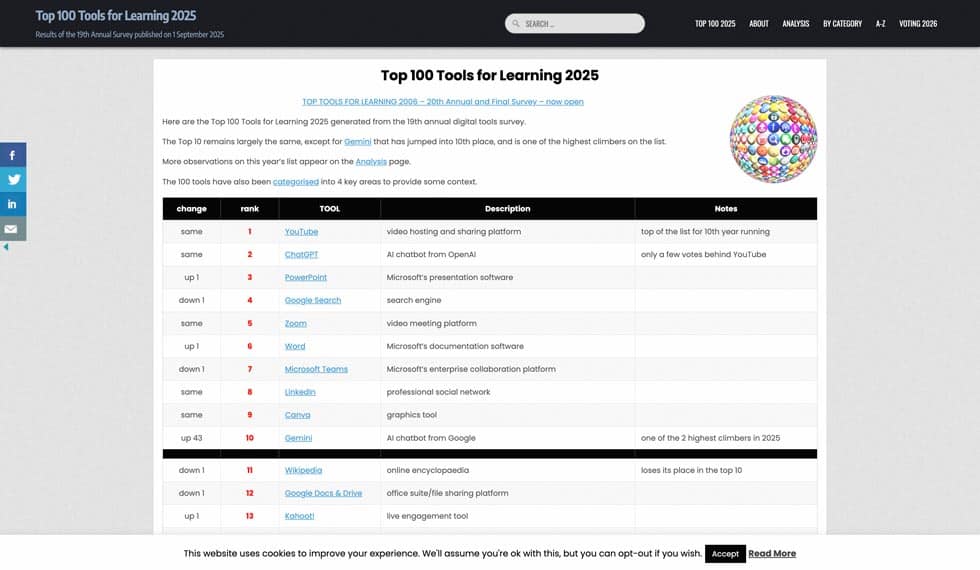
Vote Top Tools for Learning
Resource
Browse: Top Tools for Learning
Transcript
Bonni: Today on episode number 386, I share about my tools for learning. This is the second part in a two-part series, although you can listen to them in any order, or just listen to one or the other of them.
Production Credit: Produced by Innovate Learning, maximizing human potential.
[music]
Bonni: Welcome to this episode of Teaching in Higher Ed. I’m Bonni Stachowiak, and this is the space where we explore the art and science of being more effective at facilitating learning. We also share ways to improve our productivity approaches, so we can have more peace in our lives and be even more present for our students.
Thanks for joining me for today’s episode of Teaching in Higher Ed. I’m beginning the second part of a two-part episode about my tools for learning, but the nice part is you don’t have to have listened to part one, you don’t have to listen to both parts, you could just pick one or the other, or listen to both. Today’s episode is based on a post that I wrote, which was my participation in Jane Hart’s Top Tools for Learning 2021. She does this every year, and in recent years, it’s expanded so much that she looks at tools for personal learning, tools for workplace learning, and tools for education. If you’re anything like me, these distinctions, all the lines between them get blurred, and because I just find it great to be regularly, daily, minutely engaged in both teaching and learning, and workplace and nonworkplace, and all that good stuff.
I’d like to begin today by sharing about a tool that I know many of us use, and that is called Zoom. I know that with the pandemic, most of us have probably heard of Zoom and used it. I used it well before COVID hit us. What I have found over time, is that it really is fairly easy for people to get started with, it handles lower bandwidth situations, so much of the time with ease, and it does continue to innovate while not diminishing its ease of use. I have really found Zoom to be an essential part of my personal learning, my workplace learning, and my teaching.
Another tool I’d like to recommend today is called Canva. Canva is a graphic design creator, that’s at its most core, that’s what it was built to do, although it also has some video elements now and blends some of its tools. What I really like about it is it’s a fairly easy way to get our ideas into a visual format that has a lot of extensive tools and templates within it. I use it both for the podcast, my personal life, and also in work, so it blurs across multiple contexts and roles that I play in my life.
What I like about it when it comes to working with teams or working in an organizational format or even in my teaching, is that we can put different logos and color schemes up there, and with a paid account, you can have up to five members on your one paid account, and so each person can be creating graphics that have some consistency across them in terms of colors, fonts, photos, et cetera, and it’s just a really well-done tool. I use it on almost a daily basis, again, across all of those roles. My kids also now sometimes will use it for portions of their homework, if there’s something that they need to create, they enjoy doing that a lot as well.
A lot of people ask about podcasting and what tools I use in creating a podcast. One of the essential things that podcasters need is what’s called a podcast host, somewhere to host your audio files that will distribute them across the various services on the internet such as Apple Podcasts, Spotify, et cetera. If you have a podcast and you want it to be able to be listed among the various platforms and services, you’ll need a podcast hosting company. Blubrry is the one that we use, and there’s a little bit of unique spelling on that, so it’s B-L-U-B-R-R-Y. Teaching in Higher Ed, this podcast has been a part of my life since June of 2014, and it’s contributed more to my learning than any other single effort I’ve taken since then. I’m very grateful for the opportunity that I get to interview such incredible people and to get to share it with people like you.
The next tool I’d like to share about is called Google Jamboard. There are a lot of tools like this where you can have essentially a group sticky note. I use sticky notes a lot. I’ve blogged about using sticky notes in my teaching, and so it’s just taking those sticky note ideas and putting them in a digital context. You can collaborate on sticky notes and simple drawings and text, and you can have people invited to join you via a link. If I was giving a Zoom session, for example, I talked about using Zoom a lot, I could put a link to my Google Jamboard to a particular board, and people could add to it, could contribute to it, and join me there. It’s really fun to be able to do that both in meetings and in classes and even just as getting ideas out of our heads.
The last tool that I’d like to share about today is called Loom. I have been using Loom a tremendous amount in my teaching, and also just in my basic communication with friends, family, and in the workplace. Loom is a screencasting application. There are a lot of them out there like this, there really are, and I don’t even necessarily think you have to pick an exact one, but just to have a tool like this in your life, which I always considered to be like a grownup version of show and tell.
We can screencast and we can show whatever we’re showing on our computer screen, we can choose to also have our face showing up there. If we got a webcam, we could have our face in the corner, we can even drag it around to where that little circle shows up. They have all kinds of things. I don’t really use them, but you can change your background on there, I think you can wear a hat on there, I can’t even remember, but there’s just fun playful things that you can do if you want in terms of the webcam and how you’re showing up. You could actually fill the entire screen just with your face, so it could be a quick way of just capturing a video of you talking and sharing that way.
Whenever I have a quick thing I want to show someone, I’ll just record my screen, and I’ll copy a link to the resulting video with a single click and then I can paste it in an email, I can paste it in the learning management system, I can also embed it. What embedding means is rather than someone having to click on a link to the video and separate it from wherever they are, it can actually show up embedded in a web page or embedded on the learning management system so they never even have to leave in order to watch one of those quick screencasts.
What’s good about this particular screencasting tool as opposed to other ones that you might use, and like I said, there are some that do the same thing I’m about to share really well, that is that you record your video, and then it’s instantly available as a link that you can copy and then paste somewhere. You don’t have to spend a long time waiting for it to finish uploading, and then when the person watches it, they don’t have to wait to download it to their computer and then have to play it that way.
The fact that the video lives on their servers is a really nice thing, and rather than me using it as much, although I continue to use Loom on a daily basis, but now I’ve really brought it into a lot of my teaching. Students all install Loom either in their web browser, such as Chrome, or even just on their computers. I use it on my Mac, but it’s also available on Windows. They can show and tell. Rather than having them write a paper, which would be a silly thing to assign for– the class I’m teaching is a productivity class, so rather than write a paper about how you learned to use whatever it is approach in the books we’re reading or in the approaches we’re learning, they can actually show me that they’re using those practices.
It really gives an incredible connection that we can have a conversation that just occurs in an asynchronous way, as in back and forth across many iterations of an assignment or as they’re building up a set of skills. Well, I’ll give you an example there, were reading the book Getting Things Done in that class. It’s a personal leadership and productivity class, so they learn how to create what’s called a someday/maybe list. They go and I’m having them use a website called Trello.
Trello is like a little set of index cards you can sort and list things out, and so they’ve got a someday/maybe list that’s broken out into categories like books they want to read or movies or TV they want to watch or places they’d someday like to visit or ideas they’re having or technology they want to try, all that good stuff. Rather than, again, write a paper about the someday/maybe list, just show it to me. They pull up their screen, and I can see their faces, and I can see what– because they also, by the way, add their own categories that they want to track, and their personalities really come out and they’re able to have more authentic assessment around actually making use of something called a someday/maybe list.
Loom has really been important to me, again, because it is across multiple platforms. They have a free version of it that anybody could use, but those of us that are educators with an EDU email address or our students can have a paid version for free. You can use Loom Education and it can– once they verify you, they’ll upgrade you to one of their paid accounts, which gets you a little bit longer recording times and that sort of thing.
The other thing about Loom that’s nice is you can watch things, like I talked about with podcasts on the first part of this series, you can watch things at a faster speed. I can view a video at double time. I can still understand everything that’s being said and just be able to provide feedback a lot quicker and be able to have, again, more rich conversations. I find that to be particularly helpful as well.
Before I get to the recommendation segment for today’s episode, I just wanted to take a minute to thank today’s sponsor and that is TextExpander. If you’ve been listening to Teaching in Higher Ed for really almost any length of time, you know that they are the longest-running sponsor of Teaching in Higher Ed. I’m grateful for their support, not just in the podcast, but more so just for the support that they make on a daily minutely basis to my life.
What TextExpander does is it’s a text expansion service. You type a few characters that you set up yourself very easily, and it expands into something either longer, like an entire paragraph that you would otherwise have to type repeatedly, or even just a single line, such as a phone number that you might not want to take the time to remember or something like the show notes for the podcast show up. They’re the same every time except for variables such as what’s the episode number, what’s the date it’s going to air, and things like that.
TextExpander can actually easily prompt you to fill in customized information, but keep the consistency that you would want for something like a letter of recommendation or show notes or feedback you’re giving on an assignment, et cetera. It’s a wonderful tool. It allows us to type less and be able to say more, and this information can cascade across different devices. It can show up on a computer, but also it can show up– by the way, on the computer, anywhere you might type, but it also could show up on mobile devices as well. It really saves a lot of time and a lot of cognitive load such that we can free up our minds to be able to do the more important work.
Back to my example of the letter of recommendation, the important part isn’t remembering what needs to go in your signatory line and all of that stuff, the important part is the feedback that you’re going to give. It frees up our time to focus on the more nuanced, the more substantive portions of whatever it is we want to write, and just allows us to focus the valuable time on those kinds of things. If you head on over to textexpander.com/podcast, you can get a 20% off of your subscription and also a free trial there. I hope you’ll consider checking out TextExpander, and I want to thank them once again for their support of Teaching in Higher Ed.
This is the time in the show where I get to share a couple of recommendations. As I wrap up this two-part series, I want to recommend that you head on over and browse the Top Tools for Learning from Jane Hart. As I’ve mentioned, she’s got tools in there specific to personal learning. If that’s really where you want to focus your time and attention, you can browse down just to the personal learning ones, or if you want to look at workplace learning, you can do that, or education, or you can browse them all together. She has lots of different ways up there we can view the information.
Once you’ve had a chance to get familiar with the tools and maybe start to experiment with some, I’d also recommend that you consider voting the next time around she opens up voting for the top tools for learning. I find that each time I do this, and I’ve done it across a number of years, I find that it really helps me to take a step back and reflect on the tools that I value and that perhaps I might even be able to get more benefit from. It’s so much fun to write the post every year and then to go back and look at what I was using in the prior years and then to go look at what other people are using and which tools are emerging and which ones have really stood the test of time and continue to be very valuable to learners and to teachers.
Thanks so much for listening to this episode of Teaching in Higher Ed. I hope you’ll consider checking out the tools for learning or going and voting on the top tools for learning. I hope you’ll also consider subscribing to the weekly update from Teaching in Higher Ed. What happens is you’ll get the show notes from each episode, will show up in your email once a week, and you also can get other recommendations that are in addition to the ones I share on the episode, and a quotable words section. It’s just a nice way to stay connected with Teaching in Higher Ed in addition to the podcast episodes like the one you’re listening to right now. Thanks for listening, and I’ll see you next time.
[music]
[00:16:12] [END OF AUDIO]
The transcript of this episode has been made possible through a financial contribution by the Association of College and University Educators (ACUE). ACUE is on a mission to ensure student success through quality instruction. In partnership with institutions of higher education nationwide, ACUE supports and credentials faculty members in the use of evidence-based teaching practices that drive student engagement, retention, and learning.
Teaching in Higher Ed transcripts are created using a combination of an automated transcription service and human beings. This text likely will not represent the precise, word-for-word conversation that was had. The accuracy of the transcripts will vary. The authoritative record of the Teaching in Higher Ed podcasts is contained in the audio file.